Problem with my FPS.


(RedBolt) #1

I’ve recently restarted playing Enemy Territory again, and my FPS drop to 20~50 for no apparent reason, it’s very laggy and impossible to play.

When i played ET before i had worse specs and i could mantain 125 FPS.

I have my Graphics on Fastest i only changed them to 32 Bit colours, my computer specs are:
Intel Core2 Duo Processor E4300
Asus Geforce EN9800GT Hybrid Power 512MB DDR3
2GB Ram

I’ve tried setting Affinity to One Core with “Set Affinity Tool 1.4 for ET” but didn’t work.
Can anyone help me?

Thanks
Bolt


(Dragonji) #2

What’s your antivirus? What is the name of the mod you try to play on? What is your ET version? Is ET the only one game where the problem occurs?


(RedBolt) #3

Hi, thanks for helping

Antivirus: Microsoft Security Essentials
Mod: Noquarter
Version: ET 2.60b

Yeah it only happens on ET.

I’ve also disabled Threaded Optimization on my nvidia panel as sugested here:
http://forums.warchestgames.com/showthread.php/15269-Enemy-Territory-gets-mysterious-lag-(with-dual-core)/page7

Did not have any change.

I find it hard to believe i can’t have at least constant 76 FPS with my specs.


(Ruben0s) #4

W:ET depends on one core of your processor, graphic cards are not that important ( I can get 125 fps without a graphic card). Most other games depend on the graphic card and that’s why they probably work fine on your PC.
I think that it’s your cpu, I guess it’s not powerful enough.

How many players/which maps are on the server where you play?
A lot of maps are badly optimized (even the original maps). And If I think of a NQ server I imagine really big maps/with a lot of players, which will cause FPS lag for almost everyone.


(RedBolt) #5

Clock speed is 1,8ghz isn’t it enough? :confused:

Even with few people it’s laggy, big or small maps.

On the post i mentioned earlier, the user “JBRAA” has the same Processor and he says he can run it well, i’ve tried the configurations he mentioned on my nvidia panel but it didn’t help much.


(Mateos) #6

Do you start it as Admin? Can you try with VSync Forced Off in the NVidia panel?

You should bve able to run it fine, my old XP has far lower specs and can run it.


(RedBolt) #7

Yes i run it as Admin all the time. I’m using these settings right now http://imgur.com/a/0Qb3S and i get 50~125 FPS but mostly 50~80, when i’m trying to fire at someone close range, its just a mess, it’s not fluid at all.


(Dragonji) #8

Your CPU should be able to run ET with at least stable 76 FPS on most maps (I have similar one, but it’s just OC’ed).

Few steps that may help you out:

  1. Make sure r_softwareGL is set to 0.
  2. Add +set com_hunkmegs 128 +set com_soundmegs 160 to the Target field of your ET shortcut’s properties. Just like below:

  1. Make sure your CPU is not overheating. AIDA64 or SpeedFan might help you with this.

  2. You can defragment your HDD as well. This may improve the performance a little.


(Mateos) #9

You use multisampling. Do you know what is does? o.o

It does a kind of AA on textures which have an alpha channel… that’s requires some power in case of ET I think…


(RedBolt) #10

I don’t even have that var on my config “r_softwareGL” should i add it?

I had hunkMegs at 128 already and soundMegs 64

I don’t think my CPU is overheating the fan speed is normal when i play, also i’ve cleaned it a few days ago.

Windows 7 schedules defragmentation automatically, so every disk is ok.

I turned Multisampling on because that’s one of the settings JBRAA had on the other post. It says on the Nvidia panel that boosts performance, i don’t know what it does.


(ailmanki) #11

try that: http://www.etlegacy.com/

2gb ram is very low, try disabling disk swapping.


(RedBolt) #12

ET Legacy didn’t help much i had 50 FPS on MLB Temple, i noticed though that if i got in those caves at the start my fps would go to 125 constant.


(diaboliksmart) #13

Hello
Set the affinity “manually”, I mean in the task manager, after having minimized ET (because your “Set Affinity Tool 1.4 for ET” does not do it)


(jacKfIsher05) #14

RedBolt, I had the same problem with low FPS before time on a machine that can run the newest games that are released and i fixed this problem with updating my graphic drivers, because the drivers that i have used were old.

Try that and say if it helps. :slight_smile:


(RedBolt) #15

Hi guys, thanks for all the help til now.

My graphic drivers are always updated. I tried manually setting the affinity to only the first core and only the second core, i get 125 fps in small places where there is not many people, but when i get into the action i get 50-70 fps.

Something must have improved the game a bit, the nvidia panel settings or the affinity, but it’s still not good.


(Mateos) #16

Could you give the link of the guy saying Multisampling “helps”?


(RedBolt) #17

Here it is: http://forums.warchestgames.com/showthread.php/15269-Enemy-Territory-gets-mysterious-lag-(with-dual-core)?p=169631&viewfull=1#post169631

He doesn’t say exactly that Multisampling helps, he just gives a few settings that may help with the game performance. He has the same processor as me, and can run the game fine as it seems.


(Ruben0s) #18

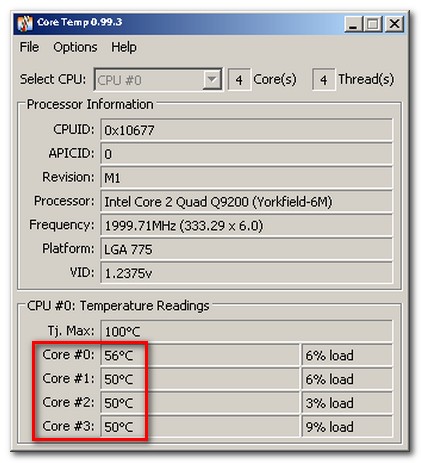
Could you install core temp and tell me what the highest load of one core is when you are playing ET.

Download link:
http://www.alcpu.com/CoreTemp/

This is what I get on a server with 26 players on it.

If yours says that it’s hundred all the time than your cpu is clearly the bottleneck.


(ailmanki) #19

http://www.tweakguides.com/NVFORCE_1.html
http://www.enemy-territory.net/tweaks.html

If you disable the extra stuff, like blood, gibs, wallmarks, you should have better fps in close range fights.
cpu should be ok btw, http://www.cpubenchmark.net/cpu_lookup.php?cpu=Intel+Core2+Duo+E4300+%40+1.80GHz

You can even benchmark et…
Get the demo from here: http://alt.3dcenter.org/downloads/enemy-territory-radar.php
put the dm_84 in your etmain/demos
start it with
/com_maxfps 999
/timedemo 1
/demo radar
When the demo is finsihed it will show a summary, average fps. Maybe helps for tweaking et… without having to fear placebo.


(Dragonji) #20

2GB is even too much for ET :slight_smile:

@Author
Try to update your PunkBuster as well and create some cfg file, named for example pb.cfg inside your etmain folder with following content:

pb_security "0"
pb_sleep "500"
pb_LogToFile "0"
pb_SsLog "0"
pb_SsSave "0"
pb_logmd5tool "0"
pb_forceoob "1"
pb_ignore "1"

pb_writecfg

Save it and just type /exec pb.cfg in game’s main menu.