
jumper, do you get the same errors with the latest and greatest release ?
http://zerowing.idsoftware.com/files/radiant/GtkRadiant-1.5.0.msi (28-Apr-2007)
GtkRadiant 1.5 released
EB1
(EB)
#41
 +
+
Violator
(Violator)
#43
Further to the missing brushes problem, here are screenies of the same map in 1.4 and in 1.5 -
1.4
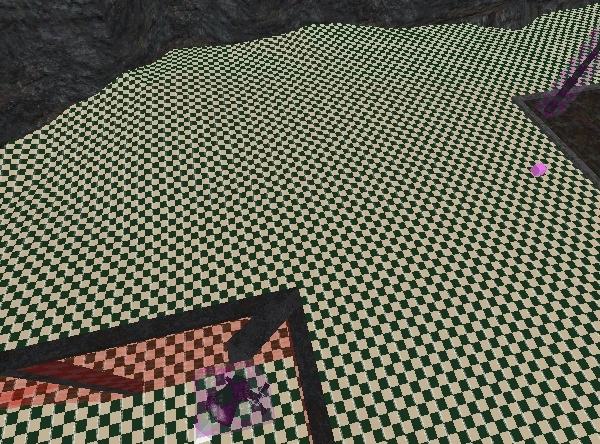
1.5

I’m guessing 1.5 thinks they are invalid and stripping them out? Note I didn’t do any editing here, it just loads like that.
Hope all this is helpful to the shaderman and co 
kamikazee
(kamikazee)
#44
1.5 has automated brush clean-up built in, if that wasn’t obvious by now.
What happens when you would do a brush cleanup in 1.4? Do they survive the sweep in that case?
EB1
(EB)
#45
jumper, I think this will be looked into very soon,
I suggest getting a pre-final version for yourself until this is cleared.
http://zerowing.idsoftware.com/files/radiant/nightly/1.5/?C=M;O=D
Jecoliah
(Jecoliah)
#46
There seems to be only one thing regarding Radiant that works perfectly - nobody complained about that part yet… the uninstaller…[/quote]
Actually i Love 1.5 and have used it for over a year now.
I don’t have the latest build as it gives me an error but i use the October 12th Release which works fine for me.
The only thing i have had to use 1.4 for is the “Thicken” command.
Anyway’s, just want you guys to know i appreciate the work you have done on 1.5.
Jec
Shaderman
(Shaderman)
#47
Some things might be better now if there would have been feedback linke yours earlier instead of the usual feedback like “where’s the Z-window?” or “why do things work different in 1.5?” :roll: Anyway, good feedback [TFA]Violator but it’s too late. For those who still didn’t read the qeradiant.com announcement:
After a very long and exhausting development phase GtkRadiant is ready for a major release. There are many more things which could have been done better or could have been fixed, but without a development team it is not possible or sane to support GtkRadiant any longer.
I hope it explains…
…why nobody cares.
:o
Violator
(Violator)
#48
As a (c#) coder myself with continual tight deadlines for customers and never
enough staff/time to meet them I know exactly where you are coming from - I’m sorry that its had to come to such a sticky end  the qeradiant site was down for a while so I didn’t realise it had been totally canned :x
It wasn’t obvious, but it is now I guess 1.4 manual clean does kill them off. Is there an option to turn this feature off? It would be nicer to be able to fix my dodgy brushes rather than recreating them (which is espectially painful with terrain as I’m not sure how it will affect the alphamap merging in new brushes after the effect into the func_group?)
jump3r
(jump3r^)
#49
i’ve downloaded a few different versions and the last one i’m able to run (but with some utf8 issues) is 1.5rc1. with all the newer ones i got these two errors.

Violator
(Violator)
#51
Strange stuff - I selected one of the ‘offending’ brushes in 1.4 (which wasn’t cleaned by 1.4 btw), snapped one of the vertices to the grid and saved. Loaded the map into 1.5 and behold none of the brushes were culled :o
EB1
(EB)
#52
To anyone getting the same error as Jump3r^:
- Uninstall Radiant
- open “my computer” > go to: TOOLS > FOLDER OPTIONS > VIEW > and select “Show Hidden Files and Folders”. Exit those windows.
- Go to your Application Data folder (example: C:\Documents and Settings\e\Application Data ) and delete the “Radiant Settings” folder.
- Go to your Radiant Install Location (C:\Program Files\GtkRadiant 1.5.0) and delete the “GtkRadiant 1.5.0” folder and any remaining files(or move them).
- Reinstall GtkRadiant
Note: This is the safe way to solve this issue, I would rather be thorough than not thorough enough.
Cheers
jump3r
(jump3r^)
#53
hmm, doesn’t work anyway. i’ve also tried to install newer version of nvidia drivers, but it’s still the same.
here’s the logfile:
Started logging to C:/Documents and Settings/Administrator/Data aplikací/RadiantSettings/1.5.0/radiant.log
Today is: Sat May 05 13:07:32 2007
This is GtkRadiant '1.5.0' compiled Apr 26 2007
Official qeradiant.com build by namespace
SingletonModuleRef::initialise: type="VFS" version="1" name="*" - not found
.\mainframe.cpp:610
assertion failure: module system failed to initialise - see radiant.log for error messages
----------------

Stacktrace is disabled in release-builds
----------------
loading custom shortcuts list from "C:/Documents and Settings/Administrator/Data aplikací/RadiantSettings/1.5.0/et.game/shortcuts.ini"
commands import: data version 1.0 is compatible with code version 1.0
parsed 0 custom shortcuts
.\commands.cpp:88
assertion failure: failed to lookup command "PatchInspector"
----------------

Stacktrace is disabled in release-builds
----------------
my pc config.:
p3 1ghz, 512mb ram, nvidia fx5700, 160+200gb hdd
winxp professional sp2 czech, directx 9.0c, forceware 93.71
btw. i’m sorry for messing up this topic with my problems.
EB1
(EB)
#54
…any custom dll’s or other files that you are using ?
(…I had the same exact issue, solved by my directions.)
No worries about the topic change, let’s get your issue sorted.
jump3r
(jump3r^)
#57
yes, i deleted ([shift]+[del]) the
C:\Documents and Settings\Administrator\Application Data\RadiantSettings
directory. when trying to run radiant 1.5 final, it is indeed created again.
murka
(murka)
#58
1.4 suits better for me, and 1.5, when i compiled one piece it didnt show it, like that brush didnt exist(well some faces were drawn and sometimes half of the top face was drawn). but with 1.4 it compiled correctly(i know its q3map2 not gtk).
press F (face mode) - then you can ctrl-shift select the faces
i meant that i want to select faces that i can see not those that are behind others, and i want to select faces fast, like 1.4, but nvm, im using 1.4
btw i had a problem, when i compiled with 1.5 i got the sv_setbrushmodel null, i looked and looked but found nothing, then compiled with 1.4 and it was fine.
jump3r
(jump3r^)
#60
i’d like to have it installed in c:\dev\radiant, but i also tried the default path (c:\program files\gtkradiant 1.5), without any success. and yes, i also tried to “start from beginning”, but every attempt ends on the same two error messages followed by crash.
edit:
well, i have no idea what do you think by custom dll’s. i had stopped every unneeded process but it had still same errors.