GtkRadiant 1.5 released


(Violator) #21

ok folks, some initial feedback (overall great work chaps 8)) -

Good things -
The plugins aren’t duplicated 4 times :slight_smile:
texture browser much nicer
UI looks/behaves nicer
Rotate tool is very nice once u get used to it

Bad things
Can’t find how to shear brushes any more (ctrl + drag in 1.4)?
Using arrow keys to move - theres a keyboard delay before it starts sometimes
Vertex manipulation is a little odd - eg adjusting height of terrain triangles it tends to move vertices around the selected one (horizontally as well as vertically)
Can’t see how to set rotation lock (eg force 45’ steps)

isn’t that how it got in to 1.4 in the first place? it had to be added later as a custom entity def. i can’t remember now, maybe later 1.4s came with it.[/quote]

Yes - I don’t have it either in 1.4 (or a few other things)


(kamikazee) #22

I don’t know if there’s still a shortcut to do that, but you might do it enabling “Face select mode”, then dragging the face to where you want it to be.


(Violator) #23

I think I tried that - it just started shifting the texture around (quite useful though in itself)


(.Chris.) #24

I am not sure if this is what you want but try pressing E and that allows to to drag the edges. Pressing Q allows you to alter the brush size and W allows you to to like move the brush around but in straight lines kind of, hard to explain.


(Violator) #25

E, then shift-drag to multi-select seems to do the trick - nice 1 :slight_smile: (bit more long-winded though…)


(murka) #26

now that iv been using 1.5 for 3 days i have seen some things i dont like and some things that i like very much:

when altering vertices, i select one and drag it but it wants to constrain the shape or sth and moves another one i have not selected(can this be turned off?)

the new texture browser has a cool feature for tags but how can i select like a feature SHOW ALL TEXTURES, with gtk.14 i went to textures/textures which is the full textures folder, this sometimes helps me look for textures before i make my own.

when i want to select a brush and put it into an existing entity i cant find how, there is no “move into entity” function.

sometimes i want so select multiple faces fast but if i hold the keys and drag it will draw a rectangle and select every one even those that are inside or behind other brushes(can it be switched, a keyboard pressing?)

but inspite of all the things i dont like this new version rocks! :rock:


(murka) #27

i have another problem. some brushes are just not displayed in radiant, i can see them in 1.4 but not in 1.5
i just copied some places and suddenly i cant see them, i made a new brush, dragged vertices and it too disappeared.

and how can i select a sincle verticle, without pulling one another moves, i cant make complicated shapes.


(.Chris.) #28

Make sure you haven’t filtered anything, goto View/Filter and check the list.


(Jecoliah) #29

See here…

http://zerowing.idsoftware.com/files/radiant/docs/1.5/

It explains how to move brushes into an entity and lots of other things.

Jec


(murka) #30

i have nothing filtered, i just copy and paste or make a worldspawn brush that is nothing different than the others, i still think its a bug.
and simple things are made so complicated now, like select one full entity, selecting multiple faces(now i have to click each one cuz i cant kick away the dumb drag function). and the new vertex dragging really pisses me off.


(Violator) #31

I’ve had a similar problem - a load of brushes vanished from my terrain on loading into 1.5, like ‘brush cleanup’ had been run (even though the brushes are valid, and I didn’t manually run brush cleanup). They were still gone though when going back to 1.4 (luckily I made a backup before any of this :))

I also have the problem moving a single vertex in the 3d view (though selecting the vertex in 3d and moving it in the 2d windows works better than 1.4). I generally only use it to tweak terrain in the Z-axis, but in 1.5 it tends to split the vertex below into 4 (I will post a screeny to show this when I get home)


(murka) #32

and when i just moved one edge to form a simple shape, it had such a big tris hell :o, ill give a screen for this

i think i dragged edges here, so both verticle and edge dragging is totally broken. plz give back the 1.4 way, if u can.


(==Troy==) #33

If you use teleports in the map, dont switch between 1.4 and 1.5 because it will be a complete mess. Trigger brushes will be lost, and all of the teleport_misc will aim at each other throught the middle unknown teleport entity.


(murka) #34

hmm im using them and both versions but this never happened. my teleports work well.
another problem, always when i select every brush making one entity (like script_mover) and delete them, the brushes are gone but the entity remains at the center of the map.


(==Troy==) #35

This happens when you create them as well… I just ignore it.

But teleport are evil… It happens irregulary…

Still I like 1.5 . :slight_smile:


(Shaderman) #36

There seems to be only one thing regarding Radiant that works perfectly - nobody complained about that part yet… the uninstaller…


(.Chris.) #37

Yeah, no one if forcing you to use 1.5 if you don’t like the changes go back to 1.4.
I’ve been using 1.5 ever since it was beta and never had any real problems with it. Sure it does things differently than before but once you get used to it I think it works out better than how 1.4 managed certain things.


(EB) #38

…it is a thankless, payless job Mr. Shaderman.

Maybe an extra install warning would be good:
"You are about to install radiant 1.5. It is not the same as 1.4, it does several things better and a few things …not as good. If you want to complain, please go in your closet and scream in a pillow.

Otherwise, if you have a legitimate bug report, please let us know.
…if you do not know how to search,research or bug report your issue and you need help, just E-mail: Someonewhocares@noonedoes.com "

Enough sarcasm ?


(jump3r^) #39

well, i also use 1.5 since its beta releases and i have had no extra problems so far, except this final version, which unfortunately doesnt work for me (as i described on the first topic page and seems like nobody cares).
however, it’s still much better than the old 1.4 version.


(Violator) #40

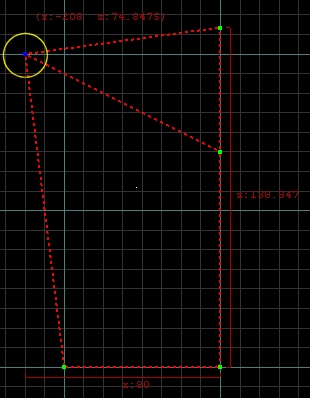
After a bit more playing around I can see why the vertex manip does what it does and is pretty cool tbh - it actually prevents illegally shaped (convex) brushes by extruding other edges to make it concave. If you select vertices which will cause a ‘legal’ move then it works ok. Once you realise this it is actually way better than 1.4 (which wasn’t too good at 2d window vertex manipulation) -

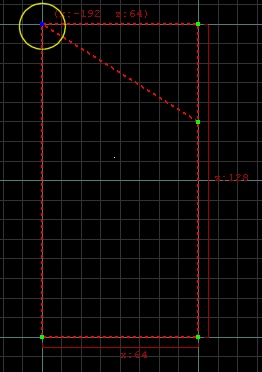
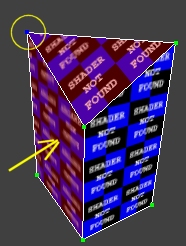
  1. Typical triangular terrain brush (right-angle corner lowered)


  1. Selecting one top vertex and doing horizontal drag in XZ window, brush stretches to preserve concaveness -

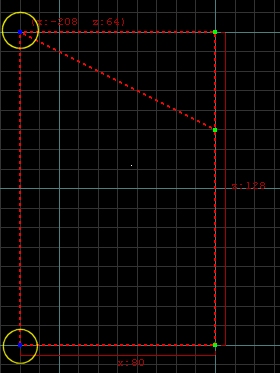
  1. Selecting the top vertex and the one below it and dragging works ok -


Hope that made some kind of sense :smiley: