FPS Drops? Let us know your details!


(meaningfulBanana) #41

http://puu.sh/i5His.png
This is all I get when I go to the support ticket site (I censored my IP)

My game plays fine until about midmatch, then the stuttering and FPS drops make it literally unplayable.

I’m trying to like and support this game, but when I can’t even finish a whole match, it’s kind of hard. I don’t see a reason to play this over ET.


(Kroad) #42

https://osu.ppy.sh/


(Ra!d3n) #43

I have the same problem as mentioned before. The game runs fine for about 10-15 minutes. Then everything starts stuttering. Besides the unplayable framerate the sound begins to stutter too and the whole computer is slowed down. I was in teamspeak with some friends and their voices also began to stutter (it sounded like they were robots). When I closed the game everything was fine again.
At the actual state the game isn’t playable for me.

Besides, the link in the first post to upload the DxDiag doesn’t work anymore. So if you could tell me how I can provide you with possible information to solve this problem, that would be nice.

My specs:
Intel Core i7-4770K
8GB RAM
NVIDIA GeForce GTX 770
Windows 8.1


(Ra!d3n) #44

// sorry for triple post, I didn’t know that messages needs to be approved first :confused:


(Ra!d3n) #45

// sorry for triple post, I didn’t know that messages needs to be approved first :confused:


(GM-Radrodo) #46

If anyone hasn’t sent in a ticket yet regarding this issue please do so and include your DxDiag.

https://support-dirtybomb.nexon.net/hc/en-us


(uncannyUkele) #47

same problem. Ticket sent … :confused:


(Ra!d3n) #48

A friend has the same problem, too. Lags and big fps drops after 10-15 minutes. Plz fix it soon :wink:


(OGHR3N) #49

[left]The same problem here. I try to do everything… My PC:

  • AMD Phenom II X4 965 Black Edition @ 3,6 GHz
  • Sapphire Radeon HD 6850 1 GB
  • 8 GB RAM
  • Windows 7

After few minutes of match I get drops FPS to 25-10… I do everything from this guide: http://steamcommunity.com/sharedfiles/filedetails/?id=454700366 and I get max. 180-200 FPS but only for 3-6 minutes then again I have drops to 25-10. Without this guide i
cant even play cuz on all settings i have no more then 30 FPS. The funniest thing is that I finished Witcher 3 on the same PC in last week on minimum-medium settings in native resolution without any problems. Dirty Bomb dosen’t look like new Witcher… And i get this?

Plz fix that soon :smile: [/left]


(agreeableHive) #50

any news? @ GM-Radrodo


(Jay) #51

my config

CPU: AMD FX-8320 3.5GHZ 8 core
RAM: ADATA XPG V3 4GB DDR3 2133 (2x4)
GPU: RADEON R9 280 3GB GDDR5

OS: Win7 Pro (64bit)

I have my settings on low, this is the only game that i get serious fps drops in. All my drivers are updated.

[quote=“LoneWolf;19969”]
I am not having any problems with framerate. I get a solid 60-80 on low settings with a 58-60 frame rate on low but with World Detail on medium.[/quote]

Well, aren’t you lucky duck :stuck_out_tongue:


(wonderfulFactory) #52

OS: Win 8.1
Processor: i7-4710MQ @ 2.50GHz
Memory: 16GB
Graphics: GTX 970M

seem to get screen lag/fps drops. whatever you wanna call it.


(Poldy040) #53

New 1.8 GB update but no improvement regarding the fps drops! :frowning: Still stuttering after 5-10 min…


(Ra!d3n) #54

Yes, update didn’t change anything. Game is still lagging like hell after 10 minutes. Why can’t you just please fix that? That problem is known for about 2 or 3 month now!

// And if you don’t have high priority on that problem because you think that there are not many people with that problem…this thread has a viewcount of 1600 views, for a 2-page-thread thats a huge number and people without this problem won’t be that interested in viewing this topic…


(thoughtfulGrouper) #55

Hopefully a GM reads this, the HUD is causing this lag. If you open scoreboard while playing (which kills HUD) the lag is gone. Also, if you go into your “GAME” options, set HUD from 100 to 0, the stutter is gone.


(honorableWalnut) #56

i have this problem too, pls patch it
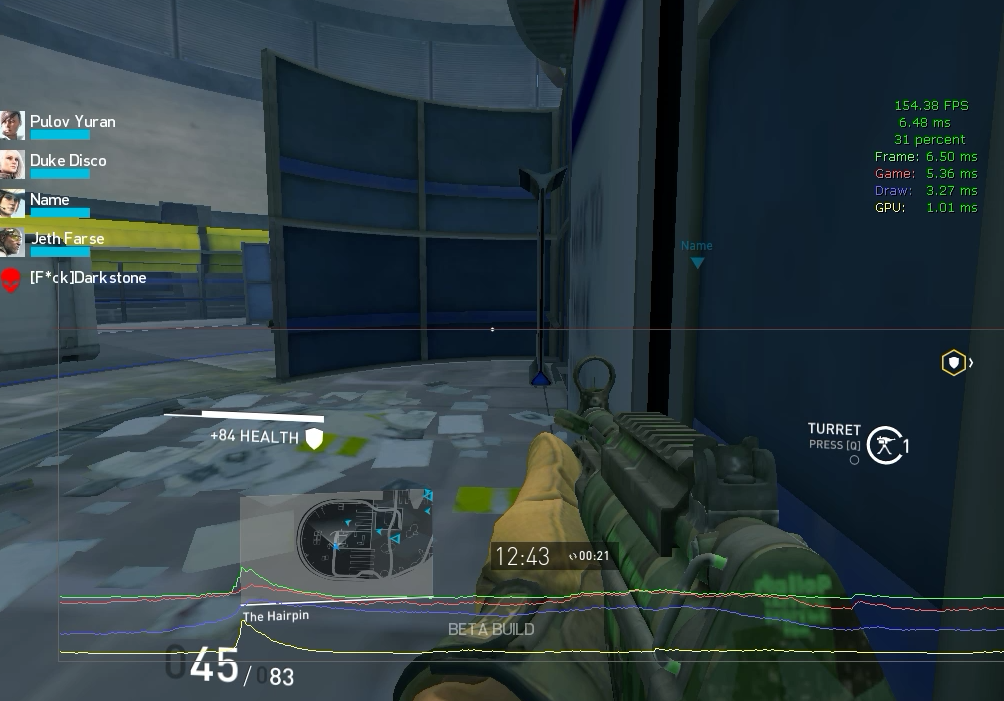
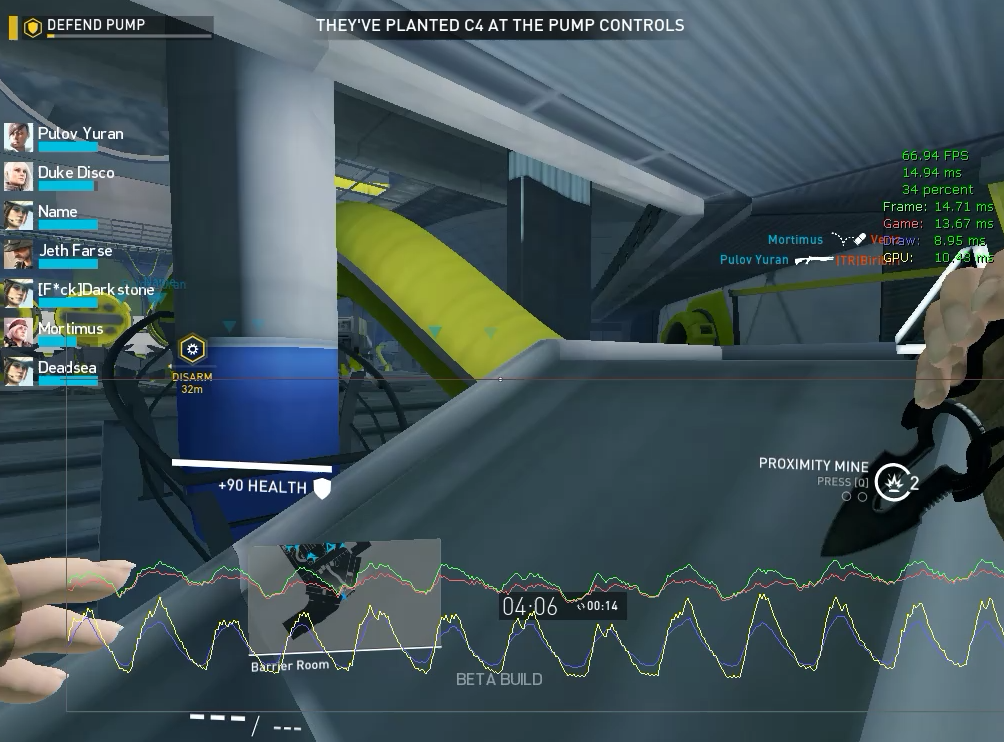
start game - http://i.gyazo.com/b4089a0fe0110c0c06f37780c4d39a64.png
after 5-10 min - http://i.gyazo.com/58870c4bf03bda252fcbfa340bd338df.png


(honorableWalnut) #57

“Hopefully a GM reads this, the HUD is causing this lag. If you open scoreboard while playing (which kills HUD) the lag is gone. Also, if you go into your “GAME” options, set HUD from 100 to 0, the stutter is gone.”
YES - http://www.youtube.com/watch?v=ywTcs2cyCB0
PLS REPAIR GAME, SD.


(omnipotentCabbage) #58

Where is this option? I can’t seem to find it


(Ghosthree3) #59

[quote=“honorableWalnut;31733”]“Hopefully a GM reads this, the HUD is causing this lag. If you open scoreboard while playing (which kills HUD) the lag is gone. Also, if you go into your “GAME” options, set HUD from 100 to 0, the stutter is gone.”
YES - http://www.youtube.com/watch?v=ywTcs2cyCB0
PLS REPAIR GAME, SD.[/quote]
I wonder if this is caused by a specific element of the HUD? The minimap jumps to mind as the first culprit. Could you try removing the minimap and checking again? Or gutting half the HUD at once, then the other half, try to narrow it down.


(Poldy040) #60

[quote=“honorableWalnut;31733”]“Hopefully a GM reads this, the HUD is causing this lag. If you open scoreboard while playing (which kills HUD) the lag is gone. Also, if you go into your “GAME” options, set HUD from 100 to 0, the stutter is gone.”
YES - http://www.youtube.com/watch?v=ywTcs2cyCB0
PLS REPAIR GAME, SD.[/quote]

Confirmed! I have tried the same as mentioned and it is exact the same for me. Displaying the scoreboard or setting HUD Alpha to zero (only zero!) eliminates the stuttering!
But playing without HUD and therefore without crosshair isn’t an acceptable solution… So dear devs, please work on a solution for that issue. Now you know where you have to search… Somewhere in the HUD! :wink: