[quote=“GM_Radrodo;17705”]Hey all,
In order for us to gather as much information on this issue please send us a ticket at http://support.dirtybomb.nexon.net/hc/en-us[/quote]

[quote=“GM_Radrodo;17705”]Hey all,
In order for us to gather as much information on this issue please send us a ticket at http://support.dirtybomb.nexon.net/hc/en-us[/quote]
same here , i have gtx 970 , i7 4770k 16gb ram , game works fine in the beginning of the match but in the middle of the game , it start lagging/fps drop hard, does anyone know how to fix that?
Hoped that new patch would have this fixed. Unfortunately problem persists.
Rig:
Geforce GTX 760
8GB Ram
Intel i7-2600k 3.40Ghz
Win 7 Pro
Done so far:
-Reinstalled drivers for GFX card
-Reinstalled Windows
-Removed GFX & CPU overclock
-Removed CPU Turbomode
Observations:
-When specating, stable 120 fps and no drops (locked)
-FPS Lag stops for few minutes when new round or map starts
I have the same problem.
Same thing with all graphic setting on default as with fps config.
Did run fraps benchmark, and the FPS is pretty stable at ~100
But its super choppy/stuttery after 5-10 min, almost unplayable.
Setup:
i7 860 @ 3,7ghz
GTX 970
14GB ddr3
830 SSD
Win7 x64
Have tried vsync on, since I have a 120hz monitor, but still same issue.
SD: I’ll gladly help out with testing possible solutions/troubleshooting.
Keep sending in tickets everyone as we are gathering information on this issue.
I know several of you have done this already but if you could please get your DXDiag and submit it here
Submit a Request -> Gameplay Issue -> Other
Subject: FPS Drop
Please fill out the details and attach your DXDiag to it. All of the extra information will help us pinpoint the issue.
Thanks!
Game runs extremely well for about 5 minutes, then all of the sudden it’s choppy / laggy. Will you guys be fixing this or did I blow 20 dollars for nothing?
This is what happens after 15-20minutes playing the game.
intel i5 2500k
gtx 760 4gb
8gb ram
winn8.1
Already did a submit request.
[quote=“sepiaChandelier;19938”]This is what happens after 15-20minutes playing the game.
intel i5 2500k
gtx 760 4gb
8gb ram
winn8.1
Already did a submit request.[/quote]
How can I display the unit graph during game play? Is it a console command? I know only the statFPS!
My config:
CPU: Intel i7 3632QM Clocked at ~3.0
GPU: Nvidia GT 630M
RAM: 8 GB
Windows 10 build 10074
I am not having any problems with framerate. I get a solid 60-80 on low settings with a 58-60 frame rate on low but with World Detail on medium.
CPU: Intel Pentium G3240 3.2
GPU: MSI GeForce GTX750Ti
Ram: 4GB DDR4
Windows 7 64-bit
Im having drop of FPS and my ping getting higher even if I have 130-140 MB/s net
Im palying on low settings, 4:3 1024x768 (streched)
same problem, submitted ticket
CPU: i7 4770k
GPU: GTX 970
RAM: 16GB
Windows 7 x64
No remedy by the recent rhino/kira update, still laggy after 5-10 min of game play. Too bad…
I have mostly 100-140 FPS but the game lags temporary from time to time.
Not sure if it is client or server related but I have a lot of microfreezes then and now.
4770k
R9 290
16GB
W7 x64
PS: limiting frames to 60 leads to even more lags. The game is very unsmooth now…
Looks like I messed up with the commands cause my FPS are still limited and much more laggy, even when “bSmoothFrameRate” is set to false again :neutral:
Edit: deleting the config fixed this issue. I have the full FPS again but the game is still a bit laggy some times. Guess it might be something with the servers performance, too.
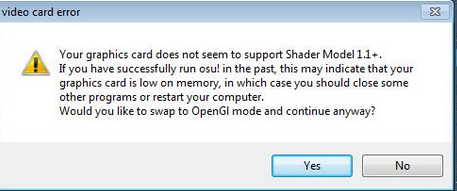
this is what happens when i launch osu after having played a game of DB in which it stuttered really badly.
i have a 4gb gtx970
Some other Player have reported a ran out of VRAM message during the game.

I had never such a message, but is it possible that these lags after 5-10 min are originated from full VRAM!?
Btw @Kroad, what is osu?
I just upgraded from a 670 to 970, and performance is underwhelming to say the least. I expected a full 120+ fps lock given the performance increase in other games. Even with everything on low quality framerate is all over the place, ranging from 300+ fps to mid 40’s when a lot of fx are on screen.
The game doesn’t feel smooth or comfortable to play, it’s a shame. I tried with and without g-sync, in ULMB mode, in fullscreen, windowed, borderless, nothing helped. Power is set to performance mode in nvidia’s control panel.
Monitoring the game’s performance with msi afterburner reveals optimisation issues : with graphics on low and every feature disabled, gpu usage often drops below 60% and is probably the cause of the sudden increases in frame-time.
[quote=“GM-Radrodo;18375”][quote=“GM_Radrodo;17705”]Hey all,
In order for us to gather as much information on this issue please send us a ticket at http://support.dirtybomb.nexon.net/hc/en-us[/quote]
[/quote]
This is all I get when going to that page, I censored my IP.
http://puu.sh/i5His.png
and I’m having the same problem as everyone else…my game runs flawlessly until mid match, then it just starts lagging and becomes basically unplayable. The stuttering is jsut absolutely insane.