players can't connect


(Kamel) #1

i’ve got a strange problem that seems to have just randomly happened one day. players will connect, and often just sit there at awaiting gamestate forever… until they eventually time out.

i don’t think any configuration was changed or anything, it just sortof happened one day.

edit: the players will sometimes be able to retry later and it work. all the players that it doesn’t happen to the first time seemingly never have the problem


(Ben) #2

yeah im getting exactly the same problems, let me know if youve found out how to fix it


(Rippin Kitten) #3

This will happen if a gamestate update or other initialization packet from the server gets corrupted or dropped on the way to the client. Unfortunately, since this is usually a problem with some router between your server and the client, there isn’t much you can do about it. If you are paying someone to host your server, you’ll want to bring it up with them and see what they can do about it.

You can do some local troubleshooting ifyou have access to a logging utility that tracks incoming packets to the server. Any good firewall program will do this. Take a look at when your friends are trying to connect and see if the packets are being filtered by the firewall.

RK


(Kamel) #4

thanks for the advice… i was just wondering why it started happening recently and never happened before =.

oh well, i will talk to my provider and see what i can get worked out.


(Kamel) #5

i dont think you were right about that. we’ve finally found a fix, but it really sucks. the best route of fixing it is by quitting et and starting it back up again. if you simply reconnect, then it will never join again (not in my experiances anyway).

if it was a routing problem, /reconnect would fix all of my problems, but that’s hardly the case.


(Rippin Kitten) #6

Wait, so you have to exit entirely out of ET then restart the game for you to be able to connect to the server?

RK


(Chruker) #7

I’m having sort of the same problem.

Either the game disconnects with a server timeout after displaying ‘Awaiting gamestate…’ for about 5-10 seconds or it sits at the ‘Awaiting gamestate…’ screen for 30+ minutes without anything happening.

I have run ethereal on my machine to see which packages are transmitted, and when the game disconnects due to the timeout, I can see about 5-6 packages sent to the server, but none returned. Whereas with marathon connect, I see the same packages sent to the server, some packages back, but then it seems to repeat itself.

On my local machine. I have tried running without the firewall, with the firewall and with the firewall having the server set as a trusted IP. No differences on any of them.
I am connected to the net via a wireless local network thats connected to the net through a linux server. However I don’t have access to do a console login on that server.
I have tried a fresh install of ET but it exhibits the same problems.

Then only thing I’m missing is a complete system reinstall. Ohh. I’m running Windows XP.

My connection problems have developed gradually. About a couple of weeks ago it all started. Until some days ago I could do the trick with restarting the game, which seemed to reduced the time it paused at the ‘Awaiting gamestate…’ screen.

(Rippin Kitten) #8

Try to secure a land line for your internet connection to make sure its not your wireless connection causing the problem. I can play just fine on my laptop from work through standard ethernet, but my wireless always leads to dropped packets, late packets, and general connection instability. I’m not too confident that wireless can support the demands of ET. =(

RK


(Chruker) #9

The strange thing is that I have been playing on the same server for 4 months now, all the time using the wireless network.

I have tried with a modem connection (ISDN modem) but that gave me the same results.

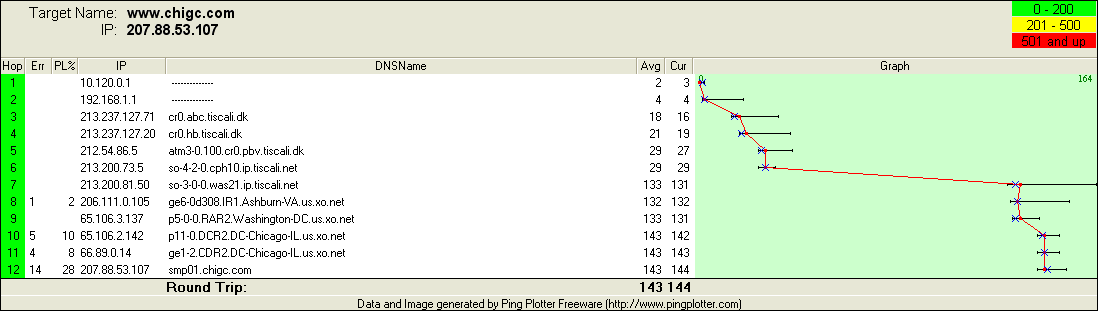
I have run a program to check for packet loss, and this was the result:

Abnix, who runs the server, was kind enough to help me. And he has done a similar test from server to me, which yeilded these results:

1. ge3-0d1.DCR1.DC-Chicago-IL.us.xo.net  0%   88   88     0    0    0     15
2. ge9-0.DCR2.DC-Chicago-IL.us.xo.net    0%   88   88     0    0    0      0
3. ge2-0.DCR1.DC-Chicago-IL.us.xo.net    0%   88   88     0    0    0      0
4. p5-2-0-3.RAR2.Chicago-IL.us.xo.net    0%   88   88     0    0    0      3
5. p1-0.IR1.Chicago2-IL.us.xo.net        0%   88   88     0    0    1      2
6. 206.111.2.94.ptr.us.xo.net           30%   62   88     1    1    1      1
7. so-6-0-0.cph10.ip.tiscali.net        32%   60   87   115  114  115    115
8. tiscali-dk-1.ip.tiscali.net          19%   70   87   115  114  115    117
9. atm1-1-0-1.cr0.hb.tiscali.dk         34%   57   87   124  123  124    125
10. cr0.abc.tiscali.dk                  28%   63   87   125  125  126    132


(Lekdevil.NL) #10

Well, that’s your answer. You’re trying to connect to a server over a network path that exhibits extreme packet loss. This will really mess up your connection, leading to the kinds of symptoms you’re describing. It looks like the PL is caused by one of the routers in the xo.net network. You could try to send an email to their NOC to notify them of the situation. Unfortunately, ISP’s usually don’t respond to complaints from individuals (i.e. not their customers). Picking a different server would be the only solution, I’m afraid.

Cheers.


(Kamel) #11

it isn’t just me, it’s several people trying to connect to my server. if it is indeed a routing issue, then why does it always work when you restart et totally, and never when you don’t restart et?

i’m not trying to cry bug or anything, but it sure seems like a repeating pattern.


(Chruker) #12

I would agree with Kamel, in regards to this being a bug or a case of bad programming :wink:

Lekdevil.NL
After being unable to connect for about a week, I have been able to play all night.
I just redid the test, with no packetloss so I hope they have fixed the router.

Yesterday it was in fact so bad that, it took ages just getting on to their homepage. However I was unable to find the correct person to talk to.