Phong shader blues, and splotches -- lightmapped terrain


(Twisted0n3) #1

Dotproduct2 terrain. Shaders all have q3map_nonplanar, q3map_lightmapMergable, and one of q3map_shadeAngle 120 or q3map_shadeAngle 150. Blends look fine, lightmap does not. Two problems. One – certain hills where there are tris almost edge-on to the sun get large black spurious shadows, which are actually made WORSE by putting q3map_splotchfix in the shader; a couple areas where tris should be partialy in shade are glaringly bright. Specific triangles show up bright that should have shadows on them while the shadows appear correctly on their neighbors – the shadow edge just terminates at the bogus tri; certain other triangles appear dark except maybe at their edges… I’ve tried q3map_lightmapSampleOffset values such as 2, 4, 8, and even 32; I’ve also tried q3map_lightmapFilterRadius 8 0. Neither fixed the problem. Turning off -patchshadows when compiling gets rid of the worst of the black splotches. (The terrain is built of triangular flat patches instead of brushes – vertex editing brushes makes Radiant unstable, and it ends up the same thing anyway after -meta. The shadows not being cast on some tris problem persists – of course, self-shadowing by the terrain completely stops working, but brushes that cast shadows cast them on some triangles while others where the shadow should continue are bright.) Problem two – some sharp corners are apparent here and there where the terrain tris make angles well under 120. Phong shading seems to be working in places, but hit-and-miss. I got a rectangular brush with caulk on four faces and one terrain shader the other two (same on both and zero offsets, rotation, scaling etc. in Radiant’s surface inspector in fact) to come out obviously a brick, with a sharp corner, even though the shader used has q3map_shadeAngle 150, q3map_nonplanar, and q3map_lightmapMergable and the angle is a precise 90 degrees, way less than 150.

Aside from the editor image and actual blend stages, this is the shader on the rectangular brush that’s failing to phong shade:

	q3map_nonplanar
	q3map_shadeAngle 150
	q3map_tcMod rotate 17
	q3map_alphaMod dotproduct2 ( -0.3 0.0 0.85 )
	q3map_lightmapFilterRadius 8 0
	q3map_lightmapSampleOffset 32.0
	q3map_lightmapMergable

The large lightmapSampleOffset is a holdover from earlier attempts to fix the darn splotches elsewhere; commenting it out doesn’t change anything.

Here’s the corresponding directives from one shader experiencing the problem with shadow casting – shadows where there should be none and no shadows in places where there should be some:

	q3map_nonplanar
	q3map_shadeAngle 150
	q3map_tcGen ivector ( 256 0 0 ) ( 0 256 0 )
	q3map_tcMod rotate 17
	q3map_alphaMod dotproduct2 ( -0.3 0.0 0.85 )
	q3map_lightmapFilterRadius 8 0
	q3map_lightmapSampleOffset 8.0
	q3map_lightmapMergable

This uses ivector and a saner lightmapSampleOffset.

And here are the relevant lines of the sky shader, the ones that actually generate light and affect shadowcasting from it:

	q3map_sunExt 1 1 1 400 -30 45 2 12
	q3map_skyLight 75 3

Ydnar may recognize them. :slight_smile:

And the compile command lines:

"C:\Program Files\Quake III Arena\Radiant\q3map_2.5.16_win32_x86\q3map2.exe" -connect 127.0.0.1:39000 -meta -samplesize 4 -v the_map
"C:\Program Files\Quake III Arena\Radiant\q3map_2.5.16_win32_x86\q3map2.exe" -connect 127.0.0.1:39000 -vis -v the_bsp
"C:\Program Files\Quake III Arena\Radiant\q3map_2.5.16_win32_x86\q3map2.exe" -connect 127.0.0.1:39000 -light -compensate 4 -fast -gamma 1.8 -patchshadows -samples 2 -scale 2 -v the_bsp

with the actual path to the .map and .bsp, respectively, in the obvious places. So it’s a recent enough q3map2, -meta is being used, the map is being vised (and it is not leaking, though that doesn’t show up in the compiler command template above of course), and lighting looks reasonably normal (this version is with -patchshadows).

The shaders’ names’ path part is the name of my map and unlikely to be duplicated anywhere else; also there’s not very much on my shaderlist.txt, although the shaders for this map I’m working on certainly are (along with a third party texture set and the stuff that comes with Quake III, including “common”). I’ve triple-checked that I’m not doing anything boneheaded in any of the shaders, with paths, with shaderlist.txt, or with keeping finding nothing’s changed only to realize q3 is loading the map from a pak file and not from the most recently compiled .bsp. :slight_smile: (it happens!) I think the problems might not actually be related – the splotching/shadowcasting issues seem confined to the patches in the map, while I’ve succeeded in exhibiting the phong shading problem on a brush.

Anyone have any suggestions or ideas what might be going wrong?


(obsidian) #2

The biggest thing that I notice that you are doing wrong is that you are using patches for terrain, which produces all sorts of unpredictable artifacts. Patches by nature aren’t designed for terrain, nor are most of those directives designed to work for patches. Phong shading, for example is usually used only on brushes, since vertex normals on patches are automatically averaged and with models shading is controlled with smoothing groups.

Try rebuilding your terrain with brushes or modeling it in your favourite 3D application.


(Twisted0n3) #3

That doesn’t explain phong shading not working on brushes sometimes. And I don’t particularly like the suggestion that I either put up with Radiant constantly crashing and losing my work (which happens with any attempt to model terrain directly in Radiant using brushes rather than patches, IME) or else shell out several grand for Max. Neither alternative is palatable, and one of them isn’t even physically possible for me. Have you got a better suggestion? Is there a way to -patchmeta just the terrain, but not arches or anything of that sort? A way to apply -patchmeta to a func_group with an entity key would be ideal…

Or, alternatively, a Radiant plugin that can turn triangular patches into thin brushes of the same shape, by “extruding” them in the direction opposite the normal by 1 unit or so, texturing the four added faces with common/caulk and making the brush detail of course. A plugin that works with 1.2.13. I tried 1.3.13, I tried 1.4, and I tried 1.5, and found each one of them unusable, each for a different reason. Couldn’t select some vertex handles in 1.3.13 no matter how closely zoomed in it was. 1.4 kept crashing. 1.5 … well, I don’t know what it is but it’s obviously not from the QERadiant/GTKRadiant family of level editors. A reskinned Qoole perhaps?

With a plugin like that I could build the terrain using nice, stable, non-radiant-crashing patches and have them turned into brushes that won’t have to be vertex edited. Even if they need changing they could be turned back into patches, moved, and then changed back into brushes. Obviously, my hypothetical plugin should confine itself to the selection when there is one, and ignore patches that aren’t flat triangles (easy to tell – the latter will have only three distinct coordinate groups, with probably seven of the nine being identical to one another, though other arrangements are possible; and there’ll be a green corner vertex with each set of coordinates, two of those sharing one such set).

But the easiest thing would simply be for q3map2 to automatically -patchmeta the same sort of flat triangular patches whenever it encounters them. Since they can’t benefit from dynamic LOD anyway, there’s no reason not to bake them into the BSP as triangles instead of keeping them as patch objects.

And meanwhile, there’s still the matter of the phong shading having failed on a rectangular brush


(The Wanderer) #4

you don’t have to shell out any money for Max because there are plenty of free 3d packages that are good enough to do something simple like terrain.(gmax for example)
That being said there are certain things you can do to minimize radiant crashes during vertex tweaking.
For one only move vertices in one direction at a time. You should always have movement restricted to one axis only.
Don’t try to do too much with one brush. Brushes are cheap, esp for terrain where usually just one face is visible, so use multiple brushes to form complicated shapes and tweak brushes as little as possible.
Also have you tried easygen for your terrain? It’s very easy to work with and can give you exellent results. You don’t have to use its shaders, just the terrain generated.

And as a last resort and just to see if it’s indeed patches that are causing the problem you can try compiling the terrain alone with patchmeta, and then decompiling the map. This will turn your terrain into an ase model or just plain brushes depending on the decompiling options used.
You can then try using this terrain and see if the problems persist. This way at least you’ll separate the terrain and you don’t have to compile with patchmeta anymore.


(Twisted0n3) #5

There’s something wrong with all of them, or they’d obviously put 3dsmax out of business by undercutting their price so drastically. Based on stuff I’ve seen in other level editing associated forums, they all have shoddy and unusable interfaces. Come to think of it, I’ve heard the same thing about 3dsmax. :stuck_out_tongue:

That being said there are certain things you can do to minimize radiant crashes during vertex tweaking.
For one only move vertices in one direction at a time. You should always have movement restricted to one axis only.
Don’t try to do too much with one brush. Brushes are cheap, esp for terrain where usually just one face is visible, so use multiple brushes to form complicated shapes and tweak brushes as little as possible.

That doesn’t work – I’ve tried it. Still crashes, even with vertical triangular-prism brushes moving vertices only vertically using X and Y axis locks.

Also have you tried easygen for your terrain? It’s very easy to work with and can give you exellent results. You don’t have to use its shaders, just the terrain generated.

What, go back to the dark ages of terrain made of a huge grid of identically sized triangles filling a rectangular area? If you want small features then all the triangles have to be small and not just the ones around that area, making for huge polygon counts? Thanks, but no thanks.

And as a last resort and just to see if it’s indeed patches that are causing the problem you can try compiling the terrain alone with patchmeta, and then decompiling the map. This will turn your terrain into an ase model or just plain brushes depending on the decompiling options used.

Aseing the terrain in q3map2 occurred to me, but I have 3 problems with it. It’s a lot of work. People have reported problems with lightmap seams/dark lines/other weirdness on ase models with spawnflags 4 that lit fine as brushwork/patchwork. And last but not least, I’d have to make a separate ase model for every single leaf, unless I wanted lots more tris visible than without aseing. Not only is that an insane amount of work, comparable to manually vising the map instead of letting q3map2 do the dirty work, even so I wouldn’t be able to do it until the map was basically done and the structural hull fully constructed and no longer potentially subject to change. The leafs now won’t be the same as the leafs then, so the division into models would end up wrong and it would have to be done a second time! And all of that is predicated upon the assumption that I wouldn’t hit some kind of previously unattained compiler or engine limit on entity quantity. Would compiling a map that had from a few hundred to several thousand misc_model entities bring q3map2 to its knees? Somehow I doubt it would fail to.

You can then try using this terrain and see if the problems persist. This way at least you’ll separate the terrain and you don’t have to compile with patchmeta anymore.

Sounds like you’re suggesting extracting the terrain and later importing it as one single huge ase model. This has two problems – I’d have to edit the terrain in a separate .map from the rest of the map, which would be a huge pain forcing me to switch between two maps in Radiant extremely frequently (and loading a new map in Radiant is very slow, as you’re no doubt aware) to refer to the “main” map to line up terrain and walls that sit on the terrain without gaps or overlaps. (Evil, evil overdraw. No – bad, bad zfighting! Horrible sparklies begone!) Second, and worse, the entire terrain would be drawn from any leaf where any of it was in the PVS, unless misc_model entities are magically a lot smarter than, say, doors and func_statics and the like. That means either an astronomical poly count turning this map into the next Chartres (or, more likely, some sort of refugee from Cranky Steve’s Haunted Whorehouse) or vastly reduced terrain detail. I might as well just build the outside areas as wall-enclosed pavement in that case. :stuck_out_tongue:


(The Wanderer) #6

I don’t think it’s wise to refuse trying modeling programs based on what you’ve heard. When it comes to interfaces radiant is not the best either, and you seem to work with that. As far as having something wrong with them, yes they don’t support all the features that Max or other profesional packages do, but they all support something as simple and basic as vertex tweaking and terrain making.

I’m not quite sure what kind of terrain you’re trying to achieve or how big your map is, but generally speaking terrains make up a small percentage of the map tris count, so i woudn’t worry about that too much. Post your terrain tris count just in case.
Also you can decompile the map as brushes too, which you can then vis. Might not be perfect but it will give you a good base which you can modify further in radiant.


(Twisted0n3) #7

Yes, but at least I already know Radiant. This would be at best like learning it all over again (and so would using 1.5, in case that doesn’t crash or something) and probably much worse since at least a totally weirded-out version of Radiant is still working with brushes and patches at base, while modelers work with … what do they work with? Just patch-like objects? Pure triangle soup? See – I don’t even know.

I’m not quite sure what kind of terrain you’re trying to achieve or how big your map is, but generally speaking terrains make up a small percentage of the map tris count, so i woudn’t worry about that too much. Post your terrain tris count just in case.
Also you can decompile the map as brushes too, which you can then vis. Might not be perfect but it will give you a good base which you can modify further in radiant.

I’m not sure how that would help. Decompiling the map back to a .map would at best regenerate the original terrain patches, and most likely generate something really b0rked in the usual manner decompiling anything tends to do.


(SCDS_reyalP) #8

FWIW, you can do per entity patch meta with this http://www.splashdamage.com/index.php?name=pnPHPbb2&file=viewtopic&t=11949

At your own risk of course. If you need a linux binary, I can probably come up with one.

If I recall correctly , you end up with artifacts if your phongshaded surface doesn’t all fit on one lightmap. (the last time I did anything with this was a very long time ago, so I could be wrong, or things could have changed since)

If you have screenshots of the problem area (both in game and how it is constructed) that might give us a better idea of whats going on.


(Twisted0n3) #9

What’s that? A beta? An unstable alpha? afraid to click link

Does it work with func_groups or only “real” entities? I imagine it must since it would be nearly useless if it didn’t.

If I recall correctly , you end up with artifacts if your phongshaded surface doesn’t all fit on one lightmap. (the last time I did anything with this was a very long time ago, so I could be wrong, or things could have changed since)

A rectangular brush around 128x16x8 doesn’t all fit on one lightmap?

Or does the whole chunk of terrain the brush is adjacent to count?

Even so, wouldn’t the result be seams every so many steps across the terrain, rather than a total failure for some chunks to show any phong shading whatsoever?

If you have screenshots of the problem area (both in game and how it is constructed) that might give us a better idea of whats going on.

None handy right now, sorry.


(SCDS_reyalP) #10

Call it whatever you want. It’s a relatively straightforward change, and seemed to work fine in the testing I did, but I’m far from an expert on q3map2. I wouldn’t expect it to mess up other things.

Does it work with func_groups or only “real” entities? I imagine it must since it would be nearly useless if it didn’t.

any brush based entities.

None handy right now, sorry.

well, that would be far more helpful than verbose descriptions.


(Twisted0n3) #11

The beta q3map2 fixed the splotch/shadowcasting problems completely, near as I can tell. (I used -patchmeta on the commandline and put _patchmeta 0 in the “real” curve patches of the map.) Kudos!

The phong shading problem is now definitely an independent issue, since it’s persisted (and since it was showing up on brushfaces all along). In fact, ironically it’s even more obvious now because a couple failed phong shade areas are evident in areas formerly dominated by erroneous shadow-casting. :slight_smile:

But I now have access to the compile box and suitable screenshots.

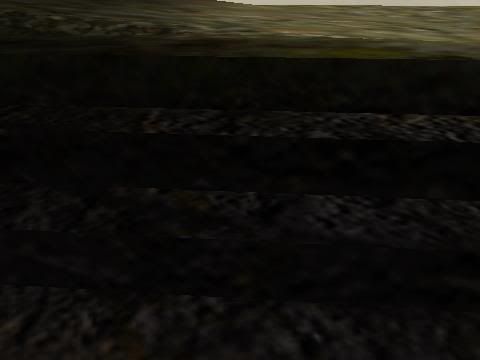
This is in-game. The steps are brushes and the corners you see are 90-degree ones. The shader used specifies a 150 degree shadeangle, as well as nonplanar and lightmap mergable. The intent is to use ordinary brush geometry but end up with steps that seem flowing and semi-natural rather than sharply edged; unfortunately as is plainly visible it so far isn’t working. All the step tops and step sides use the same shader, save the top step top, which uses a near-identical shader with q3map_tcgen ivector so as to be aligned with the terrain adjacent to it in turn.

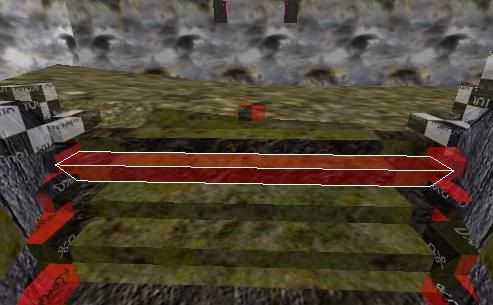
In-editor; one brush is selected to show that it is indeed a brush and to reveal more clearly its shape and relationship to the surrounding objects. The checkered cube thingies are alpha fade brushes, though in this area they are too small for the text on them to really be legible. I don’t think they are involved in the problem – the blends they control work perfectly (not that that didn’t take hours of fine-tuning and such) and I’m given to understand they don’t affect light mapping. In fact, I frankly don’t see how they could since the none of the lightmap stages in any of the shaders have alphagen vertex in them. :slight_smile: The horribly tiled background stuff is part of a huge hollow box of sky brushes surrounding the map fragment, both so it doesn’t leak and so it is lit the way it should be in the finished product. (Of course I’ll exercise tight vis control in the end, and the sky won’t extend beneath you so you can fall off the map into it and land in the middle of air and lose 10 health spraining an ankle, which actually happened to me when I went to fly around inspecting stuff but forgot to turn on noclip first – but for now this will do.)


(obsidian) #12

You are probably stretching vertex points to illegal bounds. With a little experimentation, you will learn how to work with vertex editing in Radiant without breaking brushes. You can’t force those vertex points to move where ever you what them to go… you’ll get the hang of it after a while and become ‘one with the brush’. Can’t relate to you crashing Radiant just by vertex editing brushes, though. Haven’t crashed GtkRadiant this way since the early days of developement. I’m using both versions 1.4 and 1.5. FYI, GtkRadiant 1.5 is still based off 1.4, just largely rebuilt from scratch. And learn to use the clipper tool, I often find it faster and easier than vertex editing. ydnar also added patchclipping to recent versions of GtkRadiant. It’s a little known feature where you can use a square patchmesh to clip a brush rather than just with the clipper tool. Good as an alternative for 3-point clipping anyway.

Plenty of cheap or even free 3D modeling apps out there… Gmax, Blender3D, Maya PLE, Milkshape3D… the list goes on. Just make sure you can export to ASE either directly with though a plugin. Plenty of people use the above programs for all their modeling needs. Gmax and Maya PLE are almost exactly like 3dsMAX and Maya, respectively… same company, same interface, etc. Milkshape3D is highly recommended for simple game modeling. These programs are great for just game modeling, the only thing they lack is stuff for production quality renderings (like if you wanted to make a movie like The Incredibles). Other than that, these programs are even used by professional game developers.

I think your understanding of phong shading is misplaced, which is why it may seemingly not work in your example. Vertex normals usually are perpendicular to the faces. Phong shading changes this so that the vertex normals are averaged between them. Lightmaps are generated according to the averaged vertex normal. Problem is, if you have a 90-degree bend on a brush there is no way that a mere lightmap can convince you that it is not a 90-degree bend. It can only prevent sharp lightmap edges from appearing on gradual changes to surface angle. Phong shading will not work across different lightmap images, so for Q3, lightmap images are restricted to 128x128 pixel images.

What’s that about making “a separate ASE model for every single leaf”? Why would you need to do that? Just create 1 big ASE model, caulk with large structual brushes, then add hint.

Yes, but at least I already know Radiant. This would be at best like learning it all over again (and so would using 1.5, in case that doesn’t crash or something) and probably much worse since at least a totally weirded-out version of Radiant is still working with brushes and patches at base, while modelers work with … what do they work with? Just patch-like objects? Pure triangle soup? See – I don’t even know.

Well regardless, you will have to spend a lot of time learning anyway - either with GtkRadiant and how to create terrain with brushes or with a separate modeling program. What you’re looking for is a quick-fix, which I’m sorry to say, there is none.

I’m both a level designer and a modeler, so I know the advantages and disadvantages of brushes, patches and models. So in terms of what modelers work with? All three, brushes, patches and models in unison depending on what you are building. All three have different properties, pros and cons. Learning to use all three allows you to utilize the advantages of each to compensate for each others limitations.


(Twisted0n3) #13

The lightmap really does have a sharp edge on that 90 degree angle, however, and there are even shallower angles showing this problem elsewhere in the map. Think of the rounded-edge look on a square cylinder – it looks like a 90 degree bend, but not a real sharp 90 degree bend. That is the look I’m going for. I could obviously use a pair of patches joined together with patch merge (or remove half a square cylinder, then re-merge the remaining pieces) but I’d rather it just worked. :slight_smile:

Er, I’d rather not have all of the terrain in the map draw whenever any of it was in the PVS. It would be a framerate killer.


(Twisted0n3) #14

I have some more screenshots showing some continuing lighting oddities. I’m not getting pitch-black or fullbright areas anymore, but there are some areas that are brighter than they should be (and shaded by brushes, not patches, to boot), and some that seem too dark. Creases where phong shading is not doing its job are also apparent.


(EB) #15

Could you post some up-close screenshots of the specific areas you are still having troubles with at this point ? I can not see any more than 1 or 2 extreme shadows/creases in those screenshots you have linked.

Maybe create a seperate shader for the problem areas and decrease its shadeangle to 60(or so).


(SCDS_reyalP) #16

r_lightmap 1 may also be helpful


(Twisted0n3) #17

r_lightmap 1 being a shader directive? It’s not in the shader manual…


(SCDS_reyalP) #18

No, its an engine cvar, described in the radiant manual, among other places.

It renders ONLY the lightmaps, without the textures.

ISTR there are also some lightmap debugging options for q3map2, but you’ll have to look at the documentation for those.


(obsidian) #19

r_shownormals 1 can help you test phong.


(Twisted0n3) #20

Ah … take screens with these enabled to check the thing
OK will do