
Phong shader blues, and splotches -- lightmapped terrain


(Twisted0n3) #21

r_lightmap 1 seems not to affect the display of surfaces with blend stages, which means most of them in this map. :confused: None of the areas exhibiting problems, in particular, changed to show their lightmaps – all of those surfaces use dotproduct2 shaders or other sorts of blended terrain shaders.
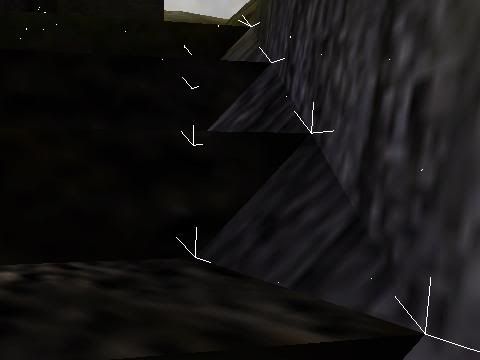
Normals along one side of the problem steps. There are three at each vertex, probably due to three surfaces there. The one angled upward at each is from the wall, which isn’t perfectly vertical there. The step angle is 90 degrees.
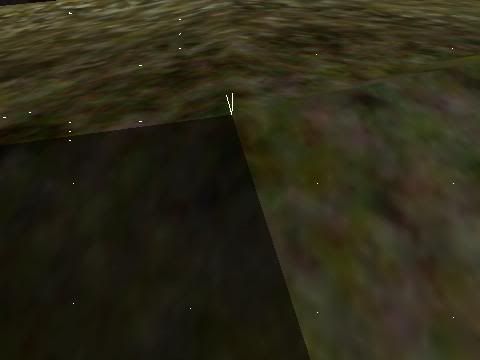
Normals at one corner of an anomalously dark terrain triangle. They are at much narrower angles still. Shader specified shadeangles are well over 90 degrees in both areas. Curiously it only seems to be showing two normals there, although there are at least three terrain triangles meeting there at three different orientations. (In fact, a quick check in the editor shows six distinct planes meeting there…actually seven, but two of them coincide one of which has surfaceparm nolightmap and the other sort 6 and polygonoffset, so only six count as far as lighting is concerned.) Is this a symptom of a problem?

(EB) #22

That seems to be a very feasible reasoning behind the problem in pic 2.


(Twisted0n3) #23

The problem triangle isn’t the one with surfaceparm nolightmap though. There’s an adjacent triangle that’s actually two triangles in the same place. One has surfaceparm nolightmap and the other has a mossy texture alpha blend, polygonoffset, sort 6, and a normal lightmap stage.

The blend “decal” is needed to cover up otherwise-unavoidable seams where there are three or more textures being blended in the same area. (And even then, some funky func_grouping is needed to control the vertex alphas separately.) If the triangle beneath was lightmapped and the decal wasn’t, the decal would glow in the dark. If both were lightmapped, the triangle would be too dark (filtered twice with the same lightmap). So in spots like that only the decal stage is lightmapped. It’s supposed to be rather like there’s a single shader with some blend stages and then a lightmap stage – and two sets of vertex alphas, tcGen coordinates, etc. :slight_smile:

Are you saying this could be causing problems with phong shading of triangles nearby? Most places I’ve used this trick look OK. This one is the only obvious problem at such a spot, and many places where the terrain seems to have failed to phong shade aren’t near any use of the decal trick.


(Twisted0n3) #24

I’d bump the thread, but it’s already at the top.

The light “leakage” through walls seemed to stop once I had an actual interior on the other side of those walls instead of a hollow space open to the sky. The phong problems on some terrain triangles and some steps remains, though, and I still also have a couple anomalously bright triangles in nooks and crannies where nearby brushwork should be shading them.


(Twisted0n3) #25

Is anyone else going to weigh in? Ydnar? anyone?


(EB) #26

Would you feel comfortable saving the problem-selected areas of the map as a .map and zipping the assets with it for q3map2’rs to inspect ? I would be happy to take a look at the files to find some possible fixes for the issues. The pics and elaborations only go so far.
-if not; I am sure someone else will be around to help…no need to be impatient buddy.


(Twisted0n3) #27

I’ve pretty much got the splotching licked – the q3map2 beta and patchmeta’ing the terrain fixes most, and the rest is just light leakage that goes away as I add more stuff and add structural brushes. But the phong shading sometimes not working along certain edges …


(Twisted0n3) #28

bump


(EB) #29

what exactly do you need to have explained and or looked at ?

Your last few posts are too obscure to find a definite problem.–Is it the light leaks ?


(Twisted0n3) #30

No, it’s the phong shading.

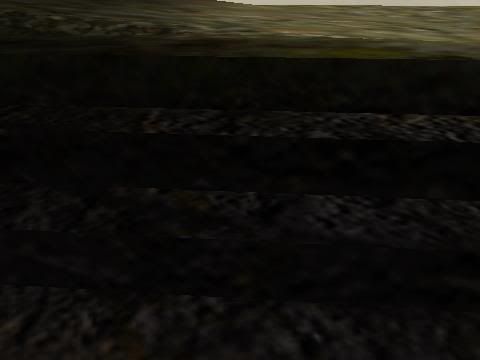
Steps should look rounded at the edges, but don’t.

r_shownormals 1, same area.

r_shownormals 1, terrain area with visible faceting instead of smooth shading.

All shaders on all surfaces visible in those shots (except sky visible in the first shot at top right) have q3map_nonplanar, q3map_lightmapMergable, and q3map_shadeAngle 150. The angles range from 90 degrees (steps) to slightly more (steps meeting walls) or considerably less (terrain).


(UniKorn) #31

Just wondering, can’t he do the terrain in patches, copy it to a seperate map and export it as an ase?


(Twisted0n3) #32

Ase causes its own problems with lighting and phong shading, as has been discussed in this forum before, so I’d rather avoid it if possible.


(EB) #33

http://www.splashdamage.com/index.php?name=pnPHPbb2&file=viewtopic&t=3068&highlight=phong

You CAN/should reconstruct your stairs to relieve some of the expectations of the phong-ing and only then rely on the phong to take care of the rest. (Move the vertices of the stairs to soften the angle of their brush faces.)

If you are searching for a definite answer then I am sorry to say that unless SOCK or Ydnar come around(not often these days) that you’re out of luck. Not to mention; that this topic has been discussed several, several times in here without a definite cure to be found.

:drink: so here’s to patience


(obsidian) #34

You CAN/should reconstruct your stairs to relieve some of the expectations of the phong-ing and only then rely on the phong to take care of the rest. (Move the vertices of the stairs to soften the angle of their brush faces.)

If you are searching for a definite answer then I am sorry to say that unless SOCK or Ydnar come around(not often these days) that you’re out of luck. Not to mention; that this topic has been discussed several, several times in here without a definite cure to be found.

Well, if he was using brushes or ASE’s most of the problems he’s facing wouldn’t occur (no guarantees that it’ll fix all problems, though). Fact is, he’s pretty insistent on using patches, which aren’t designed for this kind of stuff so any kind of artifacts that he’s been having are rather unpredictable. I doubt if Sock or ydnar can come up with any other alternatives either since Twisted’s methods are somewhat unconventional.

Other than my suggestion about going with brushes or ASE’s, there’s not much else I can recommend since it’s not something that anyone else has tried/documented/tested. So if you’re going to stick with experimental techniques, don’t expect anyone to know any answers simply because we don’t know either.


(EB) #35

… I admit I should’ve explained better.


(Twisted0n3) #36

Those steps ARE brushes, and they aren’t phonging. Use of patches elsewhere in the map isn’t relevant to the steps.


(EB) #37

I feel like we are tossing out some good stuff and you’re just sitting back waiting to find out why the world is round. (figuratively speaking)
Almost as if this is rhetorical to you although you still want an answer…


(Twisted0n3) #38

I don’t get your meaning.

The steps with the phong shading not working are brushes, not patches. That I’m using patches for terrain elsewhere in the map shouldn’t matter when it comes to explaining why the phong shading on these particular brushes isn’t working.


(EB) #39

I never mentioned the patches.
I suggest; deleting the stairs, rebuilding them with softer angles. Compile with phong.


(Twisted0n3) #40

Why? 90 degrees shouldn’t be too sharp an angle with q3map_shadeAngle 150 in the shader.