Improving hipfire-headshot consistency?


(srswizard) #41

[quote=“Amerika;140842”]@srswizard I prefer hitmarkers to be on as I’ve gotten tons of kills through smoke and view obstructions based entirely on hitmarkers.

[/quote]

That’s a good point.
I only recently started playing without them, and I found it beneficial to have that little bit less of clutter on the screen when aiming.
Hitmarkers definitely help vs Redeye, but luckily not many people play him anyway.


(watsyurdeal) #42

God dang @Amerika what do you do to those keyboards? Looks like you have claws for fingernails. XD

Maybe get some ninja print PBT keycaps?


(Amerika) #43

@srswizard I get hitmarkers that lead to kills through Skyhammer explosions and generator explosions and such pretty often as well as people sitting in Redeye smoke clouds. Also, I can get used to just about anything pretty fast that annoys me and block it out mentally. So some people will rage all day about muzzle flash where I couldn’t honestly tell you if there was muzzle flash in the game. Basically, my brain only lets me see hit markers when they are useful so I am bothered a lot less by them than some people are if that makes sense. It’s definitely a YMMV situation.

@Watsyurdeal I bought a new keyboard recently and replaced the default keycaps with doubleshot PBT keycaps with engraved lettering that isn’t supposed to wear out as easily. We’ll see though. The reason for the damage is most likely due to my typing and play-style. I type/play fingernail down and I don’t really use the pads of my fingers. Combine that with my playstyle of me rapidly mashing keys to move so that I can be super accurate with my movement means a lot of warn out keys for a membrane keyboard and keycaps for a mechanical.


(pumpkinmeerkat) #44

Where can we donate to the doubleshot PBT caps for @Amerika fund?

EDIT: never mind!

For those with limited desk space a 60% or ten-keyless board definitely helps free up extra room for a big mat.


(watsyurdeal) #45

@Amerika So you are a freaking werewolf, knew it


(Amerika) #46

@pumpkinmeerkat That’s exactly what I bought recently. A Tenkeyless Topre-switch mechanical keyboard. My mouse movement to the left would sometimes end in me slamming into my keyboard and it finally annoyed me enough that I bought the new tenkeyless. So I definitely agree that if you are going to use lower sensitivity that a tenkeyless keyboard might help you not run into space issues or hitting your keyboard while adjusting your mouse issues.

@Watsyurdeal Well, I am that too but that is a different issue entirely!! :slight_smile:


(crooKk) #47

Didn’t read down through each and every comment so I am not sure of this has been mentioned yet or not;

Aside from gettign high stable fps and nailing down some preferred settings (sensitivity, xhair, etc…), crosshair placement is probably the single biggest thing you can do to improve your headshot accuracy.

Always visualize where you think the next head might appear and have your crosshair placed there so it’s a simple mouse1 click to start hitting heads. So many people run around with their xhair looking at the ground or at waist level which puts them at a big disadvantage when their enemy is already lined up with their head.

Here is a great csgo guide made by Adren on xhair placement - some of the same principles can be applied to DB.


(3rsh) #48

[quote=“BlackFro;139931”][quote=“Amerika;139924”][quote=“Watsyurdeal;139920”][quote=“Amerika;139884”]

I use these because Steelseries QCK+ mouse pads are extremely thin which annoys me a lot. I always had to buy two and stack them.

I do agree that cloth works great. It’s smooth yet has enough resistance so that you don’t end up overcorrecting. I never had any kind of a luck with hard surfaced pads (either slick or textured).

And 100% agreed about getting a 120/144hz monitor as long as you can get that FPS in MP games. It is a night and day difference in regards to fluidity and mouse response. IIRC you currently are not on a PC that can achieve that FPS and you don’t have a lot of desk space. RIP :([/quote]

@Amerika
I always wondered about that pad, how does the texture feel? Is it similar to the QCK or is it rather smooth, almost silky like the Pure Trak Talent?

I’m a bit obsessive when it comes to peripherals and mouse pads.[/quote]

I have a QCK+ sitting right here and they feel virtually the same. The Glorious Gaming mouse pad is a lot darker and looks nicer. It’s about 2.5 to 3 times as thick as the QCK+ which is what made me buy it. Below you can see the color difference if that’s important to you.


[/quote]

Holy crap that’s a HUGE mousepad and a SMALL mouse.

I use the Razer Deathadder with the small razer goliathus speed.
The deathadder is real nice for people with big hands like me, it’s also the perfect weight.

I’ve been using 1800 dpi, 1000 polling rate, and 5 sens ingame. However I just started trying out 800 dpi.

[/quote]

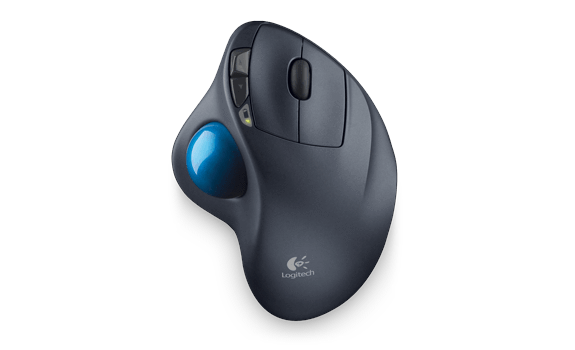
am I the only one who uses

(gg2ez) #49

[quote=“3rsh;141548”][quote=“BlackFro;139931”][quote=“Amerika;139924”][quote=“Watsyurdeal;139920”][quote=“Amerika;139884”]

I use these because Steelseries QCK+ mouse pads are extremely thin which annoys me a lot. I always had to buy two and stack them.

I do agree that cloth works great. It’s smooth yet has enough resistance so that you don’t end up overcorrecting. I never had any kind of a luck with hard surfaced pads (either slick or textured).

And 100% agreed about getting a 120/144hz monitor as long as you can get that FPS in MP games. It is a night and day difference in regards to fluidity and mouse response. IIRC you currently are not on a PC that can achieve that FPS and you don’t have a lot of desk space. RIP :([/quote]

@Amerika
I always wondered about that pad, how does the texture feel? Is it similar to the QCK or is it rather smooth, almost silky like the Pure Trak Talent?

I’m a bit obsessive when it comes to peripherals and mouse pads.[/quote]

I have a QCK+ sitting right here and they feel virtually the same. The Glorious Gaming mouse pad is a lot darker and looks nicer. It’s about 2.5 to 3 times as thick as the QCK+ which is what made me buy it. Below you can see the color difference if that’s important to you.


[/quote]

Holy crap that’s a HUGE mousepad and a SMALL mouse.

I use the Razer Deathadder with the small razer goliathus speed.
The deathadder is real nice for people with big hands like me, it’s also the perfect weight.

I’ve been using 1800 dpi, 1000 polling rate, and 5 sens ingame. However I just started trying out 800 dpi.

[/quote]

am I the only one who uses


[/quote]

Probably, yeah.


(Amerika) #50

I have a friend who uses one of those. But he’s not exactly a shining example of a good FPS player either haha. I’ve never used one for gaming.