
I have noticed a lot of times when trying to engage in battle the icons about defend here, or disarm and whatever else get right in the way and you cant even see the opponent. Also when capturing the forward flag on waterloo terminus after you capture it lets you know in big letters right in the middle of your crosshair so for about 5 secs you cant even aim at someone.
Icons getting in the way
LeeStyle
(LeeStyle)
#3
This has been a big hindrance for me while playing, the opacity is too high and you just end up completely not being able to see an opponent.

Maca
(Maca)
#5
I am continuously irritated by this especially in London Bridge, since the icon over the EV covers very often anyone who is on the EV mg.
DarkangelUK
(DarkangelUK)
#6
I’d like the option to get rid of the icons. When you get used to a map, you know where things are, you know where you need to be… no need to have them constantly showing.
maxxxxlol
(maxxxxlol)
#7
Yeah wouldn’t mind them moved from the middle of the screen to the side or something at least. On whitechapel you have about 10 things on the screen.
amazinglarry
(amazinglarry)
#9
That’s basically how I’ve felt for a while. I would love some UI customization to allow either removal or scaling of HUD / Icons.
http://forums.warchest.com/showthread.php/33769-Customizable-UI-Settings
EnderWiggin.DA
(EnderWiggin.DA.)
#10
Would love a quick toggle button for icons and alpha setting box in options.
zenstar
(zenstar)
#12
+1 UI customization.
And a toggle button to show (or press to show) so you can hit something to see all the icons when you have 2 seconds breathing space and need to quickly get your bearings.
DarkangelUK
(DarkangelUK)
#13
After playing last night, I noticed the downed friendly icon is massive! I actually thought it was another objective before I realised it was a broken heart to show me, as a medic, where the body was. I think it can be smaller and much more subtle… and not constantly showingI In RtCW it is was a small, semi-transparent syringe icon (probably the same in ET), it was easy to see yet non-obstructive. If the downed player wasn’t in your FOV, the syringe showed on the compass and gave the direction you needed to go to find them, and the size of he icon on the compass told you if they were near by (large) or far away (small) and it would increase in size the closer you go to them.
I just really don’t like having constant icons floating around my screen for stuff I’m not close to and know where they are.
stealth6
(stealth6)
#14
I like the medic icons although they are a tad too big (objectives should be the biggest imo). The only problem I have is when a friendly body is lying near an enemy body. Defibs “Nope that ain’t it.” “Stabs” Turn to next body repeat.
Or incap vs dead.
As for them being obstructive I’m already used to it from BF titles.
Christophicus
(Christophicus)
#15
I don’t generally have an issue with the icons, although I am playing at 1920x1200, and given that the UI is not scaling atm, the comparatively small nature of the icons might make it more bearable for me.
The one exception to this is with the EV as the obj icon indicating that you need to stop it entirely blocks whomever is in the gunner seat, making it impossible to tell if you need to dome someone or not :P.
DarkangelUK
(DarkangelUK)
#16
What icons? 

We had a few scuffles near the EV, was difficult to see the enemy past the friendly name tags and downed player icons.
Mustang
(Mustang)
#17
Off topic, but what is rank 3?
Or do you mean the player level number that appears in limbo menu?
DarkangelUK
(DarkangelUK)
#18
When we started, the scoreboard showed everyone as 0 but I had 3, as we continued others started getting ranks (I assume it’s ranks anyway) beside their names randomly.
Dormamu
(Dormamu)
#19
I was thinking something like that:

If the lines are to intrusive we can place them on the side of the road. You can change the lines to some kind of in pavement (center or side of the road) “Lead On” Led markers, on one side of the road the primary obj. (yellow), on the other side of the road the sec. obj (white). Example:
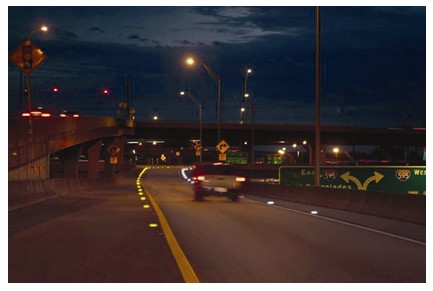
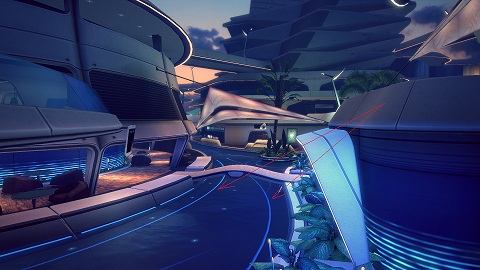
The led markers will show the direction you need to go to primary/sec obj by switching on/off in sequence on the direction you need to go. Something like those blue neon lights on the road on Brink Resort Map when you needed to escort the bot to blow up the bridge:
When the player is near (3-5m) from the primary/sec. obj the icons can pop-up “In your Face!”

The “Lead On” led markers can also be used in story as they pointed out the route to exit the radiation zones, the route to evacuation/embark etc.
Mustang
(Mustang)
#20
Yea it looks like this is the same a the limbo player level I mentioned, seems to be persistent.