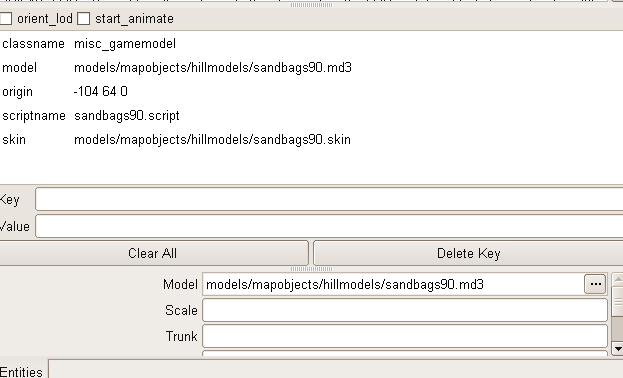
I tried a forum search but I couldn’t possibly find anything 'bout it.
Here’s my problem, I want to use the sandbags of the cmarker models in models>mapobjects>cmarker with my own texture. The problem is I don’t get it to work. Even if I select the model of the sandbags from cmarker, it doesn’t have any textures. Now I have noticed there are pretty much files in cmarker, there are some .md3 files, some .tga files, but also some .skin files.
To make it clear, I want to use the sandbags model, renamed, with my own - renamed - texture on it. I don’t need it for any construct entities or anything like that, just as a model.
I would try the following:
a) make sure it is is a misc_gamemodel
b) skin it (key/value: skin/path to .skin file)
c) give the model a scriptname (even if it just going to lie there).
I would prefer a sscriptname without a dot in the name. For example:
“Scriptname” “sandbags90”
It still displays its original texture which is loacated in textures/gwbhgv…(not important)
I guess I have done something wrong, help!
Hm, Diego might be right about using some sort of remapshader-command in the script.
It works like this: You write the command remapshader and then the shader name for the thing and then the new shadername. also, add the command “remapshaderflush”. The old shader will be replaced by the second shader.
See for example the script for the map Goldrush:
game_manager
{
	spawn
	{
		remapshader "models/mapobjects/tanks_sd/mg42turret" "models/mapobjects/tanks_sd/mg42turret_2"
		remapshaderflush

		// Game rules
		wm_axis_respawntime	30
		wm_allied_respawntime	20

		// Winner on expiration of round timer (0=Axis, 1=Allies)
		wm_setwinner	0

}
In the above script, the old shader (“models/mapobjects/tanks_sd/mg42turret”) will be replaced by the second one (“models/mapobjects/tanks_sd/mg42turret_2”).
But how to do it for your map, I do not know in detail. Perhaps it is just enough to do the things I suggest above? Just keep on experimenting and update us on your progress.
I have one more question… could you also edit the model that the standing sandbag is removed? So I only have 4 sandbags lying there?
BTW I got blender too, but I don’t have these tools to import and export it to any kind of file… only .blender files work with me. Do you know where to get these tools? Then I can do it myself… And I can also do what you did, with the models of the sandbags that are usually used for in front of an mg42…
well, it would take some work to re-edit the model, not to remove the standing
one, thats easy… but the ones laying down have some faces removed since
that part touches the standing one…
however, you can attempt it… you would need to delete the standing one,
and extrude, join… basicly form the missing ends then pin the original uv’s
and ajust the new faces/verts you added.
thanks to kat from katsbits.com for informing me of the md3 scripts,
they work like a charm… plus they import the animations ( baked, no bones )
mmmmmmmmm sounds like curried chicken roti…
EDIT: also as a reminder, since its an ase and compiled into the map,
you don’t need to include the ase model in your map pk3.
also, if your going to install the md3 scripts, you will need the q_math.py and
the q_shared.py scripts, since the md3 ones need them… at least i
remember it that way…
Thanks for the links, I hope they’ll work. The extruding and shaping won’t be a problem, I don’t know a lot about modeling, but these are things I do know, extruding was the first thing I learned that really got me to make an actual shape, and not just a simple patch…
well, for blender… hopefully you installed pyhton, and setup the paths
so blender can use it.
the python scripts you download should be placed in the blender scripts folder.[/quote]
I got python yes… But I don’t have a script folder for blender…
EDIT: when I open the file with python I get a little black text window, then it goes away withouth saying anything and nothing happens…[/quote]
ok, I installed Python again, I do have a scripts folder now. I downloaded .ase and .md3 .py files and put them in the scripts folder, but when I open Blender 3d and go to import> .md3 and .ase aren’t there? Maybe I have downloaded the wrong .py files, but they’re also not in export>. How do I do this exactly?
installing python won’t give you a scripts folder for blender, you should have
had a scripts folder when you installed blender. you will have to check your
blender install path, because its in there.
also, you have to make shure you setup the paths for python ( which i showed
a link previously )
installing python won’t give you a scripts folder for blender, you should have
had a scripts folder when you installed blender. you will have to check your
blender install path, because its in there.
also, you have to make shure you setup the paths for python ( which i showed
a link previously )[/quote]
did you uninstall the previous blender before the new install? and did you install it to a new folder…
what i found was that a new install to a new folder would work… but if i clicked
on any blend files, it would use the old existing blender installed version, so
any scripts i put in the new one would obviously be ignored.
other than that… im not shure why its not working for you.