
Centered UI - ShooterUI.ini


(Furiosus) #1

Hey guys, I’ve been impressed by some of the graphical configs coming out. One issue I’ve had with DB is that the health (and ammo) is hard to see/react to during a firefight due to its colouring and position. I’ve tried to remedy that by coming up with a more central UI.


Updated Pastebin here!
This is the file is to replace “ShooterUI.ini” in the folder “Documents\My Games\UnrealEngine3\ShooterGame\Config”. As always, remember to backup “ShooterUI.ini” so you can revert any changes.

Update: Thanks to Oottzz for the better minimap & ability cooldown placement. I’ve incorporated these changes!

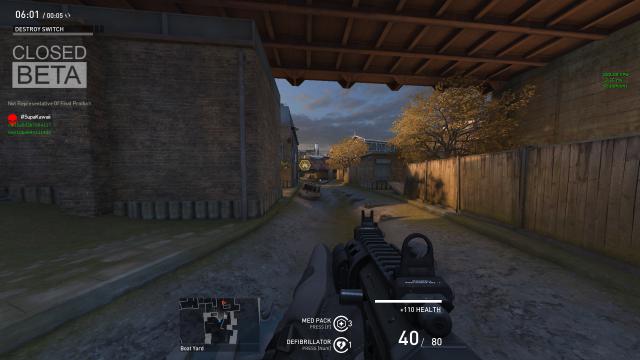
(Tomme) #2

Nice work, I have been meaning to customise my HUD for while now but have not round to it; might just edit yours to my liking :wink:


(TheNinth) #3

Thanks for this, you’ve done a great job!
The only thing I’d suggest is moving the objective info down next to the minimap.


(eliii) #4

Which cvar’s are responsible for the visuals of world and gun-model? I’d like to only use those

I’m happy with the HUD, except for the timer, so if anyone knows how to move it to the mid left of the screen it’d be greatly appreciated as well.


(DomMafia) #5

Hmm im gonna give this a try. Thanks.


(solt.) #6

Excellent! Will definitely take this out for a spin.


(Furiosus) #7

Updated this - moved the timer & objective info to the bottom and used Oottzz changes to the minimap & ability cooldown position.


(fubar) #8

Alternatively change the HUD yourself. Wezelkrozum made this tool a way back for the Alpha’s. http://wezelkrozum.com/temp/xt_hudconfig/v3/


(Ribero) #9

Any guide on how to set the positions of HUD elements in that properly?

My in game UI is not turning out like it says it should…


(finespunUvula) #10

Is this going to work with every resolution ? Im running this game on 1280x720.


(Furiosus) #11

It should do though I haven’t tried it yet. If you make a backup of you old “ShooterUI.ini” (you should anyway!) Then give this config a go and let me know.


(BomBaKlaK) #12

Here is mine :

[left][ShooterGame.SGUIHUDPlayer]
WeaponAmmoPosition=(Align=(V=HA_BOTTOM), Attach=(H=HA_RIGHT, V=HA_BOTTOM, VA=“PlayerHealth”), PixelOffset=(X=510,Y=-120), Skew=0, ShadowOffset=(X=-1, Y=-1))
AbilityCooldownPosition=(Align=(H=HA_CENTER, V=HA_BOTTOM ), Attach=(H=HA_CENTER, V=HA_BOTTOM), PixelOffset=(Y=-40, X=-55), Skew=0, ShadowOffset=(X=-1, Y=-1))
PlayerHealthPosition=(Align=(V=HA_BOTTOM), Attach=(H=HA_RIGHT, V=HA_BOTTOM), PixelOffset=(X=530, Y=80), Skew=0, ShadowOffset=(X=-1, Y=-1))
MinimapPosition=(Align=(H=HA_CENTER,V=HA_BOTTOM),Attach=(H=HA_CENTER, V=HA_BOTTOM),PixelOffset=(X=-200, y=-30), Skew=0)
ObituaryMessageLogPosition=(Align=(H=HA_RIGHT,V=HA_BOTTOM),Attach=(H=HA_RIGHT,V=HA_BOTTOM),PixelOffset=( y=-80), Skew=0)
ChatInputPosition=(Align=(H=HA_LEFT,V=HA_BOTTOM),Attach=(H=HA_LEFT,V=HA_BOTTOM), PixelOffset=(Y=-2), Skew=0)
ConsoleMessageLogPosition=(Attach=(H=HA_LEFT, V=HA_TOP, VA=“ChatInput”), Align=(H=HA_LEFT, V=HA_BOTTOM),Skew=0)[/left]


(finespunUvula) #13

It should do though I haven’t tried it yet. If you make a backup of you old “ShooterUI.ini” (you should anyway!) Then give this config a go and let me know.[/quote]

Yeah tried it out. Sadly the the centered ammocounter and health is right as a layer above the minimap (which is basically at the same place).

But was to be expected tbh. Since those settings cant go well with all the resolutions out there.


(KINE) #14


(CurryBeans) #15

It should do though I haven’t tried it yet. If you make a backup of you old “ShooterUI.ini” (you should anyway!) Then give this config a go and let me know.[/quote]

Oh noes! Its you again :pensive:
Thanks to all for the UI info in this thread.

Is the UI generator still functional transferred to the current build?


(Eox) #16

[quote=“symmetricalRotoscope;26779”]http://i.imgur.com/RavlUOM.jpg
[/quote]

@symmetricalRotoscope

Can you share the code of your UI please ? Yours looks really nice and practical. :slight_smile:


(Gwarh) #17

Does the HUD Configure tool allow you to “re-size” elements as well? For example if I wanted to double the size of my Mini-map.

I ask as I’ve poked around in it but so far haven’t found a way to do anything but re-position the elements


(KINE) #18

@Eox

MinimapPosition=(Align=(H=HA_CENTER, V=HA_BOTTOM),Attach=(H=HA_CENTER, V=HA_BOTTOM), Skew=0)

WeaponAmmoPosition=(Align=(H=HA_CENTER, V=HA_BOTTOM), Attach=(H=HA_CENTER, V=HA_TOP, VA=“PlayerHealth”), PixelOffset=(Y=10), Skew=1, ShadowOffset=(X=-1, Y=-1))
AbilityCooldownPosition=(Align=(V=HA_BOTTOM), Attach=(H=HA_LEFT, V=HA_BOTTOM, VA=“Minimap”), PixelOffset=(Y=40, X=300), Skew=1, ShadowOffset=(X=-1, Y=-1))
PlayerHealthPosition=(Align=(H=HA_CENTER, V=HA_BOTTOM), Attach=(H=HA_CENTER, V=HA_BOTTOM), PixelOffset=(Y=140), Skew=1, ShadowOffset=(X=-1, Y=-1))

you will need to mess around with Pixel Offset coz my resolution is 1600x900

[edit]

GameWaveTimerPosition=(Attach=(H=HA_CENTER, V=HA_TOP), PixelOffset=(X=-80, Y=-60))


(Morty) #19

Is it possible to disable / remove certain parts of UI ?


(CurryBeans) #20

Ok I have seen UIs without the “beta build” text which is in the middle of my ammo and cooldowns and its driving me insane. How do people remove that?