
nvm
Centered UI - ShooterUI.ini
Zita
(Zita)
#22
Any know what part I need to change for the Death spec Icons at top of screen, would like to move it to far left where the clock is and the clock to where the Death spec Icons are.
RadicalMac
(RadicalMac)
#25
I used the pastebin… replaced the notes inside and restarted the game… nothing…
qjack
(qjack)
#26
[list]m_MiniMapWidth=0
m_MiniMapHeight=0[/list]
in ShooterUI.ini you found more things you can turn on/off but didn´t test what they do.
[quote="RadicalMac]I used the pastebin… replaced the notes inside and restarted the game… nothing… [/quote]you have to set write-protection to your config files
RadicalMac
(RadicalMac)
#27
And how would I go about doing that?
EDIT: You meant read-only gg. Forgot about that.
bontsa
(bontsa)
#28
[quote=“RadicalMac;69922”][quote=“qjack;69817”]
[quote="RadicalMac]I used the pastebin… replaced the notes inside and restarted the game… nothing… [/quote]you have to set write-protection to your config files
[/quote]
And how would I go about doing that?[/quote]
I might be completely off the idea here but do you mean setting the file read-only after doing the changes, @qjack ? Nevertheless you should double-check you’ve done that @RadicalMac .
Amerika
(Amerika)
#29
After you make changes you need to right click the file and go to properties. At the bottom there will be a box you can check that makes the file read only. This will keep the game from overwriting your settings when it starts up. I know ShooterUI used to not be set to read only but a while back mine got reset and I’ve been putting it to read only since. You always need to set ShooterEngine.ini to read only if you want to keep your “FPS config” settings.
qjack
(qjack)
#31
for me, configs reset with every update and sometimes when starting the game.
set them to read-only protects against resetting.
if you wanna change something ingame (when set configs to read-only), just start game, press ctrl-tab, remove write-potection from configs, go back in game, make your settings and save, ctrl-tab again and set configs to read-only.
in my case, bindings are deleted when i change something ingame, so i do my changes never ingame.
Polo
(Polo)
#32
[quote=“Furiosus;2134”]Hey guys, I’ve been impressed by some of the graphical configs coming out. One issue I’ve had with DB is that the health (and ammo) is hard to see/react to during a firefight due to its colouring and position. I’ve tried to remedy that by coming up with a more central UI.

Updated Pastebin here!
This is the file is to replace “ShooterUI.ini” in the folder “Documents\My Games\UnrealEngine3\ShooterGame\Config”. As always, remember to backup “ShooterUI.ini” so you can revert any changes.
Update: Thanks to Oottzz for the better minimap & ability cooldown placement. I’ve incorporated these changes![/quote]
Could you make it so it fits 1440x900 16:10? im bad with kind of things… Thanks man!
N8o
(N8o)
#33
Holy necro.
But because I felt nice, give this a try, made it very quickly so if you need it changed, let me know.
Black2
(Black)
#34
[quote=“BOMBA;12981”]Here is mine :
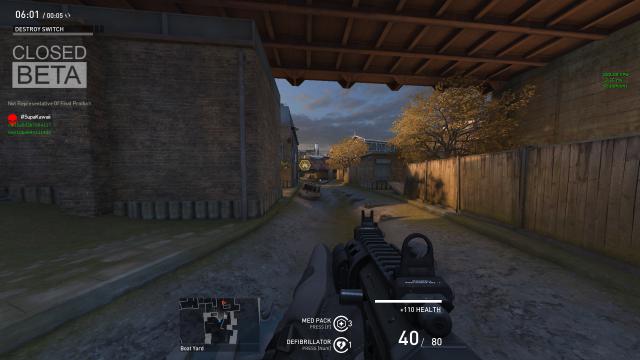
[left][ShooterGame.SGUIHUDPlayer]
WeaponAmmoPosition=(Align=(V=HA_BOTTOM), Attach=(H=HA_RIGHT, V=HA_BOTTOM, VA=“PlayerHealth”), PixelOffset=(X=510,Y=-120), Skew=0, ShadowOffset=(X=-1, Y=-1))
AbilityCooldownPosition=(Align=(H=HA_CENTER, V=HA_BOTTOM ), Attach=(H=HA_CENTER, V=HA_BOTTOM), PixelOffset=(Y=-40, X=-55), Skew=0, ShadowOffset=(X=-1, Y=-1))
PlayerHealthPosition=(Align=(V=HA_BOTTOM), Attach=(H=HA_RIGHT, V=HA_BOTTOM), PixelOffset=(X=530, Y=80), Skew=0, ShadowOffset=(X=-1, Y=-1))
MinimapPosition=(Align=(H=HA_CENTER,V=HA_BOTTOM),Attach=(H=HA_CENTER, V=HA_BOTTOM),PixelOffset=(X=-200, y=-30), Skew=0)
ObituaryMessageLogPosition=(Align=(H=HA_RIGHT,V=HA_BOTTOM),Attach=(H=HA_RIGHT,V=HA_BOTTOM),PixelOffset=( y=-80), Skew=0)
ChatInputPosition=(Align=(H=HA_LEFT,V=HA_BOTTOM),Attach=(H=HA_LEFT,V=HA_BOTTOM), PixelOffset=(Y=-2), Skew=0)
ConsoleMessageLogPosition=(Attach=(H=HA_LEFT, V=HA_TOP, VA=“ChatInput”), Align=(H=HA_LEFT, V=HA_BOTTOM),Skew=0)[/left][/quote]
I think this is the best one I have seen yet. Small concise and removes that unnecessary team health bar that eats up memory.
Would this be compatible with 800x600 resolution?
yenku
(yenku)
#35
Sorry for keeping up the necro but…
How to remove that Team Health bar ? can’t find it.