
Can not compile map???


(sadsack) #1

I been maping maps for a long time. This program (Gtk) is not a very good program. The only bsp maps I have every made was in 3D GameStudio. I have made 60 to 80 maps and never had a bit of the problems I am having with this program. In the last ten years I must have sold over 1000 maps and models, but I thing this is a bad deal.
My problem now it this, I made a 512X512 map and it compiled fine, I changed one texture in it and it will not compile. So I change back to the texture I had in it and now it will not compile. This is what I get, it tell me nothing. See photo


I hope someone can tell me what I am doing wrong. If you need the files let me know I will send them to you.

(sadsack) #2

Well this is real bad, I went back and tryed to compile 16 small map I have made in the last few days and none would compile.
This program is crap I have ver.1.3.1072 is there any updated progran that may not be so buggy?
Thank you
sadsack


(ailmanki) #3

GTKRadiant 1.4 I think is the closest to the version you got. The version continuing 1.4 is called ZeroRadiant or 1.6 - but its in beta status, and not easy to setup for ET.
http://icculus.org/gtkradiant/downloads.html#gtkr14

GTKRadiant is the Editor for maps. The error you encounter happens with the compiler I think - which is q3map2.

q3map2 is a command line program, and as such in can be used directly from GTKRadiant, some mappers use that… some suggest an external frontend … and some have just their own batch files. I would suggest to use this tool:
http://www.fileplanet.com/hosteddl.aspx?/hst/h/r/hr_o/q3map2toolz_setup.exe

Offtopic: Here is a link collection I try to mantain:


and some more links:
http://www.quake3world.com/forum/viewtopic.php?f=10&t=42049
http://www.quake3world.com/forum/viewtopic.php?p=4736#p4736


(KeMoN) #4

Sure there is. The funny thing is the discussion about an updated version of Gtk was made on one of your threads.

I still recommend NetRadiant. It is based on the latest version of Gtk (v 1.5) and it is in my experience simply better or friendlier to the user.

It may be a bit harder in the beginning since some shortcuts/entity keys were changed but you will get used to it.
Direct Link to the files. Just search for the right thing for you.

Regards


(ailmanki) #5

@Kemon: Well I used NetRadiant myself… the only downside is - there are many plugins missing, which are available in 1.4 & 1.6.
And the development of 1.6 has started again, so I would suggest to use 1.4 or 1.6.


(KeMoN) #6

Well I never had bigger problems with NetRadiant. About what kind of plugins are you talking? That you first have to copy the et_game files into the radiant directory?

Once 1.6 is released in a stable/final/public built I might change back but NetRadiant is really good to use, at least in my experience. :wink:


(ailmanki) #7


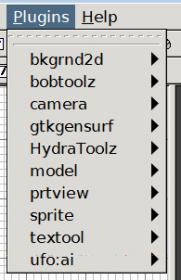
Here a screenshot from ZeroRadiants plugins menu.
GTKGensurf is a terrain editor, camera a tool to make camera pathes - I guess its more for SP.
And there is a plugin for UFO:AI - but they got there own Radiant in the meantime.
HydraToolz is somthing for WAD files… some of the other tools I am not sure if they are built-in 1.5 … like textool and sprite.


(KeMoN) #8

Ahhh, now I get it.
Well I never used one of those actually. However I once tried Gensurf but terribly failed :tongue:
But how you list them in your post it seems like you don’t use them much either?

EDIT: Aren’t we currently highjacking a poor guys thread? :smiley:


(ailmanki) #9

yes we are :smiley: … the joy of forums

I never used them, only bobToolz - which I actually fixed now in NetRadiant - though in my compile it crahes after merging a few patches. So dunno yet if my fix is so great, or if its something else causing that. I have not yet used ZeroRadiant or 1.4 - lol. But ZeroRadiant’s development just got revived so I think it might be better to stick to that.


(Mateos) #10

1.6 on the road again? I read on Q3World that the main dev halted it some time ago to join NetRadiant? So who’s developing it now?

His 1.3.8 crashes on reading the shaderlist.txt or the next time, could be nice to find out why? :slight_smile:


(ailmanki) #11

(Mateos) #12

W00t

Do want update, since I got it working fine :stuck_out_tongue:


(sadsack) #13

Hello,
A big thanks for all the help. ailanki I download you compler and it work ok, but for one thing, the first photo
is compiled in the Simulate old style-light-extra bsp meta,-vis,-light,super2 in Gtk.


Here is what i get when i used Q3map2toolz. I tryed all the type tha was listed. See photo


I have no lights in the map, the light come from the sky texture.
How do I put ambient light in the map?
thank you
sadsack


(KeMoN) #14

Just have a look at 2Bit’s mapping tutorial. It is definitely the best to learn mapping.
There is a tutorial section that deals only with lighting. [link]

If you haven’t tried that tutorial I recommend doing so. It really gets you forward and there are useful hints implemented.

Regards


(Mateos) #15

Q3Map2Toolz should have not found the shaderlist.txt or something like this… And it should have a console output recording as well; if you really want to use it, please post the console output :slight_smile:

Here both Gtk and this tool works, it just needed to manually register some files on 7 to work…


(sadsack) #16

2Bit’s mapping tutorial is very good, but some of the stuff is out dated or I have an older ver of GTK.
Wel any way I try to put a model tree in the map and all I cot was a red dot. see photo


I did just like the tut. said step by step and no model, I did look at the model and it is there with the right name.


The tut said “Click misc/misc_model and a window will open. Double-click mapobjects then trees_sd, then tree_a.md3.”

I did that: see photo


And the tree that is not there???


But 2Bit’s mapping tutorial is very good, I have already learned alot just in the last few hours
Thanks
sadsack


(Mateos) #17

Gtk has troubles to have directly the models when ET is installed far from disk root; In other words, all will be fine if you have C:\ETMap, and troubles with C:\Program Files\Wolfenstein - Enemy Territory\

BUT, before you move everything again… The solution x)

First, to select/edit/delete these things, there’s only a single way: make a brush around it, so you have the red square inside, and do Select inside. Then do N for its properties: you will notice the path is the full file path; cut it so you only have models/mapobjects/etc.

Should be working after; When you spawn an other one the red square is auto-selected, make sure to edit it before deselecting :slight_smile:


(sadsack) #18

Mateos,
This is my problem, this is the onyl computer that has XP on it. This is the only computer that I have on the web. I play et with it. My main HD drive is F. That is where I have my et program that I use on the web. I have a nother HD drive that is C. That is where I have my et and my GTK. So if I understand you I should install et like this C:\et and istall GTK C:\GTK or should it be C:\et\GTK.?
Thank you
sadsack


(Mateos) #19

I meant to avoid any models path issue you should have your ET the most close possible from the root of your hard drive, but it’s not an obligation; ET not Gtk :slight_smile:

Before I had C:\Program Files\Wolfentein - Enemy Territory - Mapping and this issue, move it to C:\ETMap (Closest from root, short folder name), and now no need to reedit the models properties.

But, still, you’re not forced to do so :slight_smile:


(KeMoN) #20

What Mateos said works but you can easily fix that permanently:

[QUOTE=Magic;174867]
to fix this permanent go to C:/Program Files/GTKRadiant-1.4/games/et.game

open et.game file and edit the enginepath to : C:\Program Files\Wolfenstein - Enemy Territory/

hope this help[/QUOTE]

You can install it where you like. Just point the radiant to the right place like above. Simply edit the direction path to yours and there you go.

Regards