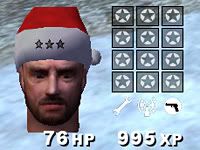
XMas Grinch Skin Pack


(Meyerinchains) #1

XMas Grinch Skin Pack by Meyerinchains

Download Here!

Transform the Axis into Grinches and give your ET server a holiday feel! This pack includes a modified version of the Santa Cap pack by SlauGhteR [NAD] and also a modifed version of the ammopack/medpack gift bows pack by EB.

INCLUDES:
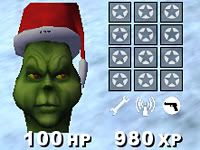
“The Grinch” head model and skin for Axis (includes animations)
Santa Cap model originally by SlauGhteR [NAD] and towofu
Santa Cap skin retouched (too bright!)
Grinch Cap model modified from Santa Cap
Snowballs for grenades
Candy Cane mine markers (green and red for Allies, white and red for Axis)
Red and green construcible ghosting texture
Ammo and Med pack ribbons by EB, (fixed Mega Ammo Pack ribbon by me)
Green satchels for Allies, red satchels for Axis

Let me know of any bugs!

This started out as an experiment to see if I could modify the ET head model without disturbing the animations…success on the first try!

We’ve had a blast playing with this and thought I’d share it with others. Enjoy!

(Meyerinchains) #2

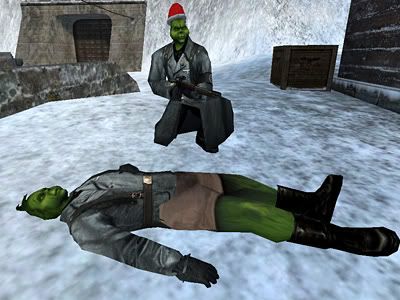
Here are some screenshots:

Mr. Grinch Face

Santa Caps

Allied Mine Markers

Axis Mine Markers

Mr. Grinch

Holding Snowball (grenade)

Green Grinchy Legs…

Allied Satchel

Axis Satchel

Construction Ghost Texture (can look yellowish cause red + green = yellow)

EB’s Ammo and Health Pack Ribbons


(carnage) #3

:clap: ha ha very nice work


(Gringo) #4

Indeed, class lookin stuff. Gotta get some o them runnning on t server :notworthy: :fiesta:


(Jaquboss) #5

very nice work, i supposed you edited ET face , right?
And filesize is very good, great work dude!


(Meyerinchains) #6

Yes, I exported a static mesh of the ET face to Maya where I’m more comfortable working with it. Then I reshaped the head without changing the amount of polys or vertices and then indirectly exported to md3. Imported that into Gmax, where I applied it to the animated ET head as a morph target. That way, all the animations are still intact. Then I just added an extra model for the Grinch hair and parented it to the tag_mouth. It’d be easier to do it all in Gmax, but the tools are limited and I’m more comfortable in Maya and got it done in about a third of the time had I done it all in Gmax.

Only thing I have yet to figure out, or try, is changing the UV coordinates, which I have no clue about in Gmax. But I didn’t really need to for this project.


(Jaquboss) #7

modifers->UV coordinates->unwarp uvw and then click edit on right panel
also you can weld verexes on left side of head , they are making kinda blocky shadow , you can do it in gmax, select head, click on modify icon ( that curved purple thing ) , click on vertex selecting , select whole face , or just problematic areas , and then in right panel scrool a bit down and then you have weld vertexes area there click “selected” and it will look smoother and will safe some vertexes


(Meyerinchains) #8

modifers->UV coordinates->unwarp uvw and then click edit on right panel
also you can weld verexes on left side of head , they are making kinda blocky shadow , you can do it in gmax, select head, click on modify icon ( that curved purple thing ) , click on vertex selecting , select whole face , or just problematic areas , and then in right panel scrool a bit down and then you have weld vertexes area there click “selected” and it will look smoother and will safe some vertexes

Cool, thanks for the UV help.

They normals are blocky when you import into a 3D app, but in game, they seem fine to me. Couldn’t really mess with welding because that screws up the vert count which is how morph targets work. The meshes have to be indenitcal poly and vert-wise. The normals can be easily fixed via NPherno’s MD3 Tool without welding verts.


(EB) #9

Good work.
I like the candy cane landmine-markers MUCH better than my dumb trees ! ( they were only half-done anyways )

Was fixing the ammopack bug enough work for you ? hehe


(Meyerinchains) #10

Was fixing the ammopack bug enough work for you ? hehe

Haha that was the hardest thing ever! I’m sure you worked on it for a while too!

I didn’t really fix it either, I just did a little work around. They don’t look metallic like the red ones, still a little shiny though. In fact, I had this complex shader for it that worked and got the metallic red ribbons on the mega ammo packs, but it was doing something weird and making the ammo packs see through. And that was an even harder bug to fix.

So I took the easy way out and just got them to look half-way decent instead of the gray ribbon. :stuck_out_tongue:


(MindgamE) #11

Got this running on our server for Christmas!


(jet Pilot) #12

Wicked work, as usual, Meyer.


(-=Slayer=-) #13

Nice christmas mod. Will be a great one for our LAN this saturday. Thanks.


(Valtam) #14

This may sound like a bit of n00b question, but can someone please tell me how to install this mod since I am new to running an ET server.

Much appreciated :slight_smile:


(KillerWhale) #15

It would be nice if you could replace the allied teams heads with santa faces or something.
But nice work.


(jet Pilot) #16

Should just have to put it in your server’s etmain folder, with the other .pk3 files. You may have to restart the server, not too sure. Didn’t seem to need to myself.


(Valtam) #17

thank you :drink:


(nUllSkillZ) #18

If you’re allied covert ops in disguise the grinch head model isn’t shown in the HUD.


(Jaquboss) #19

because hud head is done logicly : head itselfs ignore disguise, shame that thirdperson one doesnt


(Patoxic) #20

enemy teritory can be played with a different model head (not only the skin) for every 10 classes?