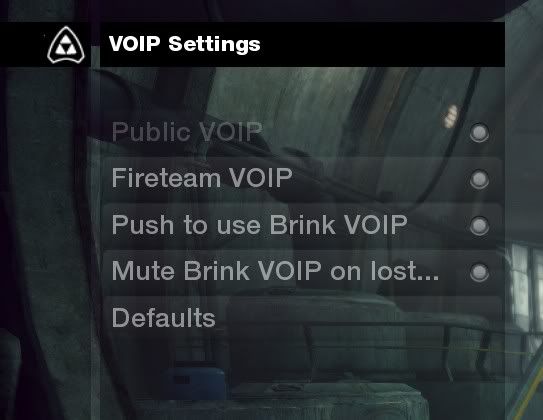
VOIP team chat on the pc?


(General_Zod) #1

I see in the menu an option for global voip chat and fireteam voip chat, but nothing for team voip. For text, I see global, team and fireteam. Actually I don’t even see a means of joining a fireteam?

Every server I’ve been on (except one) I am the only only with a headset/mic icon. But I was just on a server where everyone had a headset/mic icon, yet no one could hear me, nor could I hear them. No idea if any of them were actually using a mic. I asked if anyone could hear me by text and a couple said no.

I find it strange that they all had the icon. Did all these players have voip enabled or is does that mean the server does? And again, where’s team voip chat and not just fireteam?

In steam, my mic works just fine in the test, and has worked fine in other steam games.


(Gearbox) #2

I am also curious about this.

Brink is a Team Based shooter. The winning teams seem to be the ones that communicate, buff and work together.

And yet, there seems to be no means of coordinating quickly and easily with your team in game.

I have a blast screaming over vent with my buddies. “I need a pickup!” “We’re getting flanked right!” However, when I go onto a public server by myself, there is only silence over the voice coms and no teamwork whatsoever, it seems.

This seems like a curious, obvious oversight. What other team based shooter does not have team VOIP implemented?


(General_Zod) #3

Well, I’d at least like to know how it’s supposed to work. If I have the mic icon and no one else does, does taht mean the server has voip enabled but no one else does? And what about team voip chat? Again, only see fireteam voip. And how the heck do u join/create a fireteam?


(indirect) #4

Global chat ties into Team and Alltalk settings. The server has to have the option set si_teamVoipEnabled “1” or si_globalVoipEnabled “1” for Team chat and All talk respectively. It is by default set (on all servers) to fire team only.


(dommafia) #5

Thanks for this. What’s the default key for fireteam voice chat?? also how do you create/manage fireteams :expressionless: tapir for your help :stroggtapir:


(General_Zod) #6

Sigh, how do you know if a server has it enabled? I don’t see that in the game browser. Can I type that command in the console once I’ve joined a server to see?

And again HOW DO YOU JOIN a fireteam? I see nothing for that.

And I said, I was on a server where everyone had the mic icon but yet, no one could hear me and I couldn’t hear them.

If the icon appears on everyone does that mean they have voip enabled or does that mean it’s enabled on the server but who knows if the actual player has?

Even a server what do you mean global ties into team and all talk? It’s both? I’m thinking of ETQW where there were binds for global talk, team and fireteam. AGain I see no option for team voip. No icon if voice is being transmitted. etc.

I dunno, got spoiled by the last games I’ve played especially etqw. It’s bad enough having no vsays, but I want voip and currently have no means of knowing if it’s working or even enabled on a server.


(BJBlaskowitz) #7

Same problems here. I think they are both broken. Black Ops had the same issue. I can’t use VOIP in that game either, but I sometimes hear others, but rarely.


(General_Zod) #8

Ok, finally had voip working. The global chat is the team chat button, whatever sense that makes. If you are on a server with voip enabled then everyone will have the voice icon even if they don’t have a mic. This is when you need a separate key for fireteam vs just your team. To join a fireteam, hmm, can’t describe it exactly without being in game, but you bring up the team by pressing escape and then I think it’s leaderboard, then you can click on an individual and invite them to a fireteam.

However, the voip is quiet by default. The commands are listed in another post, but bring down the console (ctrl alt ~) and type s_volume_voip and press tab. there’s one for in and out. The default values are -6. Why a negative, I don’t know.

Maybe others don’t care about voip, I’m not sure why splashdamage doesn’t seem to like it but I do. Maybe there is a more younger aspect on xbox/ps3 (no offence) but when I play etqw, it’s usually a great bunch of guys and no one ragging on someone. Even if someone doesn’t have a mic, at least they can hear you and can, for example, take head of your warning.

I wish it had lower game volume on incoming voip (like etqw) but I doubt they’ll implement that. So I want to know is there a way of listing servers that only have voip enabled? Someone posted the server cvar for that, but that’s only good once you are on the server.

The game browser seems pretty lacking on applying filters.


(MIND BULL3TS) #9

to learn about fireteams go here:

http://www.splashdamage.com/forums/showthread.php?t=25657


(BigBiker05) #10

[QUOTE=MIND BULL3TS;303567]to learn about fireteams go here:

http://www.splashdamage.com/forums/showthread.php?t=25657[/QUOTE]

^^ I believe reading that whole thread will answer every question posted so far in this thread.


(General_Zod) #11

Well no that doesn’t answer all, most but not all.

My last question is how do you find voip enabled servers through the game browser? I assume currently it’s impossible but hopefully they can implement a feature. Not necessarily specific for voip but say, list servers that have such n such cvar enabled or value of…


(Silver.7) #12

[QUOTE=General Zod;304040]Well no that doesn’t answer all, most but not all.

My last question is how do you find voip enabled servers through the game browser? I assume currently it’s impossible but hopefully they can implement a feature. Not necessarily specific for voip but say, list servers that have such n such cvar enabled or value of…[/QUOTE]

currently you cannot filter the browser for voip settins and most servers do not have global voip on (server admins need to add a cvar to the config for that)

when you join a server you can press escape/ goto options / voip and see if voip is on
greyed out = NOT on


(General_Zod) #13

Thanks for that. I was just quickly checking with the cvar. Btw, anyone know the cfg to retain console with just ~ and not ctrl-alt-~?

But ya, most don’t have it on cause that was the default. So far I’ve only stumbled upon a couple, which brings up another thing: Currently no way to make favourites.

Hopefully, they add functionality to the game browser. I kind of doubt they’ll add a filter based on cvar value (does any game even allow that?) so I hope they add a voip icon to servers, but again I kind of doubt that too because of splash damage’s opinion of voip, so I think it’s going to remain hit and miss.


(Wilson) #14

Please just enable team voice chat on PC by default. The user can turn it off if they don’t won’t to hear it. Disabling it in the server config just causes no one to use it.

General zod: it’s com_allowconsole 1


(General_Zod) #15

Well, I’d like that too, but I doubt even more that they’ll implement that. They mentioned in interviews somewhat frowning on voip because the game is then failing to inform the player about something and needing a communication system outside the game. And their second point is people having a bad experience because maybe encountering someone not so friendly on voip.

I can appreciate the point of view on their first point, but really voip can be handy for those moments and really can be the best form of communication. They even dropped vsays for this reasoning.

And on the second point, the reverse is true: You can experience getting along just as easily as not getting along. It depends who you are playing with. Any I found on the pc side, it’s usually older players the scenario they are talking about doesn’t happen as much. No offence xbox/ps3 players.

Hmm. Way, back in the quake days, most used gamespy to find servers. Id based servers would report their cvars and you could create custom filters. Back then, quake (pre q3) had no built in browser. it was connect ip without something like gamespy. Gamespy long became bloatware, and then most games started to build integrated browsers. And it’s at the point pretty much where they are good enough.

But I would use a third party game browser if it allowed me to do this. It is an id based engine, but it uses steam. Anyone know if this is possible? I don’t even know if gamespy and their ilk are still updating to modern games.

Oh, and thanks for the com_allowconsole 1.


(Crypt) #16

Does anyone know what the s_volume_VoIPActive_dB setting do? It’s set to -20.0 right now, so I was wondering if it does anything that would also help with the volume. :rolleyes:


(dsi1) #17

I want to know why SD thought it was a good idea to make VOIP disabled by default, they must know that most people never look at the options.


(General_Zod) #18

I posted why they thought it was a bad idea, so I’m just looking for a means to find the few servers that have it enabled.


(dsi1) #19

Rude people on VOIP is why muting was invented, and I don’t even understand “They mentioned in interviews somewhat frowning on voip because the game is then failing to inform the player about something and needing a communication system outside the game” as people are just going to have to start up a 3rd party VOIP client instead of just using the game’s VOIP, and besides that, literally every single thing you could ever want to know that isn’t fluff is located on the HUD. Hell you even get some fluff on the HUD in the form of the VIP’s name.