
Hello, I have a sapphire dual-x r9 280 amd radeon video card and I am concerned because dirty bomb occasionally times-out my drivers and it is quite annoying, it may have something to do with display drivers incorrectly adjusting 3D clock speeds in intensive apps however I dont know if thats the problem, if it is I have no clue how to fix it.
Video card driver crash...
Floross
(Floross)
#3
Can try disabling ULPS via MSI afterburner. There also a registry fix where you set your ttk ( time to kill ) to more than 1 second.
Floross
(Floross)
#5
I’ll be home soon and give you some screenshots.
Update:
Download and install MSI afterburner from
http://download.msi.com/uti_exe/vga/MSIAfterburnerSetup.zip
then while installing you can opt out of RTSS ( Rivatuner Statistic Server ) and just install Afterburner.
After that launch the program and on the bottom right click Properties and you’ll see this :
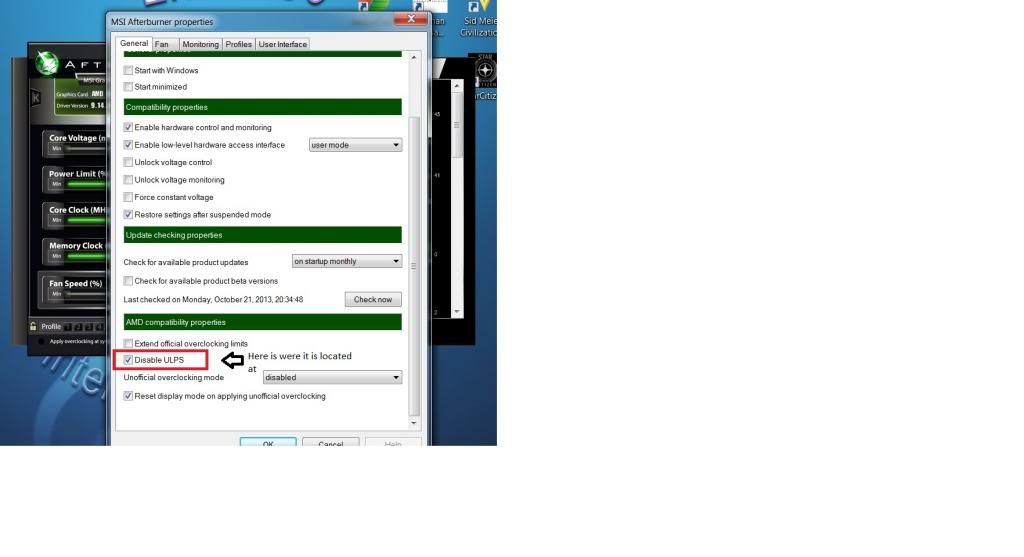
You’ll have to restart the computer.
Make sure to also check at the top Start with Windows and Start minimized.
Legospiker004
(Legospiker004)
#6
[quote=“Floross;146507”]I’ll be home soon and give you some screenshots.
Update:
Download and install MSI afterburner from
http://download.msi.com/uti_exe/vga/MSIAfterburnerSetup.zip
then while installing you can opt out of RTSS ( Rivatuner Statistic Server ) and just install Afterburner.
After that launch the program and on the bottom right click Properties and you’ll see this :
http://i1301.photobucket.com/albums/ag103/ericlee30/MSIafterburner_zps969623c8.jpg
You’ll have to restart the computer.
Make sure to also check at the top Start with Windows and Start minimized.[/quote]
WELP, that diddnt work…
Floross
(Floross)
#9
You might be able to try something I do. When my driver crashes as it does occasionally and I get a black screen, I quickly press Ctrl alt delete and I end process the game ( shooter game something exe ). Then I sleep the computer and wake it up, reinitialising the driver properly. Restarting also works but it’s longer. See if this could apply to you.
I’ve noticed my AMD card generally doesn’t like working properly on a cold boot, so it often times out once if I just turned on the PC and tried to play a game.
Legospiker004
(Legospiker004)
#10
[quote=“Floross;146730”]You might be able to try something I do. When my driver crashes as it does occasionally and I get a black screen, I quickly press Ctrl alt delete and I end process the game ( shooter game something exe ). Then I sleep the computer and wake it up, reinitialising the driver properly. Restarting also works but it’s longer. See if this could apply to you.
I’ve noticed my AMD card generally doesn’t like working properly on a cold boot, so it often times out once if I just turned on the PC and tried to play a game.[/quote]
I Just air compressed my computer and I will get back to you.
Amerika
(Amerika)
#11
A general rule of thumb is if you’re going to go with SLI or Crossfire you better be very prepared and very studied up on troubleshooting issues with games.