
Upgraded GPU.. getting lower frames


(InfernoKun) #1

So I just took out my MSI AMD R7 260X 2GB card and put in a MSI Nvidia GTX 760 4GB. The new gpu seems to be much better since I’ve tested with various games. I’ve kept the same processor which is the AMD Athlon x4 750 OCed to 3.89GHZ and I know DB seems to be a more CPU intensive game. My framerate isn’t too bad it just fluctuates between 40 and 70 which is really noticeable and hinders my aim. With my old GPU I was able to keep around 60 and a bit higher.

Just wondering why this is… I know optimization is a hot topic for a push up the priority list.

Best played with nvidia

Here are the settings I used for both cards. Tried with thread sync on and off.
http://i.imgur.com/a6TOPow.png


(HonourBound) #2

oops didnt read first time xD

It’s kind of odd given that in games like far cry 3 and crysis 3 the 760 gets about 20-30 more fps compared to the 260X

you’ve tried with thread sync on and off but i hope you’re using it off by default since that will give you more fps :smile:

You could also try toggling between borderless and fullscreen to see if maybe one of those yields a significant fps boost but its mainly a factor for input latency and ease of tabbing out more than anything but fullscreen usually has more fps provided you dont tab out a lot

temperatures are also a thing to check but since you’ve tested with other games this might not be the problem

and last of all, are you running the latest nVidia drivers? :smile: even though they update like once a week including only VR stuff :worried:


(InfernoKun) #3

[quote=“HonourBound;135960”]oops didnt read first time xD

It’s kind of odd given that in games like far cry 3 and crysis 3 the 760 gets about 20-30 more fps compared to the 260X

you’ve tried with thread sync on and off but i hope you’re using it off by default since that will give you more fps :smile:

You could also try toggling between borderless and fullscreen to see if maybe one of those yields a significant fps boost but its mainly a factor for input latency and ease of tabbing out more than anything but fullscreen usually has more fps provided you dont tab out a lot

temperatures are also a thing to check but since you’ve tested with other games this might not be the problem

and last of all, are you running the latest nVidia drivers? :smile: even though they update like once a week including only VR stuff :worried: [/quote]

Made sure I had the latest drivers for my card. I’ve also just switched to Fullscreen, but that didn’t do too much to the framerate. This is really weird .-.


(HonourBound) #4

did you completely uninstall all your old amd drivers? maybe there’s a conflict thats happening only with when dirtybomb runs (unlikely)

it’s definitely a weird problem as it should outperform your amd gpu :worried:

you could try resitting the gpu in the pci slot (unlikely again as you’ve already tested with other games)

how much does dirtybomb actually use your cpu? its it 100% maxed? other specs would be appreciated like motherboard, ram amount etc. :smile: feels like we need more data to find what the problem is, even though you only changed the gpu the problem might reside somewhere else maybe :c

do you still have your old gpu? its a time waster but you could try running db with that again and seeing if you still get more fps with it (involves a lot of reinstalling drivers and uninstalling ik :c)


(InfernoKun) #5

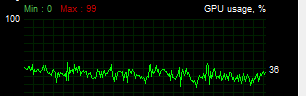
Just checked my GPU usage and it’s not going above 50% at all while I’m in game.

It does keep my CPU at 85%-100%

OS: Win 10 Pro
MOBO: MSI A78M-E35
RAM: 16GB Hyper X
HDD: (2x) 1TB WD Blue (OS on 1, DB on the other)

I’ve made sure I uninstalled my AMD drivers. I would put the other GPU back in the test, but I don’t trust myself with the amount of motherboard I’ve fried on accident xD


(HonourBound) #6

hmm, now that usage is definitely drastically low for some reason

I would say its a CPU bottleneck but it doesn’t make sense that your previous GPU was able to tackle it fine, but given its low GPU throughput i’d say that the CPU isn’t keeping up with the requests for GPU computation. Maybe the AMD GPU had some form of lower overhead that enabled you to push more frames from the GPU. weird though because you’re CPU still isn’t at 100% all the time so it shouldn’t be this degrading to performance.

Some forums state that with low nvidia GPU usages in games it can help to remove GeForce experience but I don’t see how that would help.

Are you sure your power supply is providing enough power to the new card? it on average seems to draw 50W more and your power supply might be under supplying the new card.

Could you check the other games you tested the gpu working fine on again and see if the CPU usage is lower/higher/the same as Dirty Bomb and compare the GPU usages as well? it might show a trend of some sort


(HonourBound) #7

with a new gpu detected, your BIOS might’ve set some settings automatically (though your cpu overclock stayed), check for power saving settings and make sure they’re off

also in geforce experience or the nvidia control panel check for power saving options too such as frame caps and performance optimisations that might be hindering performance. v-sync and adaptive v-sync might also be a culprit as well.


(InfernoKun) #8

I’m currently using an EVGA 500W PSU. I’ve tested the framerate and resource usage for these games. Haven’t particularly tried lowering the graphics options for these games. Dirty Bomb just doesn’t seem to run very smoothly whether it be Minimal or Super graphics options.

Assassin’s Creed Syndicate: Maxing out my GPU and CPU on medium settings 40-60FPS.
Killing Floor 2: Using about 50% - 70% of my GPU and 50% of my CPU on high settings maintaining the capped 62FPS.
Call of Duty Black Ops 3: Maxing out my GPU and using about 75% of my CPU on medium settings, 55 - 60FPS.
Grand Theft Auto 5: 50% - 69% GPU used and 70 - 85% CPU on high settings with 43 - 64 FPS.
Fallout 4: Maxing out GPU and using 64-78% of my CPU on medium to high at 53-60FPS.

My other GPU couldn’t even run AC Syndicate. It ran the other games… okay. Mostly on the lowest settings.


(HonourBound) #9

hmm interesting it’s definitely to do with the game more than your hardware then

have you tried checking the game .ini configuration files? if they’re set to read-only the settings you apply in game wont actually be applied, but if you notice a big change in graphics quality between lowest and super then i assume the settings are working properly.