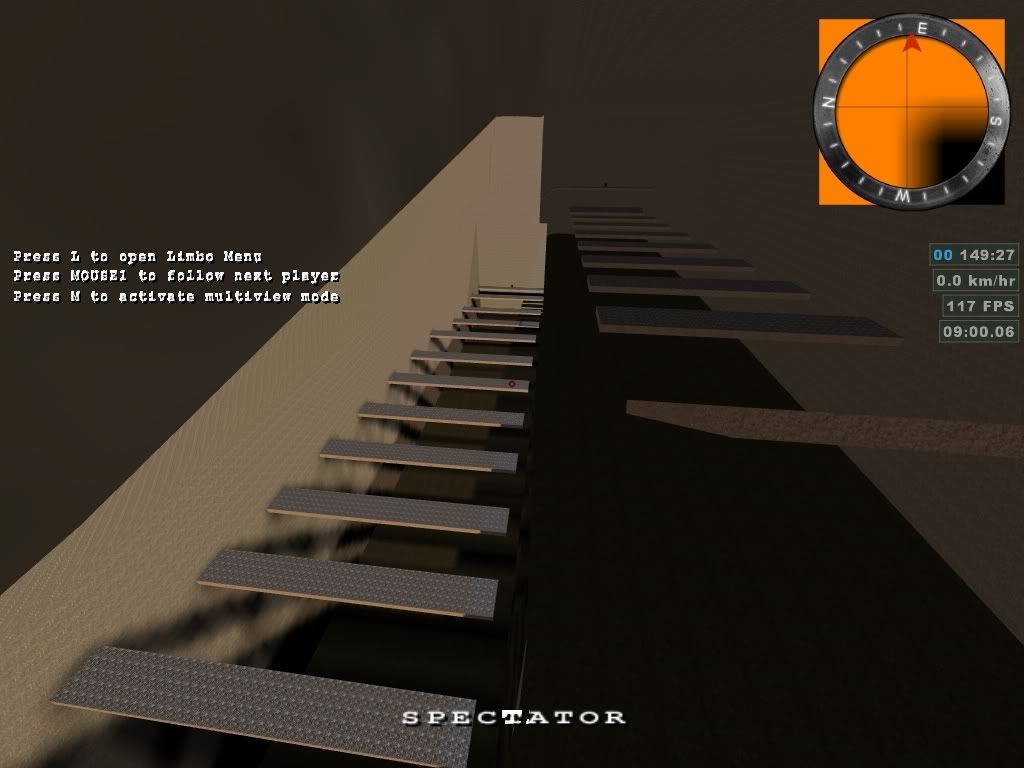
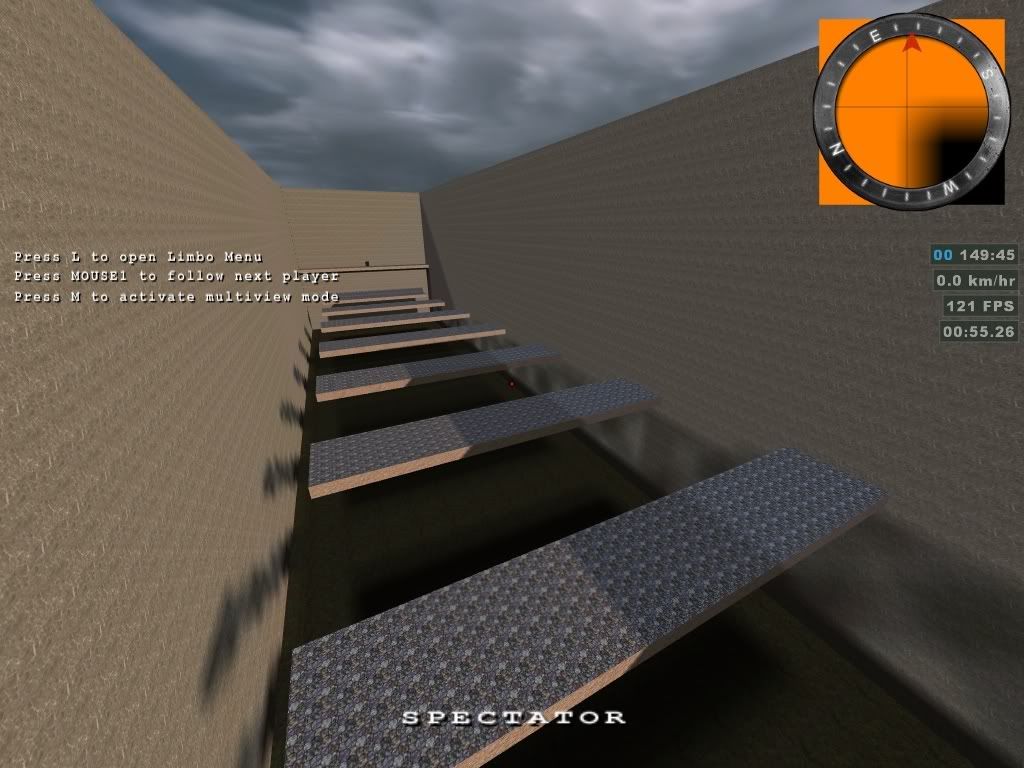
Too many shadows :D


(Diego) #21

Ah, I just noticed something. In your sun entity, you still have a radius of 500 specified. That might be breaking your sun or clamping it to an area only 500 units wide. Remove that from your entity and try again.

Also, What are you using to compile your map? Are you compiling it in radient? or with a batch file? What version of q3map2 are you using? I am using version 2.5.16. But if you are using a super fast light compile, you might get crappy shadows anyway.

You might want to try this out. It is a nice GUI compiler. I didn’t think I would ever replace my batch file but this thing is great and easy to use:


(Boosted) #22

i always compiled it with radiant…
using 1.4, which uses 2.5.11 (iirc).
but ive compiled it with the tool u gave me and use 2.5.13 (newer version always make problems…missing texture although theyre there).

but the problem remains…
used for a quick test the default options which are: -meta -v -vis -saveprt -v -light -fast -v -samplesize 4 -super 2.

also removed the radius entry in the light.

see screenshot.

right side is the room with the stone texture on top, left side the normal room (no entity sun atm).
looks a bit messy, shouldve turned on fastsky :smiley:


(Diego) #23
textures/skies_sd/sd_siwasky
{
	nocompress
	qer_editorimage textures/skies_sd/nero_bluelight.tga
	q3map_lightimage textures/skies_sd/siwa_clouds.tga
	
	q3map_sun 0.75 0.70 0.6 135 199 49
	q3map_skylight 75 3
	sunshader textures/skies_sd/siwasunbright
	
	surfaceparm noimpact
	surfaceparm nolightmap
	surfaceparm nodlight
	surfaceparm sky
	
	skyparms textures/skies_sd/wurzburg_env/sky 512 -
 
	{
		fog off
		clampmap textures/skies_sd/siwa_mask.tga
		tcMod scale 0.956 0.956
		tcMod transform 1 0 0 1 -1 -1
		rgbGen identityLighting

	}
}

Ok, this is odd. Looking at this shader that you are using. Out of all of those textures listed, the only one that seems to come with ET is the siwa_mask.tga. I can’t find siwasunbright, nero_bluelight, or siwa_clouds.

Maybe you should try a different shader? Perhaps the one from fueldump?

I tried this shader in one of my test maps. I was surprised that I actually got some kind of sky to show. However, the lighting was completely vertex lighting. I didn’t get any lightmap shadows at all.


(Boosted) #24

hmm, when u tell me where i can find it and whats the name of it? :smiley:
i couldnt find it, only the clouds.


(Diego) #25

textures/fueldump/fueldumpsky

Also, I think I’m probably wrong about the entity sun working even if you close off the sky with a brick texture. That would essentially make your environment an interior space. And even though the light is physically placed inside that space, it will most likely calculate shadows for all of the walls that you wanted to be sky and then not illuminate anything.

I just looked at Siwa Oasis and was surprised to see that you are using the same shader as that map. Not sure why it worked for them and not us unless it is a compiler thing.

I’ve always used a custom sky shader so I’ve never had to deal with this before. My entity light is set up the same and it works fine.


(Boosted) #26

now tried the fueldump one…
the shadows are correct now, but the quality is crappy.

how can i increase the quality?
i already tried

q3map_skyLight 100 3 <— Change the last value to 6.

it then said while compiling instead of 10 lights 110 lights, but the quality was the same :confused:

those are my current compile settings:

-meta -v -vis -saveprt -v -light -fast -v -samplesize 8 -super 2

edit…
forget that :smiley:

i replaced

q3map_sun 0.75 0.70 0.6 135 199 49 

with

q3map_sunExt 0.95 0.99 1.0 120 60 30 2 16

now my shadows look nice :slight_smile:

err…
with that key my shadows are in all possible directions again :x
how can i increase the quality on a different way?
the fuldump shader:

textures/fueldump/fueldumpsky
{
	qer_editorimage textures/skies/fueldump_clouds.tga
	q3map_lightrgb 0.8 0.9 1.0
	q3map_skylight 85 3
	q3map_sun 1 .95 .9 200 210 28
	skyparms - 200 -
	surfaceparm nodlight
	surfaceparm noimpact
	surfaceparm nolightmap
	surfaceparm sky
	{
		map textures/skies/fueldump_clouds.tga
		rgbGen identity
	}
	{
		map textures/skies/fueldump_clouds.tga
		blendfunc blend
		rgbGen identity
		tcMod scroll 0.0005 0.00
		tcMod scale 2 1
	}
}

even with the normal value its buggy :confused:
but only on one side?!
screenshot -> http://i206.photobucket.com/albums/bb230/Boosted23/Mapping/shot0009.jpg

dang that post gets bigger and bigger


(Diego) #27

The sky shader basically creates a series of point lights along the surface of your sky wall. The higher iterations, the more lights it uses in the same size area. But that doesn’t change the fact that you are essentially lighting your map with 110 sun lights. The entity sun is really your best bet to get 1 clean shadow. I’m not sure why it is still not working for you.

But for a shader solution, You will basically need to make your own .shader file to use it and assign it to a 6 sided sky texture. Using the first shader that I posted as a base, modify it with higher samples and the lightmap filter will reduce the stadium lighting effect.

To improve the quality of the shadows that you do have, you can alter the lightmapscale. A lower lightmapscale will make the brushes use more space in the lightmaps giving you more pixels for better shadows. You can do this two ways:

  1. Assign the key/value of _lightmapscale / .25 in the worldspawn.
  2. Create a func_group of the brushes that are looking bad. Then assign the lightmapscale key/values to that group only.

Your brushwork is so simple, you can afford to do it on the whole map. It will take longer to compile though. I also suggest you increase the size of the lightmaps you are writing. The default size is 64x64. You should increase that to 256x256. This is easy to do with that compiler gui. I also don’t use fast for my light compile. Only fastbounce. But since you are using very simple geometry with a bright ambient light. You could disable bounce light completely.

These are the options that use for my light compile:
-light -fastbounce -novertex -patchshadows -shade -v -bounce 2 -external -lightmapsize 512