
ok guys i really need some help here. when i just got a new monster pc and i have installed brink (which was previously on my gaming laptop) and i went through all the steam motions of getting this computer authorized and everything. but when i try to run the game i get an error from steam saying “the game is not available at this time, please try again later”. i have done some searches and went through the steam tech support stuff (which as we all probably know steam has horrible customer service and tech support resolution issues). i just deleted everything in the steam folder except for the .exe and now i have to wait forever to get it installed again. i guess my main question is, has anybody had this issue that can explain to me how to fix it or somebody that just has the general knowledge and can walk me through this issue. its very frustrating because i want to see what this beast can do and ive been messing with it for 2 days trying to get it running. i read stuff about the C+ files and i have installed all of those. in my new machine i am crossfiring 2 NVIDIA Geforce GTX 560 Ti video cards so i know all of my drivers are updated. i installed the directx 11 runtime web installer. so please somebody help me with this issue.
STEAM: game is not available at this time...
Not sure if this will be much help to you, but you could check out this:
https://support.steampowered.com/kb_article.php?ref=4595-WEXN-6831
I’ve personally seen this from time to time (with any game), but it’s never been consistent for me. It always just worked when I waited a minute and tried the game again.
yeah thats the steam stuff that ive went through already. so idk whats up. im actually getting ready to call bethesda softworks and see if they can help although i doubt they will
Yeah, Bethesda won’t be able to help you with this. This is some kind of problem with your Steam account/install. Does everything still work correctly on your other computer? Have you tried uninstalling Steam completely and reinstalling it? Any firewall software that may be interfering with Steam communication?
Also, to save yourself some time, perform a Backup of your games from Steam on you laptop then copy of them over to your new computer. That way you don’t have to wait for the them to download all that stuff again.
would i do that by putting them on a disk, flash drive??? how would i go about doing that. and yes as we speak the game is actually installing again. and i cant try it from my laptop right now because i have my account open on this computer so i dont think it will let me start it up, without kicking me out of this one and stopping my install which is just a few min from being done after 2 hours.
and i have my firewalls all the way down and i looked and steam is check and allowed to access the internet and everything. and my next step is totally uninstalling steam, but i def want to get those games backed up so i dont have to install them again on this computer because it takes forever.
Yes, when you create a Backup from within Steam (it will ask you to select which games you want backed up), it will create files in a folder you specify. You can then copy them to your other computer (either by using an external disk or over your network if you have sharing setup - using a cable instead of wireless would be faster). You can then just run an EXE file Steam creates to install all of the games you selected in that backup.
Be careful that you don’t select more games than you have space to backup/copy to external drive. If you have a lot of games and try to do them all, you can easily find yourself making a HUGE backup file.
got this too. worked after some minutes however. maybe the problem was that i launched the exe and the update wasn’t downloaded completely? dunno.
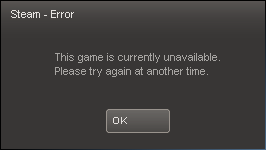
got it again, it’s obvious now when it occurs:
http://www.splashdamage.com/forums/showpost.php?p=326484&postcount=5
It may be worth noting that i disabled alerts in Steam, because i didn’t want to get Steam advertising every time i started the game. From what i read if you want to get update information of your bought games, you also must accept advertising. This is retarded, but that’s the way Steam is. Maybe i would have gotten update information if i’d have allowed ads. Don’t know, don’t care since this kind of ad enforcement is ridiculous and i’ll certainly will keep it deactivated.
Anyway, if you get the above message, first check if the game is updating.
[QUOTE=Joe999;323248]got this too. worked after some minutes however. maybe the problem was that i launched the exe and the update wasn’t downloaded completely? dunno.
[/QUOTE]
^^ exaclty what happened to me.
I tried to start the game, but did’t realise it was updating, Steam ended up freezing completely.
So I just shut it all down, re-opened steam, let it update, then started the game, happy dazeeeeee!