What I need is the following:

A raster with wholes in it (I can’t describe it any better :P). Is it possible to do this with 1 brush and then apply a texture on it and then make the holes with a shader?
If yes, where can I find the tutorial 

What I need is the following:
A raster with wholes in it (I can’t describe it any better :P). Is it possible to do this with 1 brush and then apply a texture on it and then make the holes with a shader?
If yes, where can I find the tutorial
There are some textures built into radiant. Go to textures, and search for alpha.
Those textures make use of an alpha channel. That can be an extra black-and-white channel built into the .tga file or
a separate black-and-white image. That B&W image acts as a mask that is layed over the actual texture: where the
“mask” is white the texture is visible, where the “mask” is black the texture is invisible (transparent). The mask can
have grayscales to allow for semitransparent textures and anti-aliased edges.
Have a look at some textures in your extures\alpha folder and their appropriate shader.
GL
Here’s an example:
For a model I created I needed a window-texture: Some parts were transparant, non-transparent and semi-transparent…
First I created the non-transparent texture:

Then I created the alpha channel: white= non-transparent, Black= transparent…grey-ish is semi-transparent.

I saved the texture/image in photoshop as a 32 bits tga file and saved it as “rt_win1.tga”
Here’s the shader I used:
models/mapobjects/tramfight/rt_win1
{
	qer_editorimage models/mapobjects/tramfight/rt_win1.tga
	qer_trans 0.7
	cull disable
	nopicmip
   	nocompress
   	nomipmaps
	//surfaceparm clipmissile
	surfaceparm nomarks
	surfaceparm glass
	surfaceparm pointlight
	surfaceparm trans
	{
		map models/mapobjects/tramfight/rt_win1.tga
		blendfunc blend
		rgbgen identity
	}
}
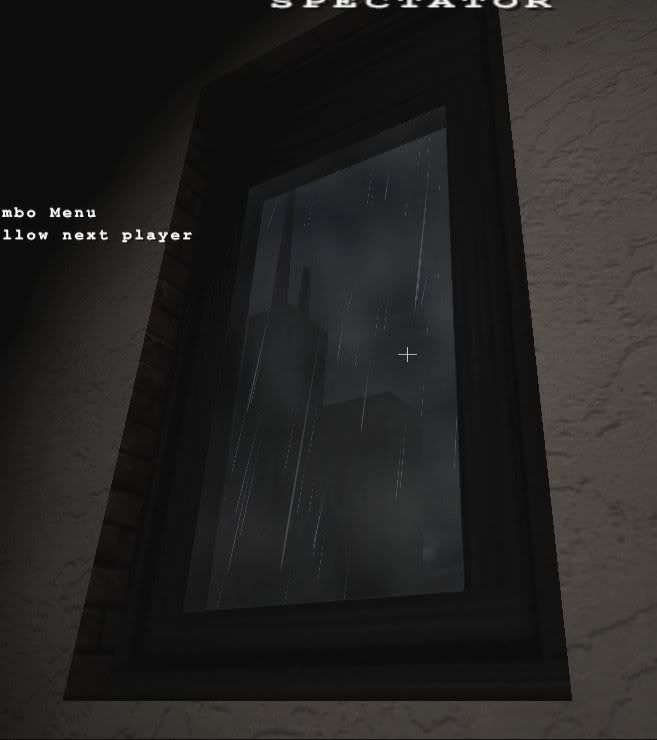
And here’s the result ingame:

How i read it, his question was: “… apply a texture on it and then make the holes with a shader” and not how to create images with alpha channels.
Ragnar_40k: My point was that You can’t create holes with a shader unless the texture you are using contains an alpha channel. Therefor he needs to create an alpha channel for the texture that needs holes in it…
that’s the reason why I posted the example, I did not misread his post.
I am confused by the way he approached the question.
I’d just like to say to Firefly that the tug/train car is coming along very nicely.
@Ramm, can you re-iterate that question\statement better ? So I can direct you to what I think is the better of the tutorials.
You could use Ifurita’s CM Marker tutorial for guidelines HERE
To the best of my knowledge:
Hopefully, one of those cases answers your question.
#3 Actually if you wanted to use clip brushing you could make part of it a clip and leave out the part of the bullet hole or whatever area so that it can be non-solid.
Yes, but I think we were talking about single brushes. Naturally, if you want to build a hole, then it’s a no-brainer situation.
i’m having a problem with a partially transparent shader myself. attempting to save brushwork while working on a window, i decided to make the frame part of the texture. i threw together a test texture so i could work out the shader at the beginning(finished window will be alot better looking with more than just the large single pane of glass). the shader at the moment is based on the safety glass shader:
textures/hotel/window_01
{
	qer_trans 0.99
	qer_editorimage textures/hotel/window_test.tga
	cull none
	nomipmaps
	nopicmip
	surfaceparm glass
	surfaceparm trans
	{
		map textures/hotel/window_test.tga
		blendFunc GL_SRC_ALPHA GL_ONE_MINUS_SRC_ALPHA
		rgbGen vertex
	}
}
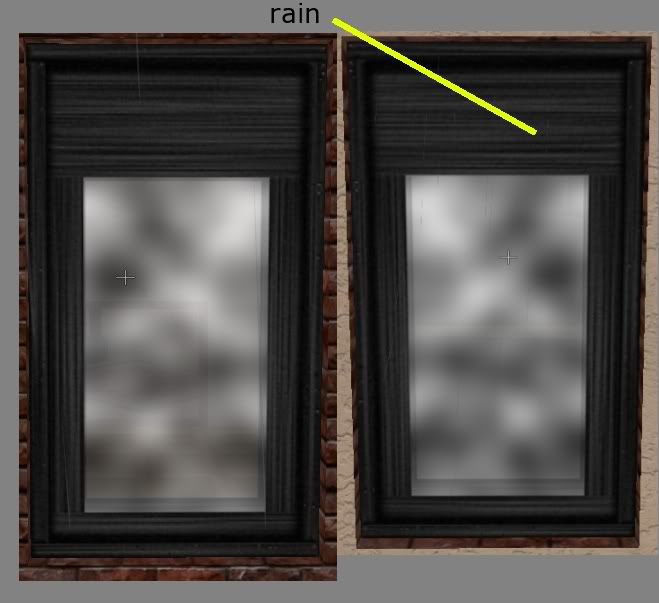
the problem i’m having is that i’m getting rain showing through the parts of the window frame that are supposed to be opaque(window on left as seen from exterior of building - no problem. window on right is same window but from interior of building - rain is visible through the solid portions of the texture):
it’s not that the rain is physically coming through the window, the closest it comes is about 32 game units from the window. it’s just that you can see the rain through it, like the renderer thinks the entire texture has the same alpha value, but only for rain(it would prolly be the same with snow i guess).
forgot to mention that all manners of the sort command do nothing for this problem. and smoke also shows through like the rain does.
is this a limitation that needs a workaround or is there something that can be done about it in the shader that i missed?
It’s a sorting issue. Q3 engine games generally don’t do much in the way of depth sorting on surfaces that have transparent shaders, so you have to use the ‘sort’ keyword to work around issues like this. Have a look in the shader manual, which explains using sort fairly well.
BTW, if my windows were as hard to see through as that, I would clean them 
EDIT: And to prevent the usual wasted answers to the original post that you get in necrothreads, please check the date of the post you are replying to is fairly current!
i posted here because this thread involved someone dealing with the same type of texture and shader as i am.
i mentioned that the sort command didn’t help(i edited it in but it was still about 6 hrs before you replied). that was the first thing i tried since that’s what solved my last problem here. the only sort command that is close to working is ‘sort 16’. with that it stops the rain on the opaque parts but also on the transparent parts, it also puts it in front of muzzleflash which looks really bad.
if ‘sort’ is the only thing that has affect on this situation then i take it that it is a limitation and can only be fixed with a workaround.
disregard about it blocking the rain in transparent parts as you can see the rain just have to look real hard(as i said it was a temporary texture done quick for testing purposes). it still puts the window in front of muzzleflash and explosions. any kind of smoke(fops, cov) or fire(flamethrower) is visible through the parts that are supposed to be opaque just like the rain.
Make another shader for the texture and do not include gl_blending and whatever else may not be needed or just use the texture by itself for the opaque area… and then build the window from 2 brushes: 1 with the trans shader for the glass area and 1 for the opaque area that will block rain.
-That’s my suggestion-unless you are doing this for tech reasons.
thanks EB. wasn’t quite sure if this is what you meant but what i did was edit out the glass of the window texture so it was just an opaque frame with a full transparent hole where the glass will be. made a seperate glass texture. shader for frame is a basic trans shader(like for a grate or a fence). shader for window is blended. put the frame in as one brush. sized the glass brush into the hole in the frame(was easy since i learned to build on powerof2 grid in the gimp). looks nice.
so it’s not 1 brush, but hey 2 brushes are better than 5…and no need for mitering.
checked with light to make sure nothing funny happened
so it’s not 1 brush, but hey 2 brushes are better than 5…and no need for mitering.
i wouldnt become overly obses with reducing the number of brushes you have. a lot of performace issues are to do with the shader you apply on them
i think you would get better performace if you made you frame out of 4 solid brushes with no alpha channel shader the one brush with one alpha channel
also the bruhses you muse to make you frame if they have the texture all applied in the same direction position i think the engine can render them in one go so number a higher number of brushes doesnt exactly mean better performace then lower numbers
spent the last couple hours testing the compile times, rspeeds, fps, bsp sizes, tris counts and etc. of 3 different paths.
this involves a large outdoor map with a very large 8 floor building(the damnable hotel i’ve been working on for the past year) as the main attraction. the hotel, including guest rooms, bathrooms, convention areas, private club, penthouse-type apartments, has over 75 fully accesible rooms(no doors yet but all the door frames are in place), a fully functional(albeit first-come, first-serve style) 8 floor elevator, 8 floor interior firestairs, 102 windows(33 on the facade that take part in the test, 14 are open/empty window structures in back, the rest on sides are boarded up with structural brushes).
the rest of the map has many solid buildings across the street from hotel. behind and to side of hotel is a large rolling hill park and forest area(no trees yet, still building the new tree models) … anyway
in this situation i see increasing the brush and tris count, aside from increasing the bsp size by about 100kbytes, causing the biggest hit in performance. that hit is almost negligible(like when a certain motherboard gets 255fps in a game/benchmark round up and the opponent gets 254, it’s just as good but the 255er gets the win).
i think options 2 and 3(#1 was like a control in the test) are equally viable with a slight edge towards #2. we’ll see how it turns out when i open up the other 2 sides of the hotel.
if anyone has any ideas for a more controlled test of this scenario for educational(and technical) purposes i’d be more than happy to give it a whirl. that is if they can give me specifics on what needs to be done.
thanks for the time and sorry for digging up an old thread.