
It works for any application/game. Just point to the .exe ;).
Running ET on X cores.
diaboliksmart
(diaboliksmart)
#23
Hello
On slow computer, running ET.exe on a dedicated core is a very good tip to increase FPS.
My own experience: video-card 7600GT + pentium 4 HT 3.2GHz => 40-50 FPS.
If I set ET.exe in priority high and affinity on the second core => 70-80 FPS 
I actually do it “manually” at each start, but I remember an old command, with a batch file, doing a “start” with parameters like /HIGH and /AFFINITY, but MS-DOS is not my friend, and can not make the command work anymore.
Thanks for this tool.
GG
iDan
(NewName)
#24
I didn’t know so many people actually used my app, it’s been posted on a fair few forums/communities.
I will update this when I have some time, it currently doesn’t support TZAC/SLAC, I should have the latest somewhere, with mod support.
Also, with the next release I’ll incorporate the FPS boost & memory freeing ability.
Shownie
(Shownie)
#25
I actually using an older pc with not that great performance, so I will definitely going to try this out! FPS boost is v57!
iDan
(NewName)
#26
I’m quite ill at the moment, so can’t concentrate on programming, it’ll have to wait until I’m better :P.
I didn’t realise it became so popular, I will release v1.5 when I can ;).
Shownie
(Shownie)
#27
This little app should be part of the new installer for et, so when you run the game, just choose, mod, cores and off you go, maybe a field for direct ip 
Indloon
(Indloon)
#28
iDan,I could’t memorize what did you say a year ago.
So I ask again:In which language did you write the app?
diaboliksmart
(diaboliksmart)
#29
iDan, keep care of your health, we want you to be “over the top” xD
V55
iDan
(NewName)
#30
Will add the IP feature in next release  it’s quite simple lol, I did it for ETTools ;).
I didn’t release as nobody was interested, all I got was FLAME and HATRED towards everything I did and said. This surely would of united the different mod players together, everything was in 1 place, perfect for clans & solo players.
Nobody appreciated my work 
ETTools before I quit the work on it.

[QUOTE=Indloon;395456]iDan,I could’t memorize what did you say a year ago.
So I ask again:In which language did you write the app? :D[/QUOTE]
Hi Indloon, I wrote this in VB .NET, framework 4.0. I have however moved onto C# since Feb 2011, glad I did.
[QUOTE=$mart;395458]iDan, keep care of your health, we want you to be “over the top” xD
V55[/QUOTE]
Ha, feel a bit better now, heavy eyes, burning, the ususal. At least the headache has practically gone and I don’t feel that sick now
Stupid flu season 
Shownie
(Shownie)
#31
[QUOTE=iDan;395465]
Nobody appreciated my work :P[/QUOTE]
Wrong,I am sure there are many players appreciating applications like this! I want to see it evolve!
Miki
(Miki)
#32
For the people who are interested ‘how’ this works, read the following text. If not, skip the boring nerd explanation.
The first thing you need to know is threading. Every process (see the list that are running on your windows computer by pressing control-shift-escape -> processes or the ps command in Linux terminals) consists of 1 or more threads. Every thread gets a small time that it can run on your CPU (mostly around 5 ms). This way it looks like that multiple programs are running ‘simultaneously’, but in fact they run one by one really fast. Look at the following for a visual explanation
singlecore threading
A:time the CPU is processing thread A
B:time the CPU is processing thread B
C:time the CPU is processing thread C
CPU(1): AAAAAABBBBBBCCCCCCCAAAAAABBBBBAAAAABBBBBCCCCC
The order is determined by the OS as some threads are given priority (OS threads will run more often and longer than user threads). The second you have a dual core CPU, there are quite a lot of differences.
multicore threading with processes limited to 1 cpu
-:time the CPU is idle (doing nothing)
CPU(1): AAAAABBBBBAAAAABBBBBAAAAABBBBB
CPU(2): CCCCC-----CCCCCCCC---CCCC
in the second example, every thread is ‘connected’ to it’s own CPU. This has to do with the caching of code, as every cpu has it’s own cache and there can be quite a lot of overhead transferring the cache from CPU(1) to CPU(2).
In the previous example we are running with affinity on 1 core. (like in the screenshot below)
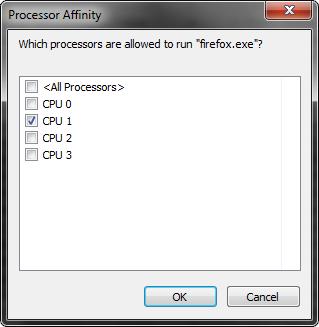
It has the advantage that the cache should not be transferred to another core. However, it has the disadvantage that one core can be more used then another. Therefore, we can run the same program with affinity on 2.
Imagine that B is the ET thread. In this case, CPU(2) is doing nothing, while ET cannot start to render it’s next frame or do it’s other game magic as it’s waiting for A.
affinity 1
CPU(1): AAAAAAAABBBBBAAAAABBBBBAAAAABBBBB
CPU(2): CCC----------CCCC------CCCC
becomes affinity 2
CPU(1): AAAAAAAA-----AAAAA-------BBBBBAAAAABBBBB
CPU(2): CCC---BBBBCCCCBBBBBCCC---CCCCCCCC
however, this is the most perfect case in witch the cache is global or transfers really fast. In most cases, you should see it like this, with more threads running & with some time to transfer cache
XXX= transfering cache
CPU(1): AAAAAAXXXDDDDDDD--------XXXCCCCC
CPU(2): CCCC--XXXBBBBBCCCCCCCCCCXXXBBBBB
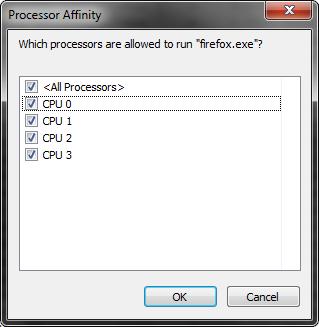
This should give you an understanding why it can be faster (as it’s on a cpu with less other threads) or why it can be slower (as it has to transfer the cache a lot). Of course, this depends on your CPU, the OS you are running, the number of threads…
Practically this means you’ll probably want to test a few times what gets the best results on your machine. Personally, I think that $mart’s idea is the best one (as ET has only one thread): set it to high priority and run it on one core but not your ‘first’ one. (in Windows taskmanger it’s not your zero one).
Conclusion
Basically, you’re not running ET on multiple cores (as it is singlethreaded), this program just makes you ‘switch’ between cores.
Hopefully this has not bored you to death, but just made you a little bit smarter.
Please correct me if I have made any mistakes, it’s already late!
Edit: For interested people, a little reading material (and a better explanation of all this)
Threading: http://en.wikipedia.org/wiki/Thread_(computer_science)
Affinity: http://en.wikipedia.org/wiki/Processor_affinity
Mateos
(Mateos)
#33
So when the support is coded it should be listed like other programs to be “scheduled” on a single core?