
reduce lag ?


(Qualmi) #1

elo,

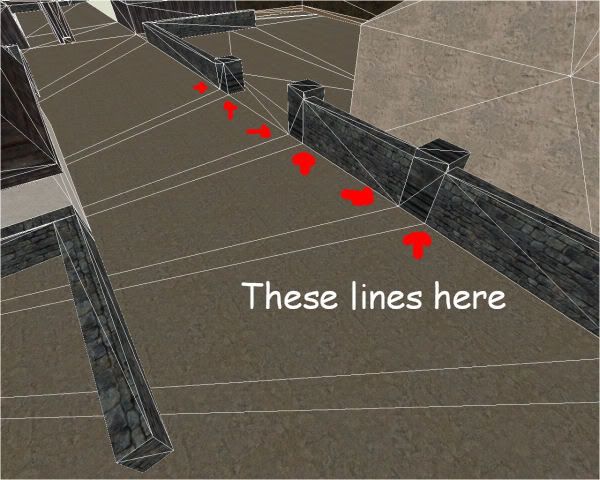
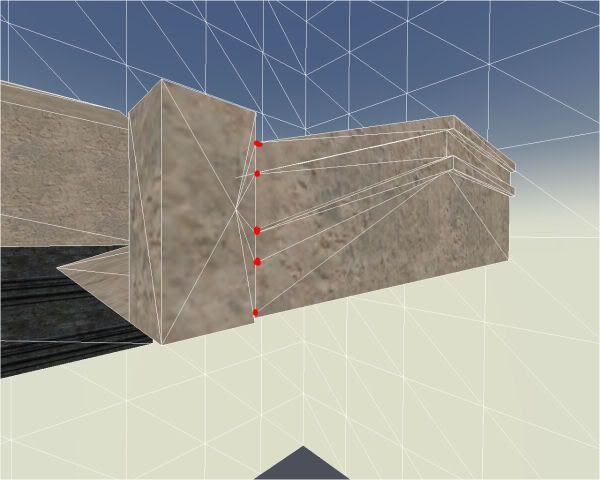
i found out today that the compiler somehow splits brushes into several faces, when it comes that one edge of a brush hits another edge of a brush, not sure. however, if such a situation happens, then the vertice of the one brush will split the other brush. i never noticed this till today :confused: i have some pics to explain better.

pic 1:
pic 2:
pic 3:
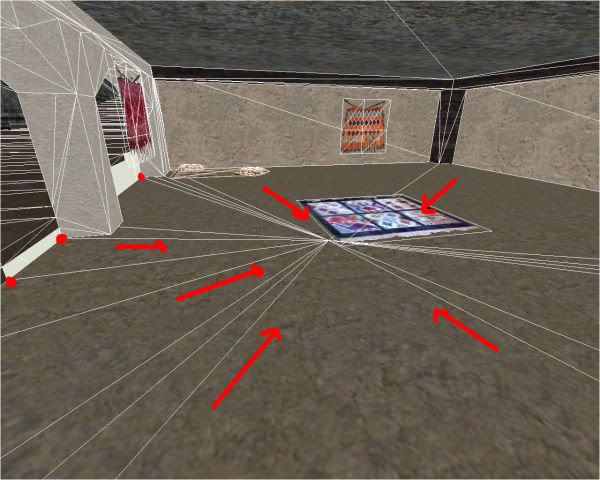
maybe sounds a bit dumb question, but i wanna make sure. is this somehow affecting my fps, meaning bad influence on it. and if yes, how do i take care to avoid such situations best ? is there maybe a compileoption which avoids such splits ? and in what phase of the compile do this happen exactly…

if anyone knows sth would be cool…mainly the first question is the most important to me. do this somehow reduce fps ?


(Flippy) #2

Yes! They are called “T-junctions”.

Have a look here on what causes them and how to fix it:
http://www.splashdamage.com/forums/showthread.php?t=10838&highlight=t-junction


(Qualmi) #3

thx flippy.

is tris 1.47 good ? :slight_smile:


(th0rn3) #4

As flippy said, it is called T-Juncts, the compiler splits a face to more triangles to avoid a thing called flakes (as far as I remember), those are little white dots between brushes (if you ever made a terrain with tris or quads, you’ll know it).


(Qualmi) #5

i found out today that you can put -notjunc in your compileoption to avoid those splits. i hoped to find some flakes then, but i couldnt find some :confused:


(th0rn3) #6

thats good then


(Flippy) #7

Does the -notjunc flag actually work, did you try using showtris?
I thought I read that it didn’t do anything.

Even if there are t-junctions in the final bsp, ‘flakes’ might not appear. It is just a matter of ‘chance’. I believe the flakes appear due to rounding errors in positioning of the brushes, and they might be too small to notice in many cases.


(Qualmi) #8

[QUOTE=Flippy;190041]Does the -notjunc flag actually work, did you try using showtris?
I thought I read that it didn’t do anything.[/QUOTE]

yes, i tried that. there were actually no tjuncs and all brushes were like i was created them, no splits. but on the downside of that my tris suddenly moved up to 2.3, dunno why :confused: dont understand what this number wants to tell me :confused: and flakes i saw some. they are really tiny and when i compile without -notjunc they dissapear :slight_smile:

edit: i would wish for myself a shader which do the -notjuncs trick to specific brushes. do anybody knows such a shader ?


(th0rn3) #9

[QUOTE=Qualmi;190043]
edit: i would wish for myself a shader which do the -notjuncs trick to specific brushes. do anybody knows such a shader ?[/QUOTE]

I think I saw this kinda shader command while browsing through the Q3 Shader Manual…


(Qualmi) #10

i found it…

–> http://pumpkin.game-server.cc/q3map2/shader_manual/ch3.html#notjunc

hmmmmmmm… :smiley:

edit: according to wikibooks/q3map2 tjuncs

can cause sparklies and LOD cracks

ok: sparklies i have seen. these are the flakes bespoke. but what is this lod crack about ? sounds bad :confused:


(Qualmi) #11

sry for doublepost, but i think i found it…

–> http://pumpkin.game-server.cc/q3map2/shader_manual/ch3.html#notjunc

hmmmmmmm… :smiley:

i guess i must know now all about t-juncs to consider if this will make my mapperformance really better if i put it on specific brushes. anybody knows sth ? caus i saw that my tris count went up a bit as i skiped the t-junc via -notjunk…

edit: and not to forget, where do i put this command bzw. how to use it :confused:


(kamikazee) #12

[QUOTE=Qualmi;190053]ok: sparklies i have seen. these are the flakes bespoke. but what is this lod crack about ? sounds bad :/[/QUOTE]The term “sparklies” is simply an older or more common term on these forums, which may in turn give more results when searching for it.

I can’t recall what LOD cracks were, but I do remember that you could have some cases where you could have a complete rectangle-shaped hole in brushwork. So I’m going out on a limb and assume that this is meant with a “crack”.


(Pande) #13

LOD cracks… I think its refering to patchwork not becoming less detailed at a distance.


(kamikazee) #14

[QUOTE=Pande;190068]LOD cracks… I think its refering to patchwork not becoming less detailed at a distance.[/QUOTE]Sure, but what’s the “crack” then?


(Flippy) #15

Gaps between two patches maybe? If you have like an arch, where the underside (roof) of the arch is a patch, and the sides (front / back “walls”) are patches, and they become less detailed from a distance, they might not close up anymore and gaps will appear between their junctions.


(C) #16

Is this a crack?..
It happens when You create some brushwork, arbitrary scale it down, then select the vertices and move them… the vertices snap to the grid.

I do not think You get cracks on triangles that are all part of the same brushface…

`

btw. about Your tris…
You say Your triscount is 1.47… i think You are looking at the mtex value…
The tris-value is 2-part, like 1612/1966,…
The first value is the number of triangles drawn by the game, the second is the number of triangles visible by the engine…
Of course these values depend on Your map, and from where You are viewing into the map.


(ailmanki) #17

I think those cracks/sparklies happen when the engine does round something. It surely happens also when the triangles are originaly wrong, as shown by C.
Then when a t-junction gets rendered, might be that you see those errors due to rounding - I suppose that also happens when they are on the same plane and perfectly aligned, but it might have also todo where in space those vertices are defined . as maybe there cannot happen any ‘rounding error’ but I have no idea how this is internally calculated. What I mean is that a triangle might have all its points on a ‘integer’ value … so rounding it shouldn’t make any difference.


(C) #18

The help in Radiant (F1) says the following:

An Explanation of T-Junction Cracks
“T-junction cracks” can be more difficult to track down and fix. They are caused when the vertices (control points) of a curve patch don’t match up with surrounding world geometry. They can be caused when a patch extends into the world on one or more sides (see fig. X-3,) or when there is a split in the faces that make up one or more edges of a patch


(Qualmi) #19

hmm…would like to see the image of it :mad: however thx. i think i know now what it is, but not 100% sure…