
q3map2 and size


(Chruker) #1

Hello

Now for the second and probably not the last time I’ve hit one of q3map2’s limits. The first was MAX_MAP_BRUSHES, to get around that one I had to write a script which reduced the number of triangles by merging similar brushes. But now I have hit the MAX_ORIGINAL_EDGES limit, which - from what I can understand from the q3map source code - is strictly a compile time limit.

This all let me to wonder why the limits are so small. I know the more complex/large a map is the more likely you are to run into performance problems when playing. But I think it would be better if the mapper would realize this on their own, when their maps runs at 10 fps or something.

I suppose some of these limits that q3map2 has to enforce are dictated by the bsp files it creates, or by the game played. But I would like to hear if some of these limits could be adjusted.

Just wanted to hear if it is possible.

Also is there a maximum visual distance in ET? I seems to have hit that one too :disgust: cause my terrain appears and dissappear when turning around.
(ydnar) #2

What kind of map are you building? The limits are reasonable, and are far larger than previous q3map versions. It sounds like you’re trying to create an overly detailed brush-heavy map.

Consider rebuilding detailed sections out of models and using misc_model entities instead of complex brushwork.

y


(ratty redemption) #3

can someone list advantages of using models instead of detail brushes?


(Chruker) #4

Its a large outdoor map. The majority of the brushwork is so far the terrain. I have used easygen to generate the terrain which is 128x128 divisions, which equals 32768 brushes generated by easygen - that was where I ran into the MAX_MAP_BRUSHES error. Then I worked on optimizing the terrain. Since it contains some large flat areas, I wrote a program that could join most of them together. That reduced the brush count to around 20000. I then added a skybox and got the MAX_ORIGINAL_EDGES error.

I have now reduced the terrain to 64x64 divisions, and kept the skybox as is, and now there aren’t any errors.

Would it also have helped if I had converted the terrain to an ASE model? Does the fixTjunction routine also include ASE models?


(Chruker) #5

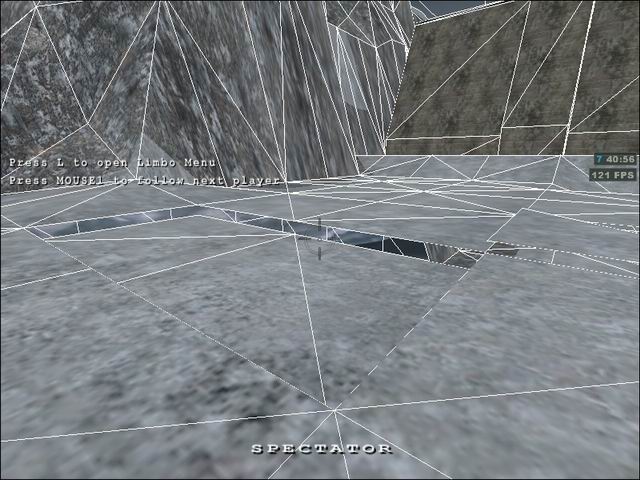
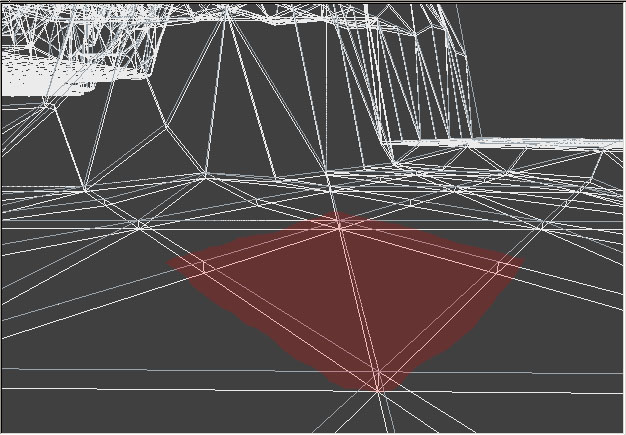
Now that it compiles I’ve found some strange things when flying around it in ET. Brushes which in radiant are sharing vertices seems to be splitted in the game. Here are two screenshots of it:

There are several places around the map where this happens.


(rgoer) #6

That’s a symptom of the way -meta can’t quite figure out how to deal with large, flat areas that are made of many triangles. I’m not really sure of much more than that I’ve been told “-meta handles large, flat areas that are made of many triangles unpredictably.” In recent versions, ydnar has been screwing around with how -meta works, maybe this will get addressed sometime after he gets shaderlab going again.


(ydnar) #7

Don’t use EasyGen’s “Thin Mesh” option. It creates too many planes and leads to errors like this. If you need to carve tunnels, use the clipper tool to snip tunnels out from underneath the terrain you want.

y