
Prob.: Faces with texture blending get darker with distance


(DrunkyDuck) #1

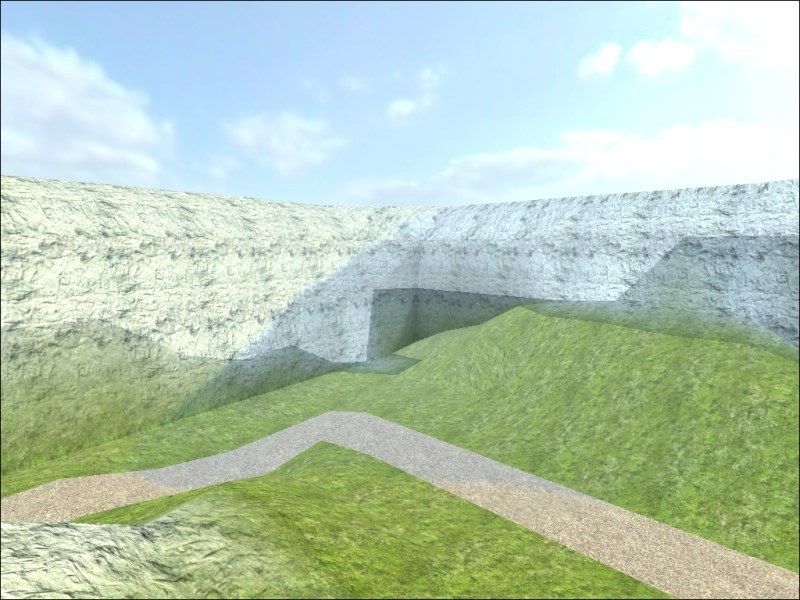
Here’s the problem, the faces with the blended textures seem dark from a distance (click for a bigger image):
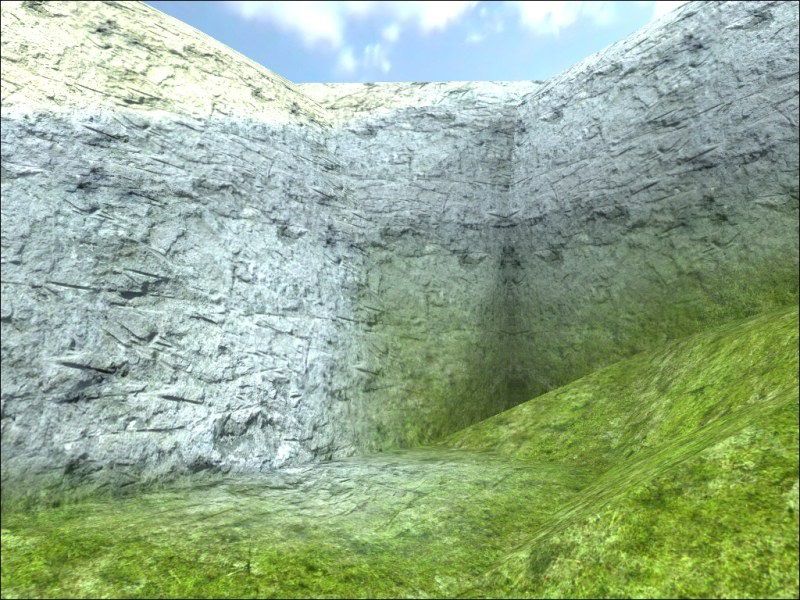
And once you get close, they look fine:
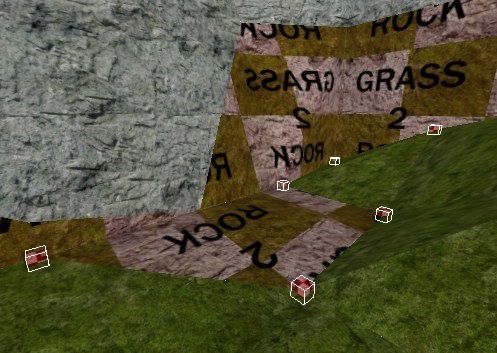
Here’s an editor shot, from that same corner, alpha fade shaders are selected so you see where they are (vertexes where i want the transition to be 100% grass - primary texture, and other vertexes are 100% rock - secondary texture):
And here is the shader used on those faces (lightly modified Sock’s shader from this tutorial):

textures/dd_colombia/ter_rock2grass
{
        qer_editorimage textures/dd_colombia/ter_grass2rock.jpg
	
	q3map_nonplanar
	q3map_shadeAngle 120
	
	{
		map textures/dd_colombia/nature_grass01.tga	// Primary
		rgbGen identity
	}
	{
		map textures/dd_colombia/nature_rock01.tga	// Secondary
		blendFunc GL_SRC_ALPHA GL_ONE_MINUS_SRC_ALPHA
		rgbGen identity
		alphaGen vertex
	}
	{
		map $lightmap
		blendFunc GL_DST_COLOR GL_ZERO
		rgbGen identity
	}
}

Thanks in advance.


(ACROBAT) #2

I have a general question. How did you transition from X-Y plane to the Z-Y or Z-X without having distortion using that shader?

Don’t you have to use two different shaders as you change planes?

Could you use some 75% or 50% blends to make those lines go away from a distance somehow?

Also did you make that rock yourself and grass yourself. IT looks pretty nice.


(-SSF-Sage) #3

Try removing q3map_nonplanar, for me it caused some problems with blending and shadows. Give it a try and tell us the results.


(DrunkyDuck) #4

I have a general question. How did you transition from X-Y plane to the Z-Y or Z-X without having distortion using that shader?

Well, the ground uses a shader with a grass texture applied to it, the hillside plane uses a shader with the rock texture, and the one in between uses those same two textures but blends them smoothly (no “alphaFunc GE128” command). All three shaders (grass, rock, grass2rock transition) are the same size and are tiling correctly throughout the map.

Don’t you have to use two different shaders as you change planes?

I do. Check the shader I posted, there is a primary and a secondary texture in it. The terrain is textured with either one of those and ter_rock2grass shader is used on the faces between the transition (like on the 3rd image).

Could you use some 75% or 50% blends to make those lines go away from a distance somehow?

I got a response on another forum about this problem, it seems that the error is caused by the fog. Now I’m not sure if I should remove the fog, or
is there a way to make the fog+texture blend combination work properly?

Also did you make that rock yourself and grass yourself.

Nope, they are both free textures I got from the internet.

Try removing q3map_nonplanar, for me it caused some problems with blending and shadows. Give it a try and tell us the results.

Unfortunately, it didn’t work. Guess I’ll try removing the fog now…

Thanks for the replies.


(ACROBAT) #5

Where did u get the textures (I need a place to get textures)


(obsidian) #6

He’s using normal box projection UV’s instead of planar projection.