[Performance] ATI: Performance worse After 11.5 and 11.5a hotfix!


(Arkveveen) #1

This issue is a bit out of control, as I’ve noticed with many of you, and I’m in the same boat. Unfortunately, I am not sure if I can be included in that ‘same boat’ because I have a pre-built PC I bought from Best Buy that is better than you think; a mid range PC that is pretty good for gaming, at least for the most part. It’s basic specs are this, but I won’t get into anything too specific:

Asus PC with Windows 7 64 Bit OS
AMD 6 Core Processor with 2600 MHz of RAM
8 GB of RAM
ATI Radeon 5750 HD

I can run Homefront on nearly max settings (and I know that game isn’t very impressive with it’s visuals) very well, BC2 with good performance with shadow qaulity on medium, 2x AA, HBAO off, and max for everything else. Crysis 2 runs best on the ‘High’ setting, but it can perform well on ‘Very High’. Other more high end games run pretty good, I just need to tweak them properlly to match my system. Overall, it’s a good mid range PC, and I am happy to have it!

Now, on to the issue: It is unplayable now, the user interface/HUD now flicker sometimes, and no amount of tweaking of the graphics options help in any way. The recent 11.5 driver update caused this to happen, and I am not sure if I want to uninstall that driver. The performance is unbearable now, but it was pretty good in multiplayer when I first played but worse for singleplayer, yet mostly in the first mission. The performance issues popped up in the second mission, and I was getting really angry. I enjoy the game so much, and I am not disappointed by it at all, it’s a good alternative to Bad Company 2 which is getting old fast as I’ve clocked 500 hours in it total. I am glad to put this game into my shooter collection, it was well worth 50 bucks; now, these issues just need to be fixed… because now it is just unbearable and I will be unable to play the game for a bit because of that user interface/HUD flickering.

I wish the rest of you good luck in enduring these issues! :slight_smile:


(SeedyROM) #2

As ridiculous as this might sound, it worked for seven (yes SEVEN) different people on our server, including myself, so it’s worth a mention. Please try it before shooting it down.

Click the “DEFAULTS” button on your 3D Gaming Preferences page in Catalyst.

Even if you think this is nuts and it might actually increase many of your settings, it actually appears to work for some odd reason. I was running multiple items on “Performance” and had various things like AA reduced and in-game settings on LOW and the game still ran in the 20s w/Fraps. I did the fix and immediately the game ran like butter. I was then even able to change in-game to High/Medium and it still ran great. Easily doubled my frames and others reported the same.

I’m fully aware early release games are full of strange oddities and false reporting so here’s all the background info I have. Of the seven of us with ATI cards, five were on 11.5a and two of us stuck with 11.5, all of which had sluggish performance. For me (4850 1GB) and another user (6600), 11.5a was much worse. I uninstalled everything, went back to 11.5 stock and it was still bad but playable. Mid game someone said “I clicked defaults and the game runs like glass now”. One by one we exited and like magic the game ran much better. I have not gone to 11.5a yet but others on it found the “Default” trick to work just the same.

Take this all for what it’s worth but PLEASE report back if this works for you. Let’s get the word out if true :cool:


(prease) #3

Thanks. This helped a lot


(SeedyROM) #4

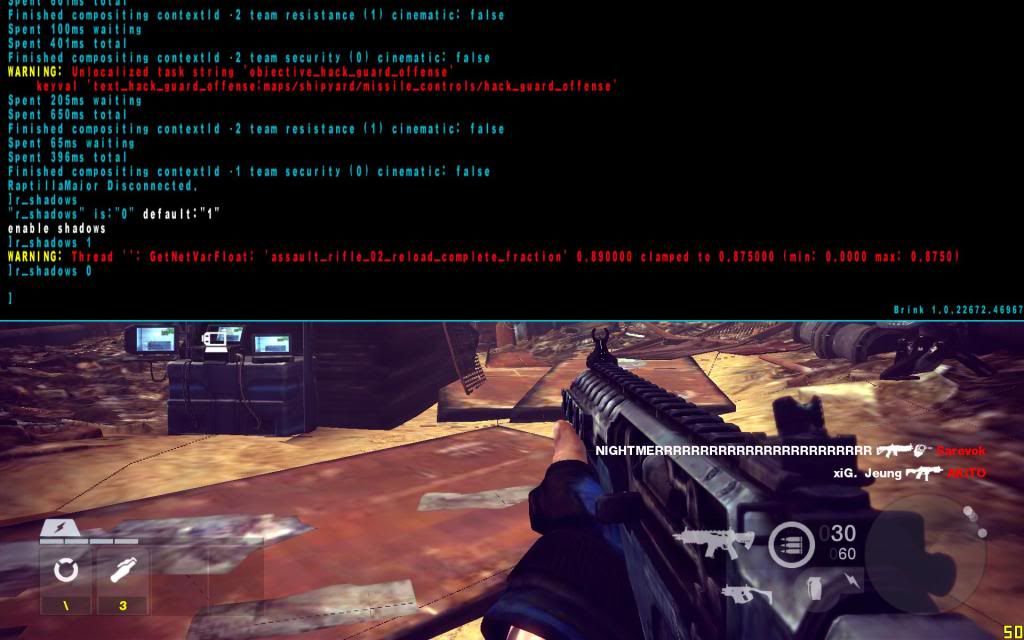
Also this should help for other ATI users until the shadow issues are worked out. These are some screenshots to show my ~20+ FPS gain with r_shadows 0. For anyone that tries it and notices no improvement, be sure you’re in an actual game. Just loading a challenge only showed a 2-3FPS boost all alone but in multiplayer, especially in the open, it’s a huge increase.

Conditions: 16 Player full MP server, outdoors, FRAPS for FPS.
System: E8400 Dual Core/4GB/Win7/ATI Radeon 4850 1GB

r_shadows 1 (default) = 27 FPS

r_shadows 0 = 50 FPS (very playable, jumps to 70+ indoors)

Your mileage may vary and of course the game looks a bit worse, but use this as a temporary fix until it’s addressed.


(ehlo) #5

Windows 7 64 bit
Intel Core i7 720QM
ATi Radeon Mobility HD 5870
8 GB RAM

The game was unplayable with catalyst 11.4 due to low FPS so I updated to 11.5 and hit defaults. Still had low FPS though slightly better. I then tried 11.5a with defaults and saw no difference. So, for me, the game is just barely playable at low settings with 11.5 and 11.5a. I get about 15-20 FPS dropping even lower than 15 in hectic moments.


(daz2007) #6

dont blame ATI, there is only AMD to blame


(ehlo) #7

Thanks for the help daz… Anyways I just tried r_shadows 0 and saw an improvement in FPS. Averages around 30, dips below 20 with a lot of action on screen and climbs as high as 60 in quiet areas. Although the game is playable like this, the wild fluxuations in FPS make it feel quite choppy.

Note: After disabling shadows I noticed a graphical glitch where sometimes everything would be covered with a blueish hue.