
No Sound Fix


(GeneralLee131) #1

A couple days ago my buddy and i were playing when all of the sudden he lost all in-game sound. He tried adjusting all of his audio settings, restarting the game, restarting his PC, and even reinstalling the game. Shockingly, none of this worked. He still had sound on all his other games and apps, so we were stumped. To Google it was. We found that many others were having the issues as well, but nobody seemed to have a definite fix for it.

Today, i hope to bring you that fix.

-Uninstall Dirty Bomb

-Run a search for ShooterGame and Dirty Bomb on your computer since it goes by both names and delete all remaining Dirty Bomb folders and components. Usually it’ll leave behind a folder or some components in SteamApps/Common, in Documents/UnrealEngine3/ShooterGame, in Appdata/Local, and Appdata/Roaming.

-Run CCleaner’s registry cleaner to make the following process shorter if you so desire

-Open RegEdit. If you’ve never used this program before it can be a bit daunting, so i’ll run you through with extra detail. RegEdit pros will already know where i’m going with this.

-Press ctrl+f to open the Find menu, alternatively you can right click on one of the HKEY folders and select “find”

-Type in “ShooterGame” and let it search the registry. Each search can take some time.

-When it takes you to a folder, it’ll lightly highlight it in gray. Right click on the highlighted folder and delete it. It can be kind of hard to see so be careful to delete the correct folder as deleting the wrong thing in the registry can damage your Windows install.

-Press F3 or alternatively go up to Edit and select “Find Next” and it’ll take you to the next component. The uninstall for Dirty Bomb is pretty sloppy and leaves behind 10 or so keys. You’ll have to delete all of them.

-Once RegEdit can no longer find more ShooterGame keys, you can now reinstall your game and cross your fingers

I followed this process on my buddy’s computer today and it worked perfectly, though im sure there is a way to shorten it. I figured that covering all the bases at once would be the best solution. If you’ve exhausted every other effort to bring your sound back, i hope this works for you as well. Let me know if all goes well. Thanks!
(WarStorm_) #2

Too be more specific the problem stemmed from adjusting Voice Receive Volume under Game settings. Hopefully this guide helps someone seeing as this seems to be a common bug.


(murkyTap) #3

This is the exact same problem i am having right now caused by the exact same thing.


(shimmeringHarbor) #4

I have found the solution!!!

Close Dirty Bomb and Steam before this!

  1. Go to start and search regedit and open it
  2. Go to “HKEY_CURRENT_USER\Software\Microsoft\Internet Explorer\LowRegistry\Audio\PolicyConfig\PropertyStore\7a8c800f_0{219ED5A0-9CBF-4F3A-B927-37C9E5C5F14F}”
  3. Right click on the red reg file and click Modify and delete the {0.00…} before and after the real key.
  4. Close all and open Dirty Bomb.

5, ENJOY the sound !!!


(Bytron) #5

If you have razer synapse, open it and go to mixer and you will find that it mutes it on launch for some reason, you can simply unmute it and then you should have sound.


(NuclearSharkhead) #6

None of these worked for me. I uninstalled and reinstalled the game three times and deleted all aforementioned folders and files.

There is no “mixer” in Razer Synapse.

It had nothing in the reg file to begin with, so nothing to delete.


(NuclearSharkhead) #7

I HAVE THE SOLUTION.

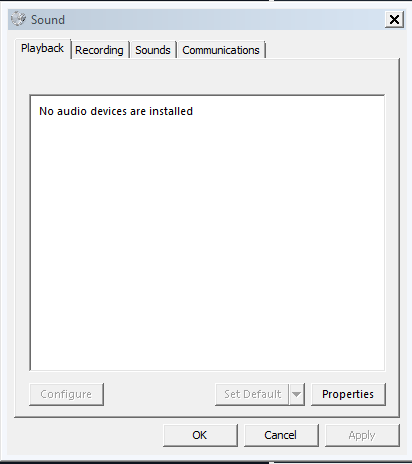
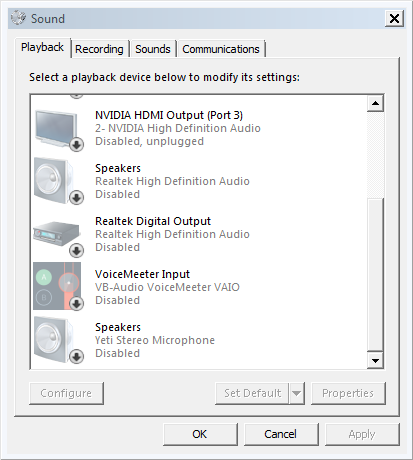
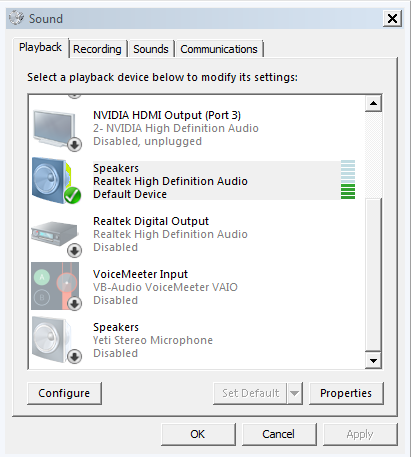
STEP 1 - One by one, disable ALL OF YOUR PLAYBACK DEVICES. All of them. Not uninstall, just disable. Even your normal speakers. I also disabled some of my recording devices but that in retrospect may not be necessary.

STEP 2 - Right click inside the device list and put a check next to “Show Disabled Devices”. You will need them if you ever want to hear your computer make a sound again.

STEP 3 - Enable your normal speakers and set to Default. DIRTY BOMB SOUND IS BACK.

To prevent further encounters of this bug, if you ever need to turn down voice receive volume, do it in the main menu, not ingame. I found that to be safe.


(DaaDog) #8

[quote=“NuclearSharkhead;78920”]I HAVE THE SOLUTION.

STEP 1 - One by one, disable ALL OF YOUR PLAYBACK DEVICES. All of them. Not uninstall, just disable. Even your normal speakers. I also disabled some of my recording devices but that in retrospect may not be necessary.

STEP 2 - Right click inside the device list and put a check next to “Show Disabled Devices”. You will need them if you ever want to hear your computer make a sound again.

STEP 3 - Enable your normal speakers and set to Default. DIRTY BOMB SOUND IS BACK.

To prevent further encounters of this bug, if you ever need to turn down voice receive volume, do it in the main menu, not ingame. I found that to be safe.[/quote]

Doesn’t work for me XD (also nice vids)