
Negative Lights


(Valhue2) #1

I know that Q3map2 supports negative lights. My question, does it support negative lights emmitted from a shader or is it just point based lighting?

EDIT: one other thing i forgot to mention… when a q3map2_sun (or the likeness) entity light is created, is that sun light global to the entire map, or just the area its placed in?

V^2

(ydnar) #2

Negative shader lights should work, but I haven’t tested them.

Suns are global, parallel infinite lightsources. They light up everything, everywhere.

y


(Emon) #3

Whoa, negative lights? Just light with a negative value?


(Matt) #4

Yeah I’m confused on the negative lights thing… A screenshot example?

Would it be possible to invert colors with a light? Sort of like berserker in Doom?


(SCDS_reyalP) #5

The original RTCW q3map supported negative light entities, but AFAIK, they never worked in q3map2. Never felt a huge need for them myself…

edit:
Matt, the negative entitiy lights were were just what you’d expect… a ‘dark’ rather than a light.


(Valhue2) #6

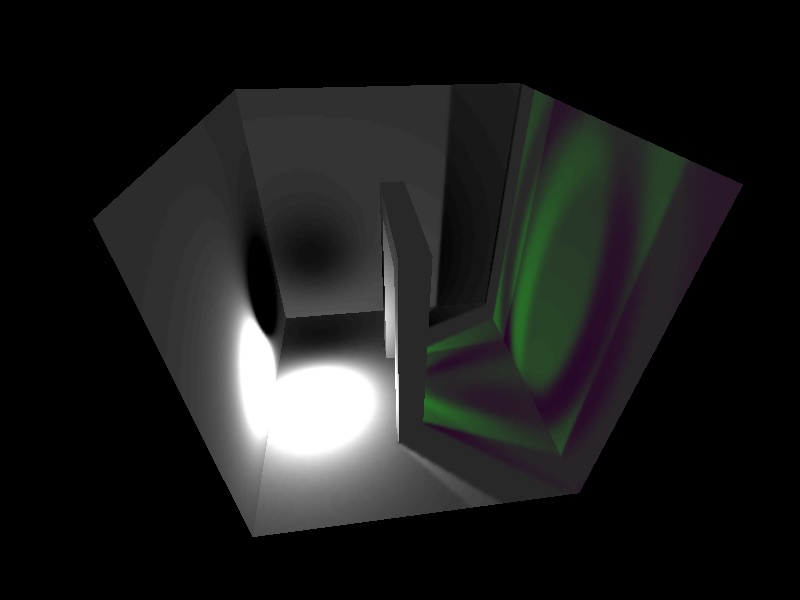
Well thx for the info Y… i was hopin to just have a sun light light up one room… oh well… ill just work around it… Bounce the crap out of that room i guess…

This is a negitive light, (upper left corner of screenie)

*taken from shaderlab.

Basically a negative light is a point/ shader based light that “sucks” up all surrounding light no matter how bright the light is… im assuming that setting a given value to it will make the radius larger or smaller… enough chit chat… ya get the picture.

V^2


(ydnar) #7

Actually it had these crappy “darklights” which replaced any light value already at a sample with its value. They weren’t really much use.

y


(onu) #8

So if one were so inclined, they could make more detailed shadows in an extremely well lit room…

…blah, I’ll go make a quick example to show a good use for it. Assuming this works in Q3…


(rgoer) #9

If you were going to go to that kind of trouble, just make yourself some badass shadow maps in photoshop and apply them as “filter” decals.


(-=skOre=-) #10

/Me is thinking about SeriousSam2-like running shadow blobs via lightstyles in a long hallway…

All theses features… sigh


(Valhue2) #11

Well this is how i was going to use it: a ‘bottomless’ pit where the bottom of the pit gives off a negative light so that it will fade to pitch black… As of now, im using an ambient light value (yeah i know about _minlight and the like) to light up all dark areas, but i dont want the bottom of the pit to have a defined area. Thus the negitive light will be used so that it will fade to black… i may use fog, but it all depends on the final outcome for that room… FPS wise. Thats how im going to use it…

V^2


(onu) #12

Well my draw to negative lights is because (I assume) they effect the light grid. For the really detailed stuff you’d want shadow decals anyways, but for large over-head beams or the like where a player standing under one should actually be darker, it seems a negative spot light is the solution…