
I am using the model “models\mapobjects\blitz_sd\blitzbody3_s.md3” in a map.
Everything is drawn and lit correctly except the windows - they are all black.
I have tried modifying the shader or remapping to another one, but the windows are still black.
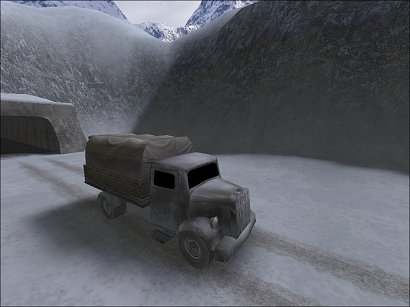
The shader file is in “models_mapobjects.shader”
Here is the window shader from that file:
models/mapobjects/blitz_sd/blitz_sd_windows_s
{
	qer_editorimage models/mapobjects/blitz_sd/blitz_sd_s.tga
	{
		map textures/effects/envmap_slate.tga
		rgbGen lightingdiffuse
		tcGen environment
	}
	{
		map models/mapobjects/blitz_sd/blitz_sd_s.tga
		blendFunc GL_ONE GL_ONE_MINUS_SRC_ALPHA
		rgbgen lightingDiffuse
	}
}
The “textures/effects/envmap_slate.tga” is present and I get no errors during compiling or in the game.
Does anyone have a fix for this?
EDIT: Screenshot moved.