
looking for some tuts or explanations (mapmaking)


(dwe_flame) #1

for now i created terrain with using the easygen program.
but are there already out better tools to make terrain ?

i am starting to learn a bit on how to use the whole skip/hint textures. i think i start to understand for the indoor, but not for all the outdoor stuff.
is there some good tut on this or a clear explanation for dummies ?

looking for a explanation on how to use the lightgrid texture in a map.
have not found any docu on this part, but i know it is better to use lightgrid texture than to have all be from out of the sky


(IndyJones) #2
  1. maybe try hand-making terrain? but then blending is a pain in the ass.

  2. italy has 0 light entities. whole lighting comes from sky + some lamps, that’s ALL. and it doesn’t look bad… :slight_smile: i don’t know what are you talking about lightrid.

(dwe_flame) #3

well, looking into some source maps, i see most mappers are using a lightgrid texture.

reading some info learned me it has some to to that it will only calc light that is withing that grid, or some like that :\


(Pegazus) #4

[quote=IndyJones;191602]1. maybe try hand-making terrain? but then blending is a pain in the ass.
[/quote]

How come?

Anyhow making terrain by hand is the best way and you have more control over your terrain overall look.
Here is a fast tutorial i once wrote around here, should help you to get the basic idea :slight_smile:
http://www.splashdamage.com/forums/showthread.php?t=17618&highlight=hand+made+terrain+tutorial


(Avoc) #5

[QUOTE=dwe_flame;191603]well, looking into some source maps, i see most mappers are using a lightgrid texture.

reading some info learned me it has some to to that it will only calc light that is withing that grid, or some like that :[/QUOTE]

Are you talking about light-emitting textures?


(Pande) #6

q3map_surfacelight <amount>
q3map_lightRGB <amount of red> <amount of green> <amount of blue> // actually normalized, not RGB, silly game makers


(dwe_flame) #7

those are the cvars (to call it that way)

but i’m looking more on how to apply it in the correct way into a map. what to pay attention too, and what now.

for example a L-shape map


(Qualmi) #8

http://www.nibsworld.com/rtcw/tutorial_detail_and_hint_brushes_part1.shtml

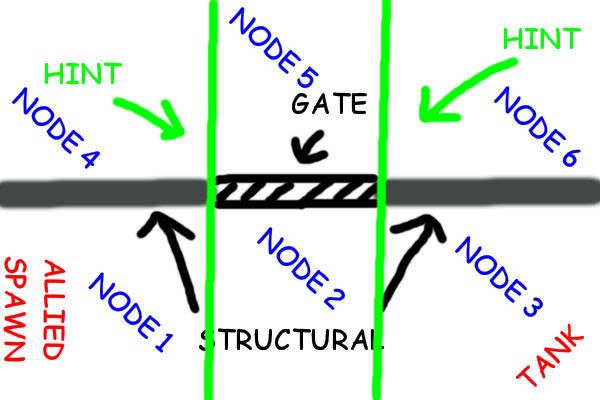
edit: to get a rough idea from it you could make it like this

now if you stand in node 1 you wont be able to see node 4. same for node 3 and 6. there is of course a better solution and in this example you must take care that it is a 3d space. so you must set hints along the z-axis too. the tutorial will show you the rest. its really easy to understand, but the task itself is sometimes really a headache :frowning:


(shagileo) #9

Taken from your map topic:

… Anyhow, I once created a document with some useful links in it for hinting tutorials. Maybe it’s useful to you, here’s a go:

Hint brushes tutorial links
(source: http://stefanpiot.googlepages.com/prefabs )


(Pande) #10

Qualmi, if you stand in Node 1 you can see all but 4. if you were to use splice hinting then perhaps you could fix this but in the meantime your axial diagram doesn’t show the power of hinting too well. :frowning:


(Qualmi) #11

jejeje…as i said. there is a better solution. it wouldnt be very useful to flame if i would show a pic with about 20 nodes, which are nonaxial. this would be very confusing for a beginner in hinting. also, what i always asked myself is: if you have too many nodes, too many splits, then maybe there is a certain point where calculating what gets drawn takes too much cpu power (edit: also those popups are known to influence). only a point to think about =) and of course you could split this better. but that is up to flame then :slight_smile:


(Diego) #12

[QUOTE=dwe_flame;191603]well, looking into some source maps, i see most mappers are using a lightgrid texture.

reading some info learned me it has some to to that it will only calc light that is withing that grid, or some like that :[/QUOTE]

I’ve been trying this out. To my understanding, the light grid is for entities. So it will only calculate the grid within the bounderies of this shader. Entities outside the box would be black. But I’m pretty noob with this technique as well. Most of the time I try to use it, I get a “lightgrid mismatch” error and I don’t know what that is.


(kamikazee) #13

I’m not Ydnar nor Obsidian, but I thought the lightgrid texture is only necessary in maps which have a lot of terrain around the player-reachable area of your map.

In these cases, it doesn’t make sense to calculate the lightgrid for inaccessible areas. Adding one or more brushes with the lightgrid texture on it will make Q3Map2 only calculate the lightgrid inside the bounding box of all those brushes combined.

Mostly, you’d want to make it one big brush, using many small ones will mean that Q3Map2 replaces them with one rectangular brush which encompasses them all.


(Jecoliah) #14

LightGrid…

The only reason you would want to use it is to cut down on the -Light compile Time and make the final BSP file a little smaller.

If this is not a concern then no reason to use it.

Jec