
Loading panel background not displayed


(Chruker) #1

Hi

Does anyone know why the loading panel background sometimes isn’t displayed?

It seems as if it skips drawing the campaign map and the side panel graphics. However it does print the map text, and serverinfo.

On the next update of the loading panel the background is drawn correctly.

If I remove the 500 msec delay in cg_drawinformation, it seems to draw it nicer. However the second drawing is just happening faster.

Does anyone know why the background isn’t drawn on the first call?

(KillerWhale) #2

Hmm, not sure what you mean, maybe a picture of the bug would help explaining it better.

If I remember correctly the loadingpanel is draw in two places:
First the ui draws it(ui_loadpanel.c), showing the “awaiting gamestate” message, and after that the cgame (cg_loadpanel.c) kicks in and draws the server and map info. On the ui code it doesn’t draws the map and such, is that what you mean?


(Chruker) #3

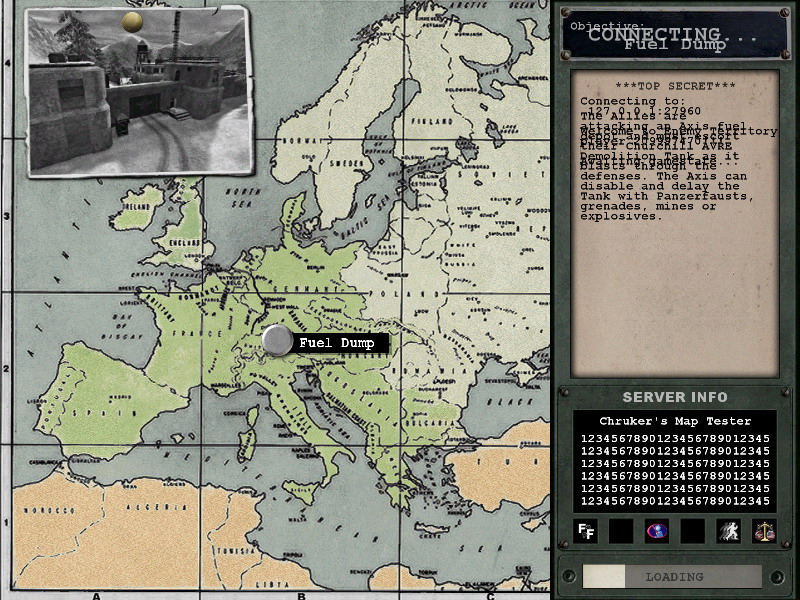
I made two pictures:


This is when connecting to the server. Notice how the text from the connection screen and the map load is displayed on top of each other.


And this is when loading the next map. Notice the remnants of the intermission screen.

My thoughts are that for some reason the bacground is not being displayed in the cg_loadpanel.c. But I can’t locate why.

Both ui_loadpanel.c and cg_loadpanel.c have a similar setup of the background image.


(FREAK!!!) #4

i think, its more a problem of your graphic card, because i never had such a “weird” screen.

did you tried, if its a bug on some versions of driver, or if new/old drivers will not display such a bug?


(Jaquboss) #5

lol , load screen is weird from RTCW, also look to ATi buglist , you will surely find about RTCW loadscreen :slight_smile:


(Rain) #6

I see this all the time, but since it goes away after a single frame, I haven’t cared enough to fix it.


(Chruker) #7

The fix to this problem is a one line change shown here:
http://games.chruker.dk/enemy_territory/modding_project_bugfix.php?bug_id=079 - Background images on the loading screen are not always shown

My theory is that some other piece of code leaves the color at an unusable value, or perhaps the color isn’t initialized properly. Anyway the color and pictures gets added together in the renderer, and the lack of an alpha channel results in the lack of images displayed. Sort of the same things as with the delta fireteam icon.

Does that sound as a likely explanation Rain?

Also ui_loadpanel.c contains similar code, but I haven’t noticed the bug there so for now I haven’t added the code to that function.

Also I guess you could input valid color values in the panel_button so that the color is set using the code already in the BG_PanelButtonsRender_Img…


(Rain) #8

That sounds like a likely explanation, yes. CG_DrawConnectScreen is the very first thing that cgame calls that actually draws anything on the screen (called from CG_DrawConnectScreen ← CG_DrawInformation ← trap_R_RegisterShader ← CG_Init ← CG_Main), and SetColor hasn’t yet been called from cgame when the loading screen is drawn (so the color is undefined, probably whatever it was when ui finished its las draw.)

Calling trap_R_SetColor(NULL) on cgame init is definitely a good idea, although I think I’d personally put it very near the top of CG_Init (before the trap_R_RegisterShader calls) for clarity. Good find.


(squadjot) #9

go chruker!! :smiley:


(Chruker) #10

I’ve updated my fix to setting the color in cg_init()


(Jaquboss) #11

Good find , but i thought that you were working on render bug during reloading …
When ATi FSAA is active , screen blink black …
I think that it is for nVidia as well , ATi says that it is game bug ( from RCTW )
But i dont care about that thing…


(Chruker) #12

I have noticed the same black blinking with ATI. It is actually the reason why I have antialias turned off.

I can’t remember seeing it with my Geforce 3 card but then again I didn’t ran it with antialias when playing…