Lights turned on and off by switch


(Noldor) #1

hello, as topic i would know how to turn a light on and off with a switch or a event. I saw on the Venice map that the antitank cannon lights turns on when it’s ready and whe n a soldier go in the trigger area, it turns off.

I’m a newbie on level designing, can you point me to a tutorial for this things?

Thank you very much (PS: chavo one are you italian? Venice is very well done :clap: - i am italian and i can recognize some architecture).

Bye!
Noldor


(chavo_one) #2

Actually I’m an American, but I do have some Italian heritage if it’s any consolation. :slight_smile: I used many, many reference pics to create some landmarks in the map. I definitely wanted it to be as authentic to the city as possible. Thanks for noticing!

As for your question, what I did with the AT Gun lights was I created two script_movers, with different shaders applied to each one. One script_mover had the “light on” shader applied to it, while the other script_mover had the “light off” shader applied to it. Then I toggled them off and on inversely through scripting.

As for a tutorial, I don’t know of any that explicitly show this technique. However, digibob and sock wrote an elevator tutorial, and the light on the switch changes from green to red. They used func_statics instead of script_movers.
http://www.planetquake.com/simland/pages/articles/rtcw_baslift.htm


(Noldor) #3

thank you very much! i’ll try as soon as possible. :notworthy:


(sock) #4

Yes use “script_movers” instead of “func_static” entities, they work much better in ET.

Sock
:moo:


(Noldor) #5

let’s see if i get the point:

  1. make 2 brushes
  2. put texture of light to the brushes
  3. press N and give the script_mover entity description to the brushes i created
  4. throught scripting (but i don’t know how) i can make visible the brush with lighted texture and make invisible the other, or viceversa

if this is correct, you solved me part of my doubts. :slight_smile:

[EDITED] PS: Chavo One i notice sort of z-buffer error on the light texture of the antitank cannon in Venice (as when you put 2 brushes at the same place without caulk the bottom one). Is this related to the other script-mover behind? if so, with scripting, when you make it invisible, why the texture still interfere with the other brush?

(sorry for my english :frowning: )


(MadJack) #6

Probably something else as a “setstate <thing> invisible” is really invisible in the game.


(chavo_one) #7

You will only get a z-fighting error if you are running with a 16-bit detail buffer. The reason being, I am using a decal for the lights. You’ll notice in the shader I am using polygonOffset. A picture is worth a thousand words…


(eRRoLfLyNN) #8

Actually I’m an American, but I do have some Italian heritage if it’s any consolation. I used many, many reference pics to create some landmarks in the map. I definitely wanted it to be as authentic to the city as possible. Thanks for noticing!

Hey, I was watching the remake of the Italian Job a week or 2 ago with my good lady friend, and as you might know some of that was set in Venice. OMG I felt like I had been there when I was watching it. I was pointing at the TV screen going “Bah, wtf! I fought there!!” lol. My bird, of course just looked at me funny, as they always do when Wolfenstein comes into the conversation. But seriously man, your map is excellent, and I can’t beleive how realisitic it is, especially around the library and the area where the boat starts. There is a full scene between Donald Sutherland and Mark Walberg at that place and it looks identical. I was expecting to hear some arty strikes pounding down at any minute lol :D! Nice work :clap:


(MuffinMan) #9

lol yes that would have brought some funny actio into the scene!


(chavo_one) #10

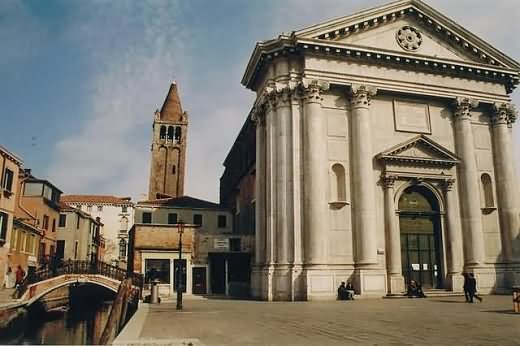
When I saw the Italian Job remake, it was after I had built most of the map. But as I watched it, I was excited to see some familiar sites that I had been studying through pictures online. The church (or library as I call it in the map) that is seen in Italian Job and IJ: The Last Crusade is called Campo San Barnaba

The initial courtyard with the AT Gun is based off of Campo Santa Margherita. Check this out, it may look familiar! :slight_smile:
http://www.schule.berg.net/hepel/schueler/9if199/9test.htm

I could point out tons of other pictures that were incorporated into the map, so I’ll stop. :wink:


(eRRoLfLyNN) #11

Yes that’s the part I was talking about. It’s so close to the real thing I couldn’t believe it. Even the waterway, and the wee roof to the left of the library/bank where I like to throw my cowardly grenades from :stuck_out_tongue:


(Noldor) #12

Yes, good work Chavo One! I study MDAMS here in Italy (Multimedia and Art, Music and Show Disciplines) and i’m studying the Neoclasicism and Manierismo (i don’t know the english word). I saw some churches and buildings on Venice. Of course, i can’t say they are “so close to the real”, as i studied so well the originals, but the “feeling” of being really in Venice is amazing! :slight_smile:
i started studying ET level designing (with very poor q3arena basis) because i have to make the Thesis project for my University about the “Basilica di Superga” (a church of Superga, a town near Turin, my city). My objective is to reproduce perfectly that church - i have the opportunity to make as many photos i want. But, hell, i’m far to have sufficient acknowledge to make good architecture , and my “scripting” situation is even worst :slight_smile:
Well, i’ll keep testing and tutorialing…

Hey i was forgetting the most important message: thank you guys for your support, with screenshots and links, you are helping me so much! i never could start mapping without the Socks’ reference manual and your support! thank you again!