Lighting of tree models...


(MrLego) #1

I am trying to get some misc_gamemodel trees to illuminate properly.

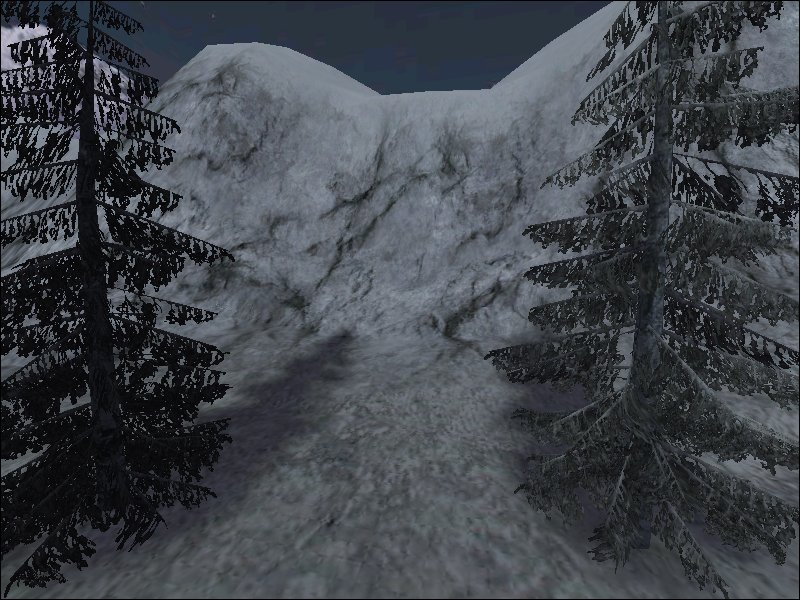
In the below screenshot the tree on the left is a misc_gamemodel and the tree on the right is a misc_model.

As you can see the tree on the left is unlit while the right tree is lit properly.

Does it make any sense to use a misc_gamemodel in this case?

Is it even possible to light the misc_gamemodel so it appears the same?

EDIT: Screenshot moved.


(SteelRat) #2

Do you have the same problem with another sky? (Could the object you have be in an area that is “clouded”?)


(seven_dc) #3

I assume you have a key _rs as value 1 in your gamemodel… teh models are compiled into bsp so they make the map bigge in size.


Ship sale


(hummer) #4

AFAIK, misc_gamemodels are vertex lit, and game models are lightmapped… so if you start putting parts of gamemodels where no light can be seen, parts of the model will become very dark. I had this problem with some plant models…

I changed the model’s shader to have an rgbGen const color close the sunlight so the models didn’t look super dark…

For example:

models/mapobjects/indy/bush_desert2_converted
{
	qer_editorimage models/mapobjects/plants_sd/bush_desert2.tga
	cull twosided
	surfaceparm nomarks
	surfaceparm nonsolid
	surfaceparm trans
	nopicmip
	{
		map models/mapobjects/plants_sd/bush_desert2.tga
		alphaFunc GE128
		rgbGen const ( 1.0 0.95 0.9 )
	}
}

I had to point the model to the new shader. This was only to make it seem “not as bad” as the dark vertex lighting, and it won’t look nearly as good as light mapped will.

If you can spare the bsp size, go with a misc_model.


(MrLego) #5

Do you have the same problem with another sky? (Could the object you have be in an area that is “clouded”?)

The sky is not the problem, although it is a nightime skybox with a bright moon - no cloud layer to obscure the lighting .

I assume you have a key _rs as value 1 in your gamemodel… teh models are compiled into bsp so they make the map bigge in size.

Yes I have “_RS” and “_CS” both set to 1.

I had to point the model to the new shader. This was only to make it seem “not as bad” as the dark vertex lighting, and it won’t look nearly as good as light mapped will.

Hummer - Wouldn’t I need to modify the models to point to the new shader, or will just using a new shader do the trick?

I don’t mind baking the misc_models into the bsp, it is only a small valley. The down side is it takes me slightly longer to compile for testing.

Does anyone know if when the model is compiled into the BSP, it is stored once and referenced multiple times, or is it stored for each usage?

IE: If I had 100 trees in the map would there be 100 occurences of the model definition in the BSP or only one?

Thanks


(hummer) #6

Yes, you would need to modify the shader… just use npherno’s tools to do so.

I’m pretty sure the model is stored multiple times in the BSP. IE, the more models you have, the bigger the BSP size.


(MrLego) #7

I may try it both ways and see what impact it has on the file size.

Thanks


(sock) #8

I am trying to get some misc_gamemodel trees to illuminate properly.

In the below screenshot the tree on the left is a misc_gamemodel and the tree on the right is a misc_model.

As you can see the tree on the left is unlit while the right tree is lit properly.

Does it make any sense to use a misc_gamemodel in this case?

Is it even possible to light the misc_gamemodel so it appears the same?

Ironically the root of the problem here is the origin of the models. When you put sections of a model into brushwork and their origin is buried inside of a brush then you will get black models. If you plant the tree in mid air it will be lit properly.

“misc_model” entity is “baked” into the BSP and if you had a forest of 100 tree’s then over 100 models and all their triangles would be “baked” into the BSP at the same time. The “misc_model” entity gains its light from where its origin is in the map which can be a problem as all the tree models have their origins at the base of the tree! (a clever location for it! :wink: )

“misc_gamemodels” entity is not “baked” into the BSP and if you had a forest of 100 tree’s then they would not be part of the BSP but loaded from a single instance when the map is loaded. Because they are not part of the BSP they get their light from a different source, the lightgrid. Plus gamemodels have to be vertex lit which is why they usually need a special shader.

A new shader type was setup called “Impliciit” shaders which lets the game/compiler decide the type of lighting needed for the model. If the model materials use the implicitmap/mask then they will receive the correct lighting. If a gamemodel is setup wrong it will flicker in game like there is a duplicate in the same place. This is because the wrong light setup has been used. Which is why misc_gamemodels should use the “implicit” shaders. This was a featured developed later on the project and not all model materials were setup with this system.

If you want to make a “misc_gamemodel” brighter in game use a lightjunior entity with a value of 200-300 and make sure the light grid resolution is high enough. (This is key on the worldspawn of maps) If you want “misc_gamemodels” to receive/cast shadows then use the _rs/_cs keys on the entity.

If you want the correct lighting on the “misc_models” then make sure the origin is not buried in the ground or fix the origin in the MD3 file. (Which is not an easy task)

Its a shame the tree models use 2 materials because you could have re-mapped the shaders using the “_remap” key on the entity and not have to fix the MD3 to point to the new material files.

Sock
:moo:


(MrLego) #9

In the long run, modifing the models to point to an updated shader looks to be the right move. Once it is done I should not have to do it again and the changed models will be available for future maps.

Looks like I have a few more things to play with. :slight_smile:

Thanks


(]UBC[ McNite) #10

This is my post from the “light and shadows on misc_gamemodels” thread. I ll move the answers in here too.

Hey guys,
considering the advantages of gamemodels I m giving them a try here, but the results are poor. The problem is the lighting, especially the lack of proper shadows. Here come 2 pics:

First pic: all trees misc_models… get backed into BSP, nice shadows, all fine.

Second pic all trees misc_gamemodels… no shadows, and even different brightness on the models. You can see Detoenis truck which is misc_model gets the good shadows and lighting though.

Difference between the 2 compiles: the 2nd one has worldspawn keys _cs 1 and _rs 1, that s the only thing. On playermodels I get a good brightness though (in compiles without the _cs and _rs, didnt have a playtest with them enabled so far).

Worldspawn settings are:

gridsize 128 128 64
_mingridlight 56
_minlight 16 (although i can't really see an effect from having this as a "minimum brightness" as ydnar describes it)
_minvertexlight 20
_cs 1 (put this in for the gamemodels only)
_rs 1 (put this in for the gamemodels only)
ambient 12
_color 0.9 0.9 0.9 

I could possibly hide the lack of decent lighting on the vegetation in a day-map. Only this is going to be a night map. So the trees better look good lol. Thx for your help guys :cool:

Shaderman answered:

I think the rs_ and _cs keys should be used with each single misc_gamemodel. Not sure if they do anything in worldspawn.

Which is right when u read socks answer. I m just having a new compile.
edit: With _cs 1 and _rs 1 the trees do cast a shadow now, but the tree itself isnt lit properly, probably due to the shader-stuff sock is talking about:


Left tree is misc_model, right tree is misc_gamemodel.
As for the saving in BSP size: 10 models of tree2 make app. 200KB BSP size which is about 50KB pk3 size. I m really not sure all the fuss with shaders is worth saving that lil bit of pk3 size.

Just adding another valuable link on rewriting shader s for misc_gamemodel s:
http://www.splashdamage.com/index.php?name=pnPHPbb2&file=viewtopic&t=2503&highlight=miscgamemodel+lighting

(=PoW= Kernel 2.6.5) #11

I’m still a bit confused.
Are you all saying that if a misc_gamemodel does NOT have implicitMap in its definition, it will NOT light properly no matter what you try?

I started using misc_gamemodel (instead of misc_model) to try and save bsp size.
My trees are not visiable at all as misc_gamemodel so I have to leave them as misc_model.

I have some trucks inside a building that are strangely lit.
They are misc_game model with _rs and _cs set to 1.

I have tried putting light juniors and light entities right near the dark areas but with no improvement at all.

If I’m reading this thread right.
You’re saying I MUST rewrite the model’s shader or use misc_model otherwise it just won’t be possible to light the truck.
Is that right?

Here’s some (gamma enhanced)images:
(Notice the door on the leftmost truck)


[/img]


(FireFly) #12

Well, Unfortunally If the origin of the misc_gamemodel sticks into a structural brush, the model will not be visible ingame. So you can try to make the brush detailed.

I always had alot of problems using a misc_gamemodel instead of using a misc_model: not lighted properly, black models, invisible models: Another solution that I use alot is this:
If you need to use a misc_gamemodel use a script_mover instead, works perfectly and the nice thing is that You can use _rc / _cs on script_movers too :smiley: