Its ATI / your graphics card? Nope.


(Capricious) #1

So, after upgrading from my c2d @ 2.8ghz to an i5 @ 3.3ghz, my frames went from 30fps to 130fps…same gfx card, same drivers.

Too bad I don’t play this game anymore - figured I let the community know my results.

How an 16 person shooter can be that heavy on the cpu, I have no ****ing clue.


(Jimmy James) #2

[QUOTE=Capricious;343499]So, after upgrading from my c2d @ 2.8ghz to an i5 @ 3.3ghz, my frames went from 30fps to 130fps…same gfx card, same drivers.

Too bad I don’t play this game anymore - figured I let the community know my results.

How an 16 person shooter can be that heavy on the cpu, I have no ****ing clue.[/QUOTE]

You clearly don’t understand that the purpose of the modern 3D video card is to take the load off the CPU for the processing of graphics. ATI can’t do it very well and nVidia can do it extremely well.

-JJ


(Qbix) #3

As I already said multiple times, the CPU is the limiting factor once you own a decent graphics card. Every GHz boost results in more frames while GPU usage stays the same.

[QUOTE=Jimmy James;343505]You clearly don’t understand that the purpose of the modern 3D video card is to take the load off the CPU for the processing of graphics. ATI can’t do it very well and nVidia can do it extremely well.

-JJ[/QUOTE]

It’s the developers’ duty to assign task to the CPU and the GPU. ATI is responsible for the perfomance of their cards, fixing bugs, improving anti-aliasing and tesselation, GPU computing etc. They are definitely not in charge of telling the other hardware of your PC to stfu and give their work to their cards u know…

My GPU (HD5870) and the one of a mate (GTX275) are at 60% load max during the game. So even if the GPU is the problem, it would not only affect ATI cards. But as I said, it’s the CPU issue here, there is definitely some bad programming behind.


(Smoochy) #4

[QUOTE=Capricious;343499]So, after upgrading from my c2d @ 2.8ghz to an i5 @ 3.3ghz, my frames went from 30fps to 130fps…same gfx card, same drivers.

Too bad I don’t play this game anymore - figured I let the community know my results.

How an 16 person shooter can be that heavy on the cpu, I have no ****ing clue.[/QUOTE]

do you have an ATI card?

going from 3ghz to 3.4ghz on this cpu saw no increase in FPS. last night i stuck my old nvidia 8800gtx back in as im RMAing the ATI in my sig and i got better fps.

a 5 year old card should never be able to outdo a new mi/high end card.


(Qbix) #5

[QUOTE=Smoochy;343666]do you have an ATI card?

going from 3ghz to 3.4ghz on this cpu saw no increase in FPS. last night i stuck my old nvidia 8800gtx back in as im RMAing the ATI in my sig and i got better fps.

a 5 year old card should never be able to outdo a new mi/high end card.[/QUOTE]

What are the GPU loads on both graphic cards?


(neg) #6

if you are trolling its honestly the worst troll ive ever seen in my life


(Jimmy James) #7

I would tend to agree with this statement if Brink was the only game I’ve seen ATI users complain about but that’s just not the case.

-JJ


#8

Well I have a q9550 running at 3.4Ghz and a 5870 I get “acceptable frame rates” in all current games, even BRNK (it does dip to 30 in some areas on Sec Tower or during the odd moment). So I think it is a very “squiffy” issue people are facing. But then I have a clean system used only for porn and gaming, fully updated and built by myself (i.e. a good motherboard) :cool: Not some cheap mobo, pre-built system, with a mediocre CPU and only a decent graphics card. :penguin:


(Capricious) #9

My card is an ATI 5870.

The game is poorly optimized. ATI may be able to do something with drivers, but that would be making up for inherent flaws in the game design.

Qbix: I’ve mentioned the same previously - I now have the personal data that shows it.

Smoochy: What kind of processor? Overclocking my c2d from 2.4ghz to 2.8ghz only improved my frames a tad (~5fps). Jumping to the i5 gave it a 100fps boost.


(Humate) #10

Ive overclocked my pc with a 4870x2 - made absolutely no difference, with minimum fps in the low 20s

Upgraded the gfx card to a 580gtx - absolutely smashes the game with the majority of the effects turned up.

Interestingly enough I was curious to see if the rectified framerate issues changed my perception of the game. It didnt :wink:


(Dangles91) #11

I use to have terrible FPS on my previous setup, didnt matter which drivers. Although 11.2 was the smoothest for me.

E8400 @3.9GHz
4GB Geil 1200Mhz
6970

Recently upgraded my machine to 2600K @ stock (cooler hasnt arrived yet)
8GB Corsair Vengance 1600Mhz
Same 6970
Didnt Format (new HDDs to come)

After todays patch and this upgrade as well as using 11.6 Catalyst, my FPS doesnt drop below 100 with everything maxed.


(needforWeed) #12

Doesn’t matter what CPU you have when you use Nvidia :slight_smile:


(kilL_888) #13

[QUOTE=needforWeed;344893]
Doesn’t matter what CPU you have when you use Nvidia :slight_smile:
http://www.techspot.com/review/397-brink-performance/page5.html[/QUOTE]

thanks for posting.

this statement is funny:

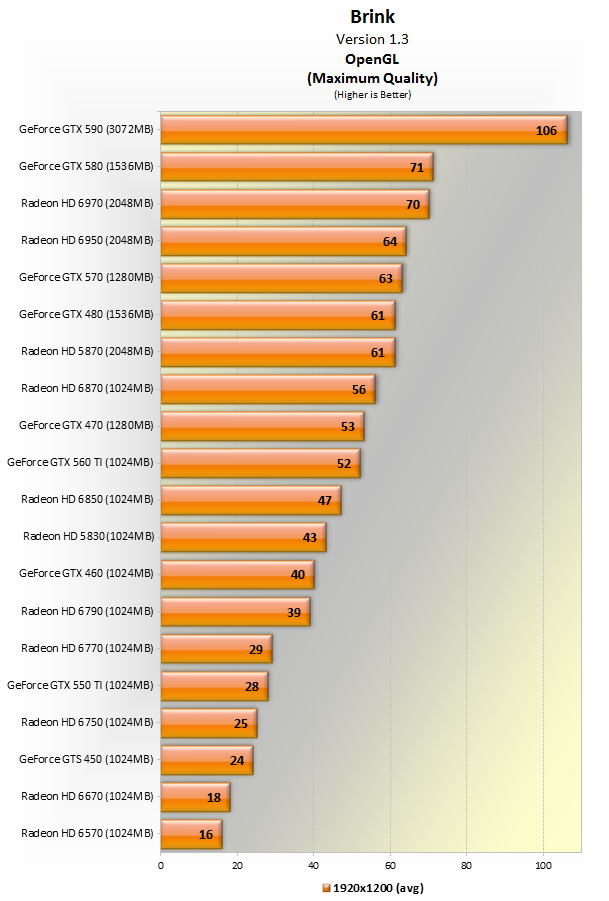
Using the almighty GeForce GTX 590, we measured the performance of our Core i7 (LGA1366) processor when clocked at 2.0GHz through to 3.8GHz in 600MHz increments. As the graph indicates, Brink appears to be predominantly GPU-dependent. Reducing the Core i7’s clock speed by almost 50% cut the average frame rate by a mere 3%


(Ghosty) #14

Not much difference between ATI and Nvidia tbh… or get a 500-600 € Nvidia card if you want to play Brink with a framerate of 100+ :wink:


(Jimmy James) #15

Yikes, what does version 1.1 and version 1.3 indicate? Is it patches for Brink? If so, the drop in frame rate is ridiculous with the new patch. What did they do to the game?

My wife and I both thought the game was a bit more choppy after the most recent patch.

-JJ


(Mustang) #16

What drop in frame rate?
One is a test to show how CPU effects performance the other is a test to show how GPU effects performance
All it shows is that a weak GPU will cause you more problems than a weak CPU


(Jimmy James) #17

[QUOTE=Mustang;345622]What drop in frame rate?
One is a test to show how CPU effects performance the other is a test to show how GPU effects performance
All it shows is that a weak GPU will cause you more problems than a weak CPU[/QUOTE]

Ah, sorry I was reading the charts wrong.

Thanks for the clarification,
JJ


(V F) #18

[QUOTE=Jimmy James;345412]Yikes, what does version 1.1 and version 1.3 indicate? Is it patches for Brink? If so, the drop in frame rate is ridiculous with the new patch. What did they do to the game?

My wife and I both thought the game was a bit more choppy after the most recent patch.

-JJ[/QUOTE]

This is the first I’ve ran into somewhat poorer framerate with this game after the latest patch.

Before this 20.xMB patch I was ranging 60 - 1xxfps everything enabled/checked within the game at 1920x1200 on two 5870’s. Usually always locked at 60 with vsync using Fraps 3.4.5. Now it seems to be always lingering around 45fps no matter what happens or hardly anything on screen. Disabling all the lovely image settings in game does not boost my framerate. It’s like I’m doing nothing to improve anything.

ATI fixed CrossFire for Brink nearly a month back. Everything was fantastic on 11.5b hotfix or whatever the last driver was right near the end of May with 11.5 CAP4. Now that I’ve updated to 11.6 with 11.6 CAP1 I’m still no better off. Nothing has improved. 45 - 50fps outdoors or indoors. Yet the giveaway both cards are generating very little heat with this new update for Brink. Before they use to generate a lot of heat but not to the same extent as I would get with Crysis 2.

Thats on a AMD 1090T about 3.8Ghz, Asus Crosshair IV Formula, 8GB DDR3, CrossFire 5870’s.


(Smoochy) #19

its a bloody ATI issue. i think people with i5 and i7 seem to suffer less, maybe more load is put to the CPU?

anyway, sent my 6970 back for testing and stuck my 8800gtx in. better fps, high texture and high shadows >30fps at all times and feels smoother. it plays better with a 5 year old gfx card using the same config!


(Smoochy) #20

get in!!! ATI card refunded! :slight_smile: nvidia here i come!!! :slight_smile: