Hi,
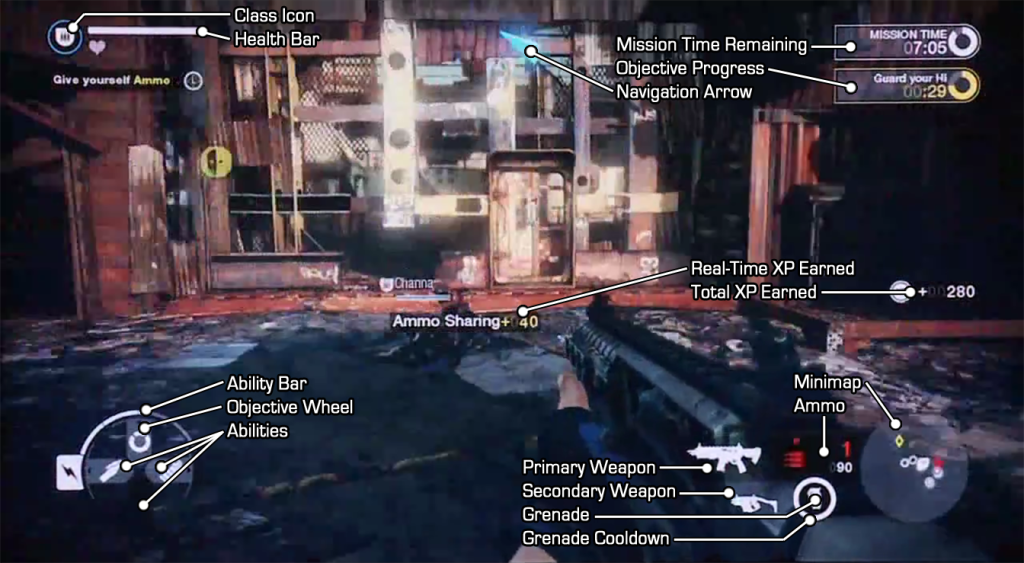
we´ve analyzed the actual ingame HUD from the latest build of Brink. Check it out -> http://www.ark-island.de/content.php?id=31
For all non german readers we´ve translated the whole description part in english. Feel free to post your opinions 

Healthbar:
The first bar shows your normal amount of life, which regenerates itself after a
while. The small bars behind the first, is additional life, granted by a medic
buff. They do not regenerate and can only be replenished by a medic.
Navigation Arrow:
The blue arrow points toward your current mission target.
Hit-Indicator:
Indicates that you have been shot. The bloodstains show, from which direction
you were shot.
Mission Time Remaining:
Displays remaining time, in which the primary goal has to be achieved, otherwise
the mission failer and in conclusion the match is lost.
Hacking/Construction in Progress:
This bar shows you the progress of your current mission goal.
You defeated Sweetman:
This announcement pops up after killing an enemy, informing you of your kill and
showing the name of the person you eliminated.
Real Time XP:
Shows the gained XP directly when you get it. If the whole group benefits from
your actions, the word “group” is displayed beside the amount of awarded XP.
Yellow Symbols:
Points toward a class-specific mission goal, that can only be executed by the
chosen class( in this case hacking). The chinese symbol points towards the
nearest command post, where you can change your class and equipment.
Grenade Indicator:
Points towards an enemy grenade being close to you. The arrow points in the
exact direction.
Ability Bar:
The so called Pips are used to activate special abilities like healing, throwing
grenades or buffing a weapon. The amount of pips you have is linked with your
choice in bodytype. The regenerate over time.
Abilities:
Here you can see the images of your Abilities. You can “equip” up to three at
the same time.
Character Class:
In the centre of the Circle, your current class is displayed. Around the
classicon arranged are, your three abilities and the obejctive wheel. If they
are on cooldown, they will be displayed with a gray background.
S.M.A.R.T.-Mode:
Shows, whether or not you activated the S.M.A.R.T-mode, in other words, whether
you are running or not.
Grenades:
Displays the amount and kind of grenades you carry.
Primary/Secondary Weapon:
Your current Primary and Secondary weapons
Ammo:
The ammount of remaining shots in your magazine and the amount of ammo you have
in reserve.
Radar:
Displays spotted enemies near you for a short time. Enemies are red, allies
white. Class-specific targets will be displayed in yellow.
btw: The fragged guy on this screenshot is Chris Sweetman, the Audio Director at Splash Damage, thanks for your blood