
i know hummer fixed his hunkmeg problem by fiddling around with models but my models are already misc_gamemodles so that wont work for me (ive only got a few anyway). are there any other ways of reducing the size of the bsp. mine is currently 22mb and i have not even finished yet. i think i might have been a bit over ambitoius with my map as i seem to hit every built in limit of the quake 3 engine so far and it’s becoming depressing if i can’t get the hunkmeg thing sorted out without comprising the look of the map then i might scrap it and start something alot more simple. well maybe just make everything in the map smaller and more simple but it will take the same time to do this then start from fresh :banghead: . so any suggestions would be very welcome
hunkmegs
Are you sure it’s hitting the hunkmegs limit?
22 megs isn’t hugely over the top I’d have thought?
Remember that PK3 files are compressed, so while you may compare your .bsp to other maps, make sure you are doing it fair!
If you are using lots of custom audio and textures too (and / or high lightmap resolutions) then yep, you’ll most likely have problems, but a large BSP file alone won’t necessarily mean problems.
im not using any custom audio, i do have a dozen or so custom textures but not a huge amount. What i do have a lot of is patches and bevels. However i tried making a lot of them out of brushes then i kept getting other errors. What do you mean by high light map resolution, maybe i can fiddle with that if i knew what it was?
What do you mean by high light map resolution, maybe i can fiddle with that if i knew what it was?
Light maps are external to the BSP but they do affect the overall size of the map in memory. You can specify where you have lightmaps by using the special shader in common. Lightgrid I think, ydnar’s q3map2 forum is the best place to ask about it.
One thing you can do to reduce the size of the BSP is by deleting and simplify brushwork/paches in your map. I know it is a crap process but it is something worth learning. There was plenty of times in the development of ET where maps had to be reduced down in detail because they got too big. Its not an easy job as you are effectively de-constructing but its a process than needs to be done.
The golden rules are as follows:
-
Can the player see the brushwork/patch in game? … no, then delete it.
-
Can the brushwork/patch shape be made from a simplier shape and a texture used instead for detail? … delete and replace with a texture.
-
Reduce the unique planes by making brushes/patches share the same plane. Less unique angles basically.
-
Reduce t-junctions by moving brushwork off alignment with each other. An example is in Oasis in the Axis garrison, the castle like tops of the structures do not meet the top edges of the building. This stops the extra brushwork splitting the top of the building into a million more triangles.
-
Use textures for details which appear in a lot of places.
-
Finally if something is in shadow and cannot be seen easily then delete it. Something in shadow is generally a waste of time because the angles are lost in the darkness, always use your poly’s wisely.
Hope that helps.
Sock
:moo:
I quartered my terrain by reducing the subdivisions (64x64 to 32x32) - which ended up reducing my .map size by 30% or more, and reducing my bsp size by a few megs. So if you have a large terrain map, you can always reduce its size as well. In my map, you can barely tell the difference either.
- Reduce t-junctions by moving brushwork off alignment with each other. An example is in Oasis in the Axis garrison, the castle like tops of the structures do not meet the top edges of the building. This stops the extra brushwork splitting the top of the building into a million more triangles.
Im not exactly sure what you mean by this? You mean from the overhead view looking down, the edges of the structures dont quite touch the edge of the building?
But doesnt that create more tri’s on the top face of the building?
Could you please explain this just a bit more? Im trying hard to reduce bsp size as well, and this seems like it could be greatly beneficial to me.
If you have two brushes that meet at an edge, compiling creates new vertices and faces so they meet where they touch ‘properly’ (this avoids sparklies).
But the extra vertices and faces created can add up quickly.
Offsetting them slightly (even by 1 unit) prevents them meeting at an edge and prevents the creation of new bits, thereby preventing your BSP increasing.
I think this is what sock means:
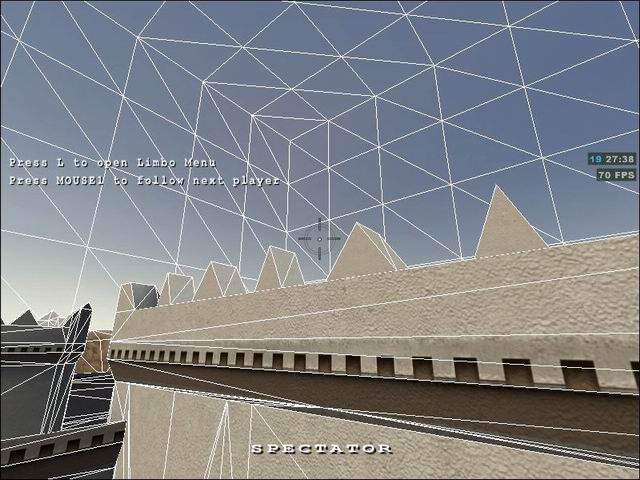
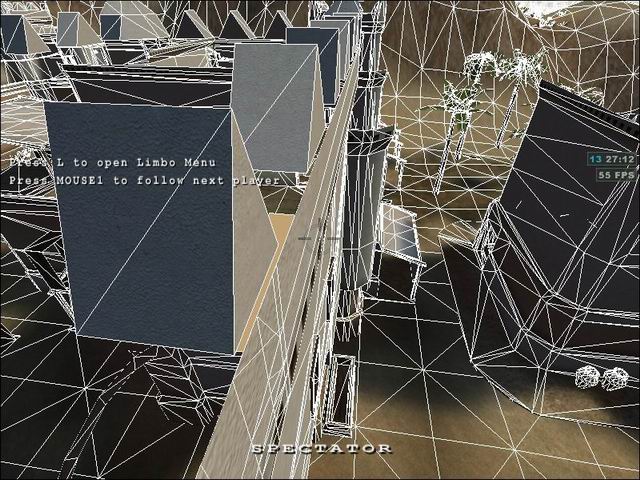
As you can see the brush at the corner has created an extra vertex where the brush meets the roof.
However by the crosshair the trianbled brush, has been moved so it does cause splits in the top brush.
A picture paints a thousand words 
Must be hard on the dyslexics seeing the above images then, but for the rest of us the above is much clearer than my techy description!
thanks for the info fellas. What you’re saying is that i anally spend hours making all my brushes line up in a very neat and orderly fashoin but this is the wrong way to do things and i should move them a bit? or am i still confused. can i shift lots of brushes by say 1 unit so that they no long line up and that will help my map.
thanks for the info fellas. What you’re saying is that i anally spend hours making all my brushes line up in a very neat and orderly fashoin but this is the wrong way to do things and i should move them a bit? or am i still confused. can i shift lots of brushes by say 1 unit so that they no long line up and that will help my map
Anal mapping is ok for some things but often when you need to push the map limits you need to break the rules. Creating perfect editor brushwork can sometimes create game engine triangle nightmares. Its always a trade off between performance, sparklies and over draw and sometimes when you need the polys something has to give and t-juntions is the first one to attack with simply tricks.
The t-junction trick can be usefull in plenty of situations with brushwork but you have to be careful with patches because they can cause sparklies and they are easy to see with a little “r_clear 1” fun. A classic examples is brushwork which meets floors and is raised off the floor by 1 map unit so it does not split the floor triangles. This method was used a lot before “detail” brushes came into existance with Q3 engines and everything was split up by the compiler. If the gap is smaller enough and lit correctly the player will never know the difference.
Sock
:moo: