
Help with lightning


(Nightcrawl) #1

Hello there, as this is my first post ever on this forum, I’d first of all say hi to all of you, you seem like a bunch of nice people :slight_smile:

And now to my problem!
As I am pretty new to play around with shaders and skies and such, I’d love to get some help. So far I’ve got my map running the way I want with scripts and all that.

With that big problem solved (it was a damn lot of hard work to figure out, being a newbie in that area :P) I’ve chosen to go on with next problem - the evil shaders.

I’ve found a skybox and gotten it in to the game and it works as it is supposed to, I guess. Atleast from what you could expect from what I’ve done so far (which isn’t very much).

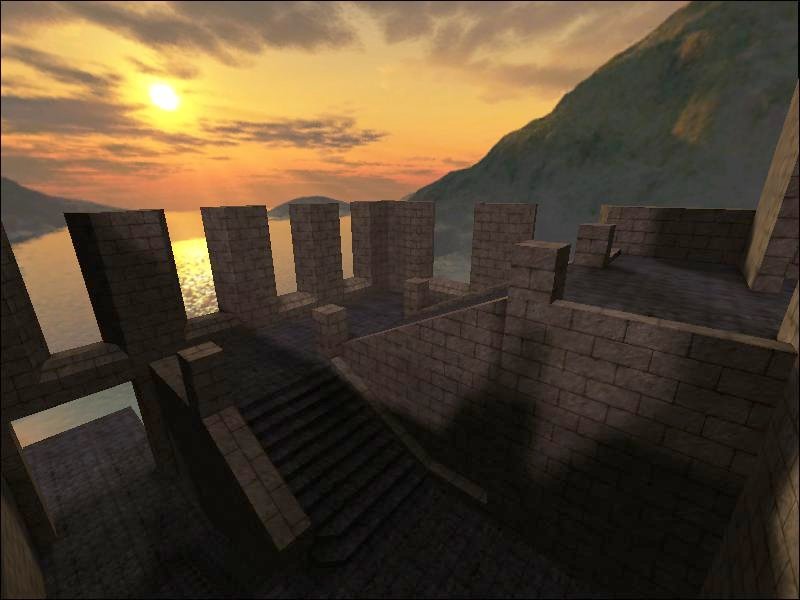
I’ll post a picture of the problem:

As you might see in that screenshot, the shadows doesn’t look they way it should. It seems as if the sun is shining from that corner, kinda. I figure that out from looking at the ground shadows and the “walls” of the map. But the “brick” textures doesn’t seem to be affected by this. And that’s where my (main) problem lies.

I suppose I’ve done something wrong, or not done enough. However I do not know what to do or not to do about it and that’s why i choose to make this thread.

Probably, there are some tutorials about this. But I’ve been looking around, done some searches but haven’t been very successfull. So if there are any, please point me in the right direction :slight_smile:

I’d appreciate any help available. If there is something you may need to know of my map or shaderfiles, don’t hesitate to ask.

Thanks in advance

/Nightcrawl

(MrLego) #2

You should eliminate the sidewalls - make them all sky textures. Right now it looks like they are blocking the light that your sky should be emitting.

Below is a screenshot of something I am working on using a skyportal and skybox textures. There are currently no light entities in this map yet - all of the lighting is coming from the skybox shader. This is an early screenshot from last November so much of it has changed. This skybox also has a setting sun AND a rising moon, so there are two distinct sets of shadows from different angles.

If you want a working skybox with shader then you can download some nice skyboxes at Sock’s :cow: website http://planetquake.com/simland/pages/materials.htm

They are complete and ready to go. You can adjust the angle, color, intensity and direction all within the shader.

I hope this is helpful.

EDIT: Screenshot moved.


(Nightcrawl) #3

Thanks for the help. I tried lowering the walls, almost to “walk height” and added some area around it, just to make it not look too awkward, but it still was the same result. It seems as if the brick textures are always “fullbright” (i think that’s the word atleast), they doesn’t seem to be effected by the skylight and I’ve tried several different angles and skyboxes. But still the same problem.

Are there anything that I might add into the shaderfiles of these textures?

edit: a picture of what it looks like in gtk:


(seven_dc) #4

I think you need lightmap stage in you shader.
like:


  {
      map $lightmap
      blendFunc GL_DST_COLOR GL_ZERO
   } 


Asian Cam


(iistrust) #5

As we’re on the topic of skys (sortof) is there ne way to create skyboxs like UT which you can add objects too?


(Nightcrawl) #6

seven_dc: I added those to my shaders, and it all became transparent? I could see through all the walls…

Anyone else have any ideas?

edit: I think I’ve figured out the problem, I had some odd settings in the shaderfile which shouldn’t be there.

Thanks for the help tho :slight_smile: