Hacienda_a1 & a2


(ChimTea) #1

Hi,

Since I just saw the topic made by Mateos, And how all you guys here helped him out quite far.

I brought the idea to post mine to. I made an alpha version and working on the beta one.

First up Alpha

Complete pack
Hacienda a1.pk3

map source file

Hacienda a1.map

screen shots from a while ago can be found here

Beta

Hacienda a2.pk3

map source

Hacienda a2.map

The first version was, according to many people way to big. So I already touched that part. The objective was to easy, so I’m working out an idea. Maybe some parts of the map are way to flat and obvious so that its to easy to camp. But I hope you guys have some suggestions :wink:


(KeMoN) #2

Hey

First of all both your .pk3’s contain the hacienda version a1.
#1 This communication cable just ends…doesn’t make sense
#2 The light has no “source” such as a lightbuld etc.
#3 visible caulk or missing brushwork
#4 see #2
#5 see #1
#6 see #1
#7 this red thing showing the gold go-to-position isn’t red
#8 see #2

I got to admit that I also forgot to always add light sources to the light entities but it really looks weird when there is a light circle without source.

I haven’t played the map online with others but in local testing it seemed to be quite easy for the allies to get to the bank. Maybe you should add a tank which blows the “bank” so it takes more time for the allies. Just a suggestion.

EDIT: These suggestions and bug-reports belong to version number a1 because there was no version number a2 in the pk3!

regards


(Tardis) #3

You might want to re - think your sky box as well as dark clouds in a desert map do not make any sence.

P.S - Some of your links on your web site are broken :frowning:


(ChimTea) #4

Ehm, the reason because the a1 version is in a2.pk3 is because I didn’t update that yet.

But the textures, models are kind of the same. Just added some models. That’s one

2#
Light source? You mean like targeting? Or just a model with light shader

3#

If your talking about a2, its not done or released yet.

8# In-game it’s red don’t worry

@tardis

Well I want a darker map, but you’re right. I’ll see it through

website related, I’m working on it


(stealth6) #5

As already said the lights are strange, there is just light, but it comes from nowhere. You need to add a model of a light or some kind of logical light source.

The whole layout of the map is wrong in the a1 version. It looks like you tried to make some kind of open world, you just dump the players in and they have to figure it out.

Try to change the layout so you guide the player. I took a small look at the source for a2 and that looks a bit better.
You have to design the map so that you have larger areas connected with smaller walkways / roads, you can’t just make everything open.

The texture on the terrain is too repetitive, in other words the texture is too tiled, the pattern is too frequent and you can see it. (Especially as a spectator)

Most of the map lacks detail, houses with no doors or windows, no boxes, trucks,…

The doors in the allied spawn are like space doors… wtf? :smiley: They also don’t make any sound.
The last axis spawn is too close to the gold. Don’t move it further away from the allied spawn / drop off point though, move it sideways (hope you understand).
It would be better if this was an escort-able truck map and I thought it was at first when I saw the truck at the allied spawn.
The icon for the gold drop off point makes no sense.
The hole in the floor hat goes into the river / sewer is really strange, you put ladders on all the sides, which makes it hard to get down and it is also not clear that the player can climb there maybe remove the “ladders” add a REAL ladder made from brushwork and use that instead.

Most of the buildings look too blocky and most don’t even have a nice roof… and the ones that have a roof the roof is way too flat. I instantly thought you did this to let people walk on them… This is a sucky idea imo (just my opinion) Preferably add a balcony and make the roofs steeper, this will looks nicer and if people still want to walk on the roofs so be it.

Also the roofs on the church are again too “blocky” most roof in real life have an overhang, you did do this on another building, but there the overhang was too small
with overhang I mean this:
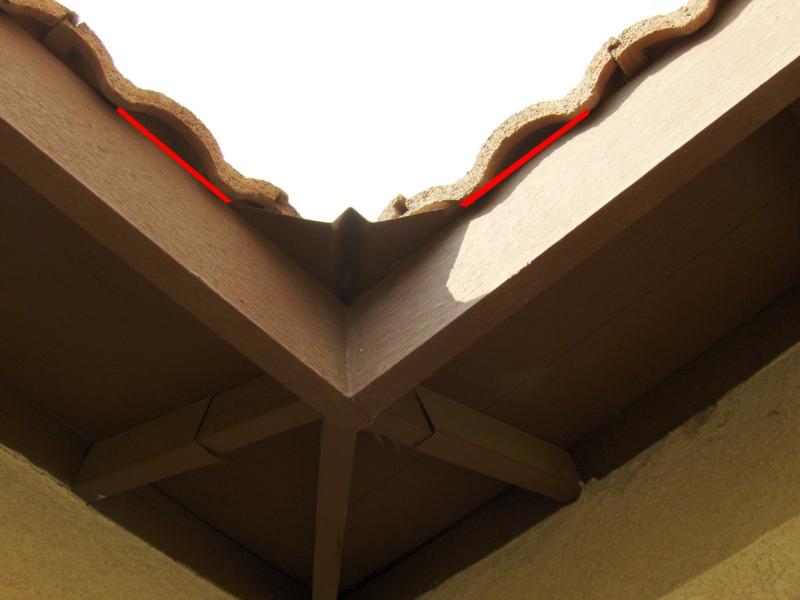
Hopefully that gives you a better idea.

As for gameplay, in it’s current state I don’t think this map is ready for a play through.

^ This may seem harsh, but hope it helps.

EDIT: btw the skybox looks fine if you just make it look less like a desert :stuck_out_tongue:
To achieve this effect try to change the edges of the map, now they end in open terrain, close some of it up with houses and it’ll look good imo.

Or you could change the skybox to a night sky, then you still have a dark atmosphere and a desert type map. You can then block players at the edge of the map with big rocks / boulders


(ChimTea) #6

These tips are really useful. I just needed that.

I had a basic idea about the map. But I didn’t have anything in mind for details. I wanted to get some response from players when I released hacienda a1.

And about the terrain, I was planning to put grass, so I’ll drop sand_disturb_desert sand_disturb, sand_dirt_medium, sand_bubbles_bright, and move on with the pavements. I was aware of the terrain looking to damn ugly :smiley:

But that’s the problem with pcx I guess. I’ll try optimizing it


(Mateos) #7

Any news?

I see you speak about .pcx… How do you find the .pcx size? I mean, for exemple, your map is 2048x2048, what’s the correspondant .pcx dimensions? How to bind a color to a texture, and make the .map understand it?

Well, EasyGen can do it… But I would like to know how it works :slight_smile: A bit offtopic but could be fine for some mappers to know?


(ChimTea) #8

Well,

I made the pcx with easygen. It’s just a square image. the colors stand for a layer in a shader. so you have a base layer with a colour to it like yellow(terrain_0)
then some others like blue & red. They stand for terrain _1 & _2, and then you have the blending between _0 and _1 called terrain_0to1
and it will need the texture you set for terrain_0 for example some sand,
map textures/mp_hacienda/sand_bubbles_bright.tga
and the terrain_01
map textures/mp_hacienda/sand_dirt_medium.tga

_0to1 will look like


textures/mp_hacienda/terrain_0to1
{
	surfaceparm gravelsteps
	surfaceparm landmine
	surfaceparm nolightmap
	q3map_novertexshadows
	q3map_forcesunlight
	{
		map textures/mp_hacienda/sand_bubbles_bright.tga
		rgbGen vertex
		alphaGen vertex
		tcmod scale 0.250 0.250
	}
	{
		map textures/mp_hacienda/sand_dirt_medium.tga
		rgbGen vertex
		alphaGen vertex
		tcmod scale 0.250 0.250
		blendFunc GL_SRC_ALPHA GL_ONE_MINUS_SRC_ALPHA
	}
}

then you need to put it in your map, you just create some terrain by using triangles.

  • Make it detail (ctrl + m)
  • Set entity func_group to it and add these entities depending on shader:

“classname” “func_group”
“terrain” “1” (dunno what this is for thou)
“layers” “3” (amount of layers _0 _1 _2) means 3 layers
“alphamap” “hacienda.pcx” (the pcx file, placed in etmain)
“shader” “mp_hacienda/terrain2” which path you intend to use for your terrain ( you could have some other terrain in a map, like mp_hacienda/terrain)


(Mateos) #9

But how a colour is bound to a shader in this system? Is it the shader value of the func_group? Will check it, if there’s different shader value depending on the surface color of .pcx in the .map…

And you have a square .pcx because you have a square map. I guess a pixel of the .pcx is 2 triangles making a square in the .map, for pixel calculation.


(ChimTea) #10

I think the pcx starts calculating from the middle of the func group. So if you don’t have a square terrain it will still be correct.


(stealth6) #11

EDIT: Hmm I think you’re right afterall, anyway here is what I’ve tried in the past:

One time I tried deleting parts of a terrain generated by easygen, you have to leave at least 1 piece on each corner or edge, I tried deleting a whole row (from the edge), but then the pcx image also moves 1 row, but if you delete the corners, like a diagonal piece then the pcx stays the same.


Anyway I don’t really understand the question, but maybe this helps. :smiley:


(Mateos) #12

There’s just two things I would like to known, and sorry sxweet to get your thread offtopic:

  • How to convert .map dimensions to .pcx one, square map -> square pcx, let’s say triangle map -> triangle pcx, but the lnik between both dimensions?
  • How to assign manually to a color of the .pcx a texture, yes there’s a shader… But how it knows that terrain_1, which is defined on a texture, is bound to this very color? And why not another?