
Getting a bounding box display for triggers


(Chruker) #1

Hi

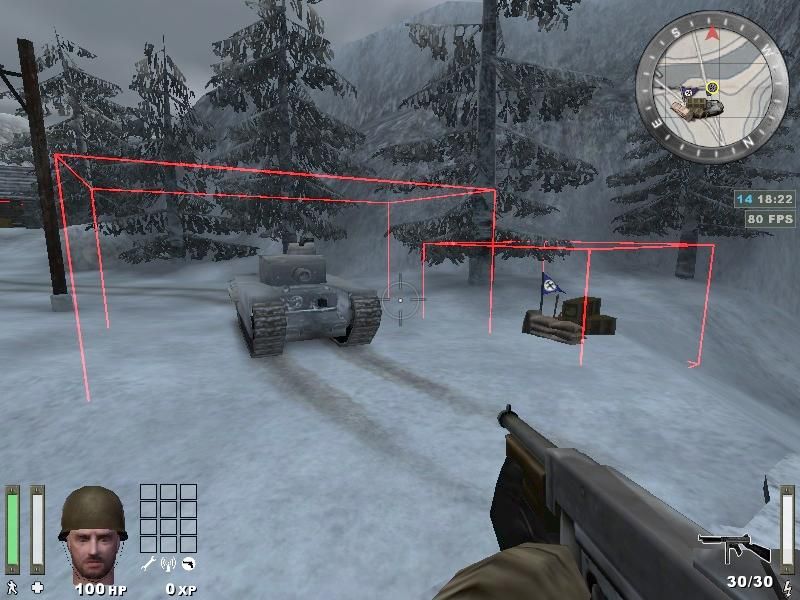
I have been messing around with getting a bounding box displayed where ever there is a trigger. Ideally I want it to be used for tracking moving triggers like for a tank.

I got this bit of code:


	// CHRUKER: Attempting to display bounding box continously
	if (1==1) {
		gentity_t *bboxEnt;
		vec3_t b1, b2;
		VectorCopy(attacker->r.currentOrigin, b1);
		VectorCopy(attacker->r.currentOrigin, b2);
		VectorAdd(b1, attacker->r.mins, b1);
		VectorAdd(b2, attacker->r.maxs, b2);
		bboxEnt = G_TempEntity( b1, EV_RAILTRAIL );
		VectorCopy(b2, bboxEnt->s.origin2);
		bboxEnt->s.dmgFlags = 1;
	}

Which I can insert and have a bounding box displayed. I just need to change attacker to what ever the variable that contains the entity. However I’m not sure where to put it, so it gets updated continously.

I have gotten my own players bounding box displayed each time I fire my gun, by inserting the code in the Bullet_fire_extended function, and I got the trigger zone bounding box displayed for a tank, by putting it in the Multi_wait function in g_trigger.

They both sort of work, but I wonder if any of you guys have a hint on where to insert it.

([RW]FRED) #2

Becarefull such code can get u a message that u don’t have free entity. In fact for each frame u will use all remainded free entities with an excessive use of G_TempEntity.


(Rain) #3

Look at the VISIBLE_TRIGGERS defines cgame…


(Chruker) #4

Funny had taken a look at those once, but for some reason I couldn’t get anything to be displayed. Anyway, it worked now:

Now on to make a cvar to turn it on and off.


(nUllSkillZ) #5

Nice work!


(Chruker) #6

A nice work on the alpha version of your tutorial. Using it and one of the tutorials you linked to, I have made a cvar which turns it on and off.

On another matter. I just spend a couple of hours hunting down a bug, which caused the crosshair tank info hint to not be displayed. After having tried various older versions of my mod, I finally tried compiling the original unmodified SDK. However the crosshair info still wouldn’t show. Then I realized that perhaps the apropriate cvar had been turned off… and yep, it had :banghead:


(Chruker) #7

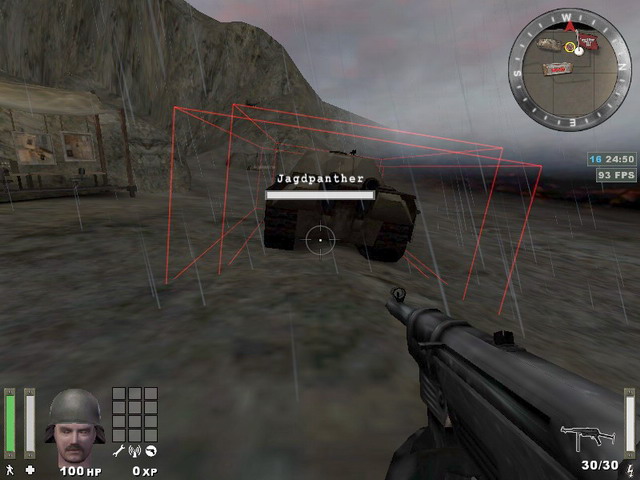
Ahh, found an error. The triggers doesn’t rotate. :frowning: I remember seeing something similar in another post about the players bounding box.

(bani) #8

bounding boxes in q3/et are always axis aligned.


(No1_sonuk) #9

If you only want it for map development, wouldn’t it be simpler to modify the shaders so that they are drawn semi-transparent?


(Chruker) #10

I would love to see an example shader of that.


(Chruker) #11

Regarding the shaders. I have just tried again, and couldn’t seem to get it to work. q3map2 seems to eat anything visible when it sees its a trigger.

Anyway, continue on the mod part of this. Despite all the vector math I have forgotten I finally managed to find some function which did what I wanted. Here is the bbox’es rotated according to the cent->lerpAngles values. This is a screenshot from Helmsdeep:

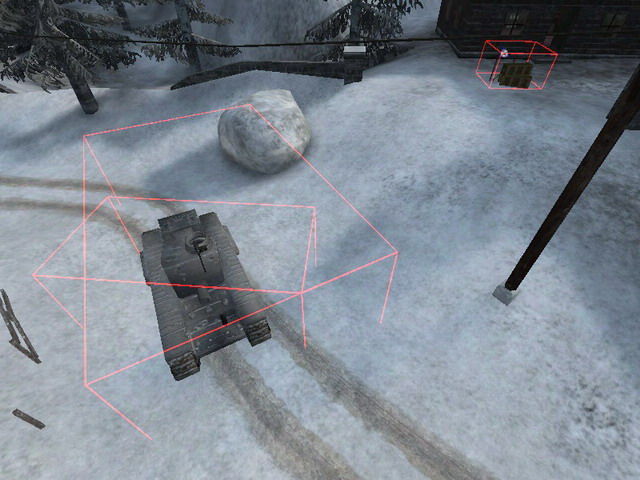
However only the trigger multiple’s seems to be updated as the direction of their tag changes. TOI only changes their position. Which is visible here:

And the TOI is indeed this way. I could stand in the corner of the small rectangle and see the ‘You are near…’ text. So the TOI gets axis aligned, but trigger_multiples changes its direction.


(TFate) #12

Very interesting. :slight_smile:

So what would these bounding boxes be used for? I imagine they could somehow help things like bots track moving entities… but of course, I know nothing about how ET’s source works. Could these boxes be used as bot waypoints somehow?


(Chruker) #13

I think bots already uses them, to know where the objectives are in a map. However as bot waypoints, I don’t think they can be of much use.

However, personally I would use the ability to see these triggers as a debugging tool during my mapping. Ex. if you have some script_mover you just can’t get to work properly and you’re not sure where on the map the trigger has jumped to.