
FaceAngles / Setrotation doorfall


(nikita) #1

Hey,

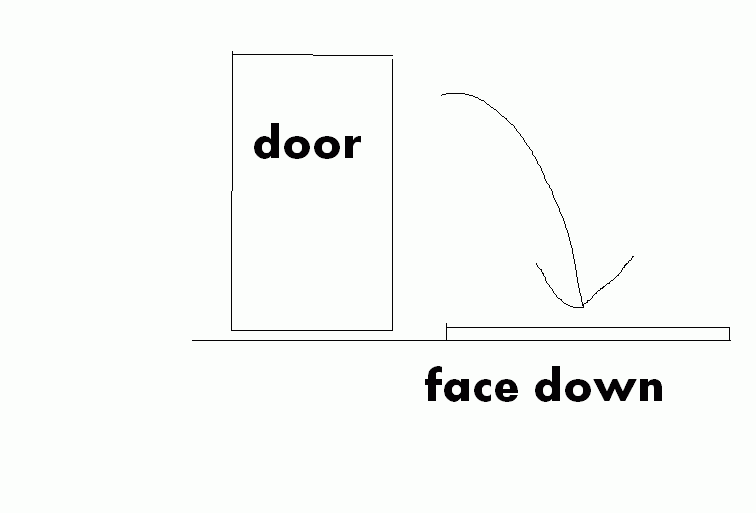
I am trying to fake a door falling
i am using the door as a script_mover, fellowing by 3 path_corners
that go slightly toward the floor, however it working fine it just the door does fellow the path and does fall on the floor but with a STANDING angles
i wish to make the door hit the floor with lay down angle…
maybe a quick scatch will show better what i am trying to acomplish

(nUllSkillZ) #2

There’s a func_rotating entity.
I haven’t worked with it yet.
But you could have a look.


(Darkfrost) #3

Nope, func_rotating will only go rotate in 1 direction

He wants his to rotate in 2… if i see that right

His door starts like this:
[]
Then he wants it to end up like this:
_
But its just going on its side… right?
[_]


(nikita) #4

yep but how do we solve that pickle :D?


(carnage) #5

can you post your script so far please?

by the sound of it if your door isnt changing angles your not using the right script commands or there is some error in your angles


(TNR360) #6

you could try a func_explosive with a 300 mass size with targeted door static on ground

the 300 mass size will block the dissapearing and reapearing door


(nikita) #7


activedoor
{
	spawn
	{
	wait 3000
	}
	trigger door_go
	{
	accum 1 abort_if_equal 1 // Will abort script if shooter is active (i.e. 1 = Yes). 
        accum 1 set 1 // Accum 1 is temporarely set to 1.
	wait 200
	trigger doorbreak1 godown
	}
}

doorbreak1
{
	spawn
	{
	wait 200
	}
	trigger doorshow
	{
	wait 300
	gotomarker doorpath1 1200 wait
	}
	trigger godown
	{
	stopsound
	setrotation 0 0 180
//	gotomarker doorpath2 120 wait
	setrotation 0 0 90
	gotomarker doorpath3 120 wait
	alertentity proper
	setstate doorbreak1 invisible
	setstate doorfake1 default
	}
}


(kamikazee) #8

Ever heard of the faceangles script command? It does something similir like gotomarker but with angles instead.

So you’d just make sure that the origin of your door is the right pivot point, then put this in the door’s script block:

faceangles 0 0 -90 700 accel

(You may need to place the “-90” value in the first or second place though, it depends on which way your door is facing by default. Try it and you’ll see if it’s right.) The timing might need fixing too, if you want to make sure the falling speed compared to the door’s weight matches.

Check Chruker’s gamecorner: W:ET scripting reference for the correct syntax of this and other commands.

EDIT: Oops, seems you heard of it according to the thread’s title… Didn’t it work then?


(carnage) #9

just had a quick look so dont expect this to be perfect but looking at the angles you are setting the door to rotate only on one axis

by looking at your diagram it seems you want the door to rotate 90 degreese roatation on the same axis as if it was on the door hindge and another 90 degreese on the axis paralel to the door bottom so it will lie flat to the ground

havent scripted for a while but im gessing the angles go in the order of X Y Z so you only seem to be altering the Z axis (looking stright down) this would explain why your door always finishes in the standing up position

as kam says this depends depending if your door beigns alighned to the X or Y axis to begin with

@ kam. I though that faceangles did something similar to set rotation not gotomarker. faceangles should be used with gotomarker to give the illusion on roation and movement at the same time


(nikita) #10

works, thank you :slight_smile:

@ car


gotomarker doorpath3 420 wait
	faceangles 0 0 90 700 accel

else only the origin postion (the center of the door) will be flat, and then the door will still fly in the middle :slight_smile:
so we use gotomarker, to set the door into a lower posotion on the floor
and faceangles like you said, to face it to the floor