
custom hint icon


(eiM) #1

Hello dear readers,

in my newest mapping project I want to add a custom hint icon to a func_invisible_user. I read and saw that in Warbell there is some kind of a custom hint icon which is added with a remapshader.

Unfortunately I have never ever used a remapshader command before so I have no clue on how to use that. At the moment my script looks like this:

remapshader gfx/2d/usableHint gfx/2d/waterHint
remapshaderflush

I wanted to test it by exchanging the use hint by the water hin icon of etmain. Though this does not seem to work. Any ideas what I did wrong within the script or can’t I change the hint icons of func_invisible_users ? Of which can I do it then?

best regards,
eiM


(ailmanki) #2

unsure, as its only a lower/upper Case thingy which I suspect
Also I don’t know if you tried to repalce the source texture or the shader… looks like you tried to replace the texture.

In any case, you need to change the shader, not the texture. And the shader is in lowercase…

gfx/2d/usablehint
{
	nomipmaps
	nopicmip
	{
		map gfx/2d/usableHint.tga
		blendFunc GL_SRC_ALPHA GL_ONE_MINUS_SRC_ALPHA
		rgbGen vertex
	}
}

gfx/2d/waterhint
{
	nomipmaps
	nopicmip
	{
		map gfx/2d/waterhint.tga
		blendFunc GL_SRC_ALPHA GL_ONE_MINUS_SRC_ALPHA
		rgbGen vertex
	}
}

(eiM) #3

hm made both lower case and still no change. So this is not the mistake


(ailmanki) #4

I tried same with the doorhint, and it did not work at first…
then I tried with doorrotatehint, and it worked…

What I basically mean is, you need to find the correct image to replace… the name is probably a bit missleading.

and the usablehint.tga is used by a ton of shaders… might be any of them.


(eiM) #5

oh yeah, I now have these:

  remapshader gfx/2d/buttonhint gfx/2d/waterhint
  remapshader gfx/2d/holdablehint gfx/2d/waterhint
  remapshader gfx/2d/secrethint gfx/2d/waterhint
  remapshader gfx/2d/usablehint gfx/2d/waterhint
  remapshaderflush

and it shows the waterhint!

gonna check whiich of those it actually changes… edit incoming

edit:
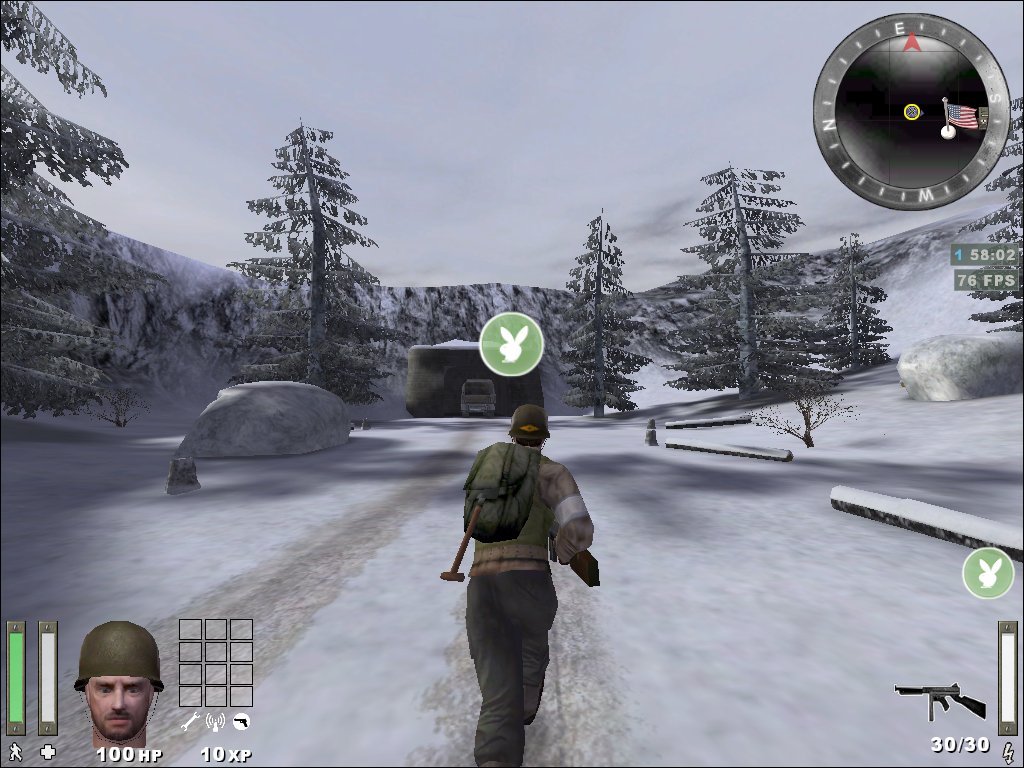
okay, func_invisible_user uses the gfx/2d/buttonhint … somehow understandable :stuck_out_tongue: I now get to see the waterhint icon. It is not working with all hint-shaders so I’ll hvae to check if it is really possible to add a custom hint via shader. WIll keep you up2date

(ailmanki) #6

http://games.chruker.dk/enemy_territory/entities.php?action=show_entity&entity_name=func_invisible_user

according to that, you can set any hint type you like…


(eiM) #7

well prolly I test that out if I have some spare time :stuck_out_tongue: but up to now its all working very nice and I use HINT_BUTTON for my covert only icon and HINT_CHAIR for all the other classes (2different func_invisible_users set visible/invisible by several trigger_multiple)


(Pande) #8

Good tutorial on shader remapping: http://www.map-craft.com/modules.php?name=DLtoTUT&op=TMCgetit&lid=313


(MrLego) #9

If you are using a mod you may need to include your hint icon shader in a pk3 file and install it on the server.

In one of my maps the remapped shader would not work under ETPro unless it was included in the etpro/mapscripts folder - it worked fine on stock ET.

Here’s what the objective carrier’s icon looks like. :smiley:


(-SSF-Sage) #10

[QUOTE=eiM;184186]
in my newest mapping project I want to add a custom hint icon to a func_invisible_user. I read and saw that in Warbell there is some kind of a custom hint icon which is added with a remapshader.[/QUOTE]

@MrLego:

It was not about sprite icons, it was about hint icons used with buttons, dynos etc.

For a sprite you don’t need to use map scripting. Ofc it should work with remapshader, but it would be map specific then.