crazy light


(blizzard) #1

hello

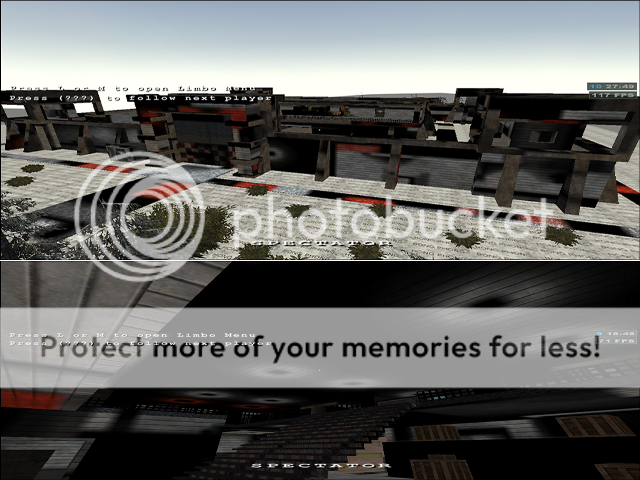
i can’t fix a problem with strange light all over the place
I’ve made some screenshots so you can see it by yourself

Explore Jurgen Kieboom

someone told me before that it has got something to do with compile but i’ve made this topic for more explaining because i still don’t understand.

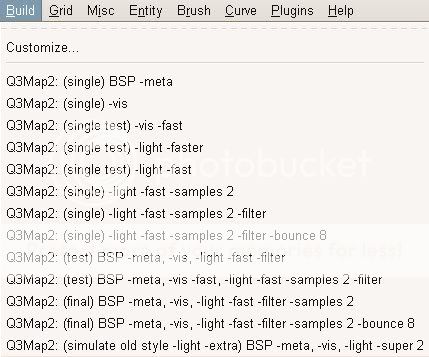
the options that i can choose to compile are these

Explore Jurgen Kieboom

plz help me
thx


(blizzard) #2

b.t.w. if i compile with the Q3map2 (single) BSP -meta I will get no strange light anymore but the shadows are all gone.


(Qualmi) #3

do this error occur when you play a already finished and packed pk3 of your map or is this error occuring in your testenvironment too ? i can remember that i once forgot some files in my pk3 as i tested it and there suddenly was strange light in my map too. but yours look a bit different than mine. my lights have been squared or rectangled.

edit: just to let you know. -meta will not compile any lights in your map. this is why there are no shadwos.

edit2: ofc then you could say your map must be completly dark, but you know what i mean :wink:


(stealth6) #4

lights actually look normal to me, I think you mean they don’t look how you want them to look (like other maps). You need to change the radius on the lights/ add more lights / add some ambient


(blizzard) #5

it’s a complet pk3 package

and stealth6 i don’t think you right cuz i don’t have any light in my map
before i had red lights in each prison and some red lights in the wall but i delete them and 1 time i moved my whole map a couple of grids. i compiled the map and the red light and some white lights are all over the place, they are not really light but light textures with a light shader. but i delete them all and they are still there. i’m not sure about all this but there is a opportunity that i’m right cuz as you can see at the second picture by the problem there are some sqaured shadows with light around it that looks like a light that i used before, that’s why.

qualmi i don’t know what your lights had looked like but it could be the same problem
and what means ofc
you said you forgot some files in your pk3
the things i know about the ligths in a pk3: 1the bsp is telling something about the light 2 files like scripts arena and lvlshots doesn’t say anything about the lights in your map 3 i’m not sure but what the Im_0000 .etc files for?
and if it’s true what i just said it has something to do with the compiling.
if i’m wrong what else must it be?

plz help again
thx


(Qualmi) #6

ofc just means ofcourse :slight_smile:

concerning the lightproblem…i only can tell you what i did wrong. it had sth to do with the lm-files youve mentioned. to make everything sure: dont compile with -meta for your release. always choose -light options. then, if you package your .pk3, just inlclude those lm-files in the right place. i once forgot them and this caused some weird light effects in my map f.i. squared shadows at the ceiling. would be nice to know what exactly those files do. cant say anything about that. just include them and see if it works.


(stealth6) #7

you have to include those lm_0000 files.
Sounds like you moved you whole map, removed some lights and the recompiled?
Then when you played it again the lights were all messed up. Maybe you didn’t use the right compile options
The first compile
Q3Map2: (single) BSP -meta // This compile only redraws brushes (no lights or visblock)
Q3Map2: (single) -vis // Only compiles vis block (no lights or new/changed brushes)
Q3Map2: (single test) -light -fast // Only compiles changes to the lights, no brushes or vis block

So if you know that then you might know what you maybe did wrong?
you can combine 2 compiles first do
Q3Map2: (single) BSP -meta
then
Q3Map2: (single test) -light -fast
This will first compile the changes you made to the brushes then it will redraw the lights

This is just a quick way to maybe fix the lights, the other compile options take alot longer, but then the lights
look more realistic, also I didn’t include -vis, cause this is for optimizing your map and you don’t really need it for quick testing, only for the final versions

(kamikazee) #8

Maybe it’s all of the above, but maybe you have both a pk3’ed version and an in-progress version of your map sitting in your mapping environment. This would mean that you are still playing the old version without knowing it.

Also, if you moved your map, did you do a full BSP -meta, -vis and -light compile cycle? Merely running -light again will not work if you moved your map contents.


(blizzard) #9

ok i will try it
another question if i want do a final compiling witch options are important to compile (in the build menu)


(blizzard) #10

I’ve fix the problem
i am now going to explain the problem:
I import the Im files in the /maps directory but it must be /maps/(your mapname, directory)

when i read this by qualmi
always choose -light options. then, if you package your .pk3, just inlclude those lm-files in the right place. i once forgot them and this caused some weird light effects in my map f.i. squared shadows at the ceiling.
i thought maybe i’ve don’t put these files in the right place :stuck_out_tongue:
i read the turorial about making a pk3file once more and they weren’t in the right place
so lesson one:
DO EVERYTHING EXACTLY THE SAME AS THEY WRITHING IN THE TUTORIALS :smiley:


(blizzard) #11

o je
THX YOU ALL GUYS, GOOD FRIENDS, I DIDN’T FIX IT WITHOUT YOU
:D:D:D


(Pande) #12

Another hint, after compiling a map delete the folder that is created by q3map2 with your map name that has images in it. These images are seriously odd, they cause random shadows in your map and some very annoying problems with lights dissapearing (or being covered with shadows not sure yet) and brushes faces disapearing (as if they were caulk) and is also the source of many lightflood problems you may notice on the edges of brushes where light goes ‘through’ another brush, very odd.