
Converting RTCW MDS to ET MDM tutorial..


(Jaquboss) #1
  1. Get Ikonatto’s conversion tool, you can find it within this archive…
    http://mak.s13.xrea.com/ET/archives.zip
    beware we will need at least this version, that one on RTCWPrison is too old…
    2)Open mdsmx.cfg
    Use:

MODE=1
MDS=input/body.mds
MDM=output/body.mdm
MDMSOURCE=input/body.mdm
REFERENCEMDM=ref/body.mdm

3)run mdsmx.exe


Now you have body.mdm in output directory , BUT tags will be badly rotated resulting in bad visual artifacts like displaced gun/head etc…
So we must continue
4)copy body.mdm from output to input
Get some body.mdm from pak0.pk3 ( original ET mdm file, doesnt mind which character)
put it to ref directory
5) open mdsmx.cfg and change MODE to 4
6) run mdsmx.exe and then you will have correct MDM file in output, you can use it if you have permission, because it appears correctly in game…
You will also need to take care about head, but that is really diffirent story, unchanged RTCW heads will not do much problems if you dont use ET helmet or cap…
7) copy rtcw .skin files and rename them to following :
modelname_skinname.skin , where modelname will be model name ( duh!, but of course without extension ) and skinname will be same as field in character file ( by default these are : soldier, medic, engineer, fieldops, cvops ), you should copy in stuff from RTCW versions of this file, and also put there playerscale and desired amount after that ( 1.2 should be ok ), if there are some pathes to textures and they arent right change them… ( this will happen if you use another folder )
Thanks to Ikonatto for this tool so you can concert your favourite MDS model to ET…
If you are able to change RTCW MDS models you can even alter ET ones…
EDIT:Small example from light_test map
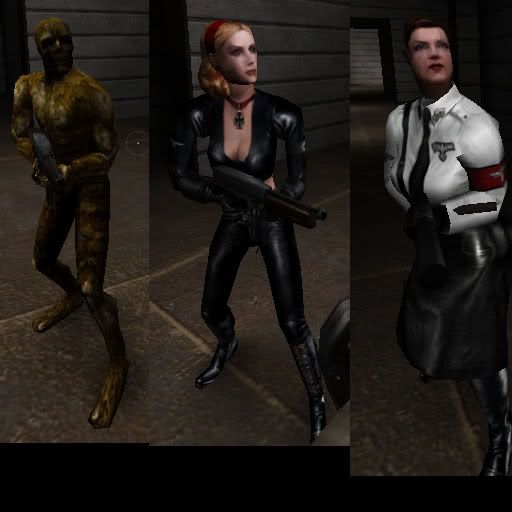

Those used edited head, you can do it in 3ds/gmax by importing standart ET head, and then rtcw head, delete ET head , keep only tag_mouth from it and delete tags from RTCW head, after that copy tag_mouth and attach head to it, this will make rtcw head somewhat animated, dont forget to rename head back to h_head and delete copied tag polygon
after that move original tag_mouth to be somewhere around neck or slightly under it
Export it and now ET cap/helmet should work :slight_smile:
On those example characters i shoot all helmet stuff down to make it look more like originals…
Again thanks a ton to Ikonatto , and dont forget that this is licensed stuff…


(carnage) #2

i belive u missed a small part about rtcw moddles being a bit smaller than the ET ones this makes holding some weapons a bit poor in places and ime pretty sure there will be hitbox issues

however using the tool i think u can use a refernace moddle to resise the mdm skeleton to exactly how the ET one is


(Jaquboss) #3

I dont know they all looks ok, but yes this tool support resizing…


(carnage) #4

look on the pick above, the elite gaurd is hold the gun though the magazine


(kamikazee) #5

My project to directly compile skl to mdm/x won’t be ready soon, but I’m going to try some reverse process first.
Probably mdm/x -> 3ds. (importers/exporters for 3ds are quite common or even native to 3d programs)


(Jaquboss) #6

Maybe you are right but if then again, i can just resize factor in that utility…


(ikanatto) #7

Wondering Janquboss handles my tool much better that I do… :eek: Thanks for providing an easy-understandable tutorial. This reminded me how to use this. :smiley:
Anyway resizing mdm of my tool may result in strange looks, because this feature will only enlarge vertex position, but bone length remains. So this might lead to a slightly fat model. :moo:


(Jaquboss) #8

Yeah, i see it too :slight_smile:
However , MDS importers and exporters are well avaiable , so you can try that way too…
Also there can be somewhere used playerscale in some file in ET, cant remmember thought…
And i did write this because documentations writes about single functions and so, but not about complete work like this …


(carnage) #9

playerscale <VALUE>

in the skin file

if someone finds some good valaues for moddles maby u should post here so we can all get an idea what value to use


(Jaquboss) #10

I found how to use playerscale … But still thanks for posting it…
I think that around 1.15 - 1.25 should be ok…
EDIT: updated turorial…


(elliotbelt) #11

:???: wo much of info but still dont gett all of it

so this means i can chance the model or do you still just chance the skinn


(kamikazee) #12

The whole model.

You actually make a model, export it, make an MDS out of it and then use ikonatto’s convertor to convert it to MDM/MDX.
So it is possible, but it’s some work.


(elliotbelt) #13

so that means i can chance the player model for a snake or somthing like that.
if i new how to use the that thing that is posted up there.
but its not realy a program more a html wep page for offline that tells you how to make thous things.
but i dont get any wisher out off it since i dont no the slices thing about moddeling.
so the stuff wat there is said makes me do this :???: :???:

there are some links for a tourial in the quickmdm but they dont work i mean the one for 2 or 3 tourials.
and there is talking about a program but i dont see any program :???:


(elliotbelt) #14

so k now wats rong dont have got a program to make models check check doesn my new avatar works :bored:


(carnage) #15

so that means i can chance the player model for a snake or somthing like that.

the player model on its onw can be changed to anything that uses the same skelital stucture as the rtcw models that are pob the most logicla place to start if your going to just replace the model with a new one

for something like the snake your looking at new amiantions as well. this means replacing the mdx files and there are a fiar few… not to mention all the setup text files that need updating to suit the new anmations. This also means that all players will uses these anmations so without altering the code its only posible to have 1 skelital stucture for all the players

/RANT

your sig is anoyingly big


(nUllSkillZ) #16

Just a little hijack.

So the process for playermodel creation would be:

[ol]
[li]create / export a skl-file
[/li][li]run buildmds (RTCW-version) to convert skl-file to mds-file
[/li][li]use ikanatto’s tool to convert mds-file to mdm-file
[/li][/ol]

Links I’ve found for the skl-export and skl to mds conversion:

[ul]
[li]MDS Exporter
[/li][li].mds export guide by pants
[/li][/ul]

Unfortunately the skl-exporter doesn’t work with gmax.


(kamikazee) #17

That would be the steps to take, yes.

But you see we need some new plugins for some 3D editors. :frowning:


(P4nth3r) #18

Wouldn’t it be much easier if somebody just made a exporter straight to mdm?


(kamikazee) #19

Mr.Mxyzptlk. (Don’t try to speak out that name…) pointed me to an interesting file format, called FBX.
It’s actively supported/made by Autodesk and they have plugins for most 3D editors. (Autodesk is the creator of 3D Studio Max and now Maya as well)
So I’d then make a convertor to convert md3, mdm/mdx or something else to FBX or back. This way, I don’t need to support lots and lots of 3D editors with all seperate plugins and formats, but just 1 format by means of a convertor. I don’t even need to worry about the plugins myself, I only should keep up with the format’s specs.

This still saves 1 conversion step in the old way above, as you don’t need to convert a mds to mdm/mdx anymore. Even MD5 should be possible.


(Shanks) #20

How do you suppose the animations would be exported?