Convert HL2/DODS/CSS maps to ET


(KENNITHH) #1

Hi there

Since you guys/girls are helping me out with a SOF2 cause on this forum, I thought I will do something back for you. I think some might like it but some will detest it but heck, it could give nice maps, even though there already are wicked maps in ET.
So…, I might know a way to get CSS/DODS/HL2 maps to ET. Because I know how to get them to SoF2 and they aren’t any different while they are in the .map type.

You can use the .map files for getting buildings/terrain or use the whole map.

I must say I haven’t tried this yet for ET but if I can open ET *.map’s for SoF2 then it’s the same for opening SoF2 *.map’s in ET.
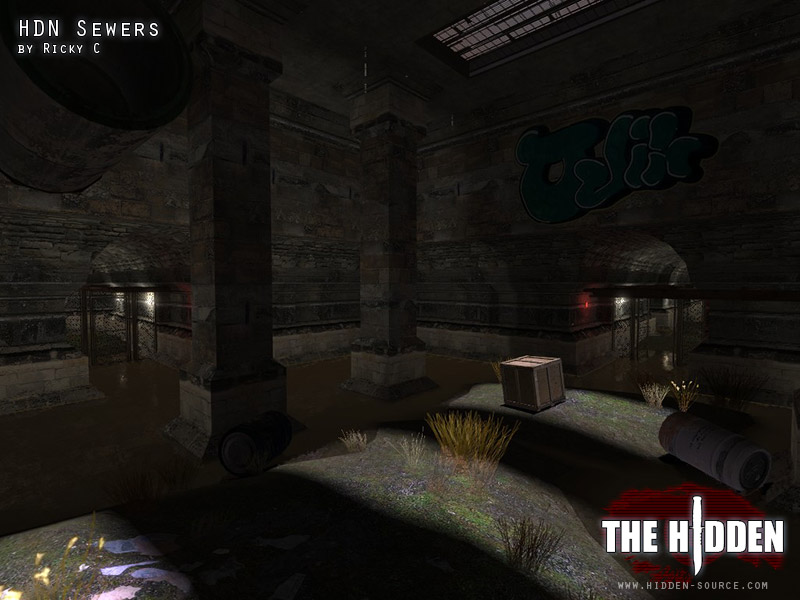
I did mp_sewers with this, it’s a map called Sewers from the Hidden Source mod (a mod from HL2)

Here we go

1. Download/get a map from css/hl2/dods for example cs_nuke.bsp
2. Use vmex.jar to convert the .bsp to .vmf. Just open vmex.jar, browse to the .bsp and press Decompile. Now you’ll get cs_nuke_d.vmf
3. Open the cs_nuke_d.vmf with a tool called Crafty, go to file, Export, then choose MAP Files (*.map) and name it cs_nuke.map for example. Now you should have cs_nuke.map
4. This .map is not the same as ET/SOF2 .map so you have to convert them. This you can do with hlq3map_convertor.exe.
6. Open the hlq3map_convertor.exe, click Input and select the cs_nuke.map, click output and type mp_nuke. At the bottom choose HL -> Quake3 and press convert.
7. Now you have a .map from css/hl2/dods that you can use in ET.
8. You have to add textures yourself in GTK at the end because all the textures will be gone.

  • To get vmex.jar working, you need JRE

  • To get crafty working, you need to have Microsoft .NET Framework Version 2.0 and Microsoft Visual C++ 2005 SP1 which can be found here.

  • Don’t forget to ask the owner of the map if you MAY use their maps to port to ET

Hope you like it
And thanks again for helping me out here

Greetz
Kennith


(Cambodunum) #2

Wheee … this will cause trouble xD


(KENNITHH) #3

Could be but if people will use it fairly I don’t see any problems like asking the owner first, don’t use the whole maps but just a few parts like buildings, then I think it’s ok, OR if its just for personal use I think its ok too


(Indloon) #4

De_dust2 in ET,must be World War 2 kind…:smiley:


(Avoc) #5

Well, it would be nice to see how some of the maps in HL2 episode 2 were made.


(Infinitypl123) #6

Anyone tried it? Any screens?


(KENNITHH) #7

In Hidden Source (HL2 mod so same map type)

In SoF2 (same map type as ET)
http://img167.imageshack.us/img167/5628/shot0008er8.jpg

It looks a bit different cause I used different lights then CSS and the screenshot from hidden source is the old Sewers map

EDIT: Quickly did de_dust2 to a .map (in 3D its the bombplace, I think its A, don’t know xD)
http://img818.imageshack.us/img818/4058/dedust2n.jpg
Now I have to add that I did something else too, I opened the de_dust2_d.vmf with Hammer (like GTK but for CSS/HL2 etc) and removed all the crap like lights, models, camera’s, triggers etc… (did this to get the structure only) + I removed the skybox to give a better sight in the screenshot. But as you can see, everything is caulk so you just have to add textures to it.


(ailmanki) #8

pretty amazing stuff,
are displacement maps also converted into - something?


(KENNITHH) #9

[QUOTE=ailmanki;354530]pretty amazing stuff,
are displacement maps also converted into - something?[/QUOTE]

What do you mean with displacement? like maps with hills?


(ailmanki) #10

Not necessarily, but I guess mostly that applies to hills.
http://developer.valvesoftware.com/wiki/Displacement


(KENNITHH) #11

Hmm I think it’s something like the patches we have in GTK. And I don’t think they do that but what could be done to get them is convert them to obj via Crafty, import it in Milkshape3D and export them as Quake3 map then they will look like GenSurf mountains even though they are just small.

Another way might be exporting them from the obj as a model and make the model static, solid so you can run over the model (hill).


(daz2007) #12

Awesome, Is it Possible to Convert ET Maps to Team Fortress 2


(KENNITHH) #13

I think it’s very possible yes, maybe with the hlq3map_convertor.exe (you’ll get the hl .map file) but you have to get this map in some kind of thing like hammer, imma try it out later (have to go to the hospital in a few minutes)

and this, read it on some site.

Just open radiant and export the map to .xmap format then restart radiant in hl1 mode and import the .xmap then export the map to hl1 .map format and it will work perfectly in hammer for hl1 and hl2, odds are you will have to fix entitys and realign some textures.

EDIT: Yes yes, it works but I had to adjust the .map. BUT when I just opened the .map with CRAFTY to check if it shows everything, it said
Error loading file:
C:\Users\KENNITHH\Desktop\mp_radar.map

Error: Error parsing file: malformed structure near line 2322 and thats because of this

// brush 249
{
patchDef2
{
radar/borderroad
( 3.0 3.0 0.0 ) ( -2192.0 -3216.0 1292.0 ) ( -2217.0 -3241.0 1317.0 ) CRETE4_WALL01 [ 0 0 0 0.500 ] [ 0 0 0 0.500 ] 134217728 0 0
)
} <----------------------------- this
} <----------------------------- and this

I think it sees } } as ending of the whole map, so I tried removing everything from about this till the end and it loaded the map :smiley:

So I think the best thing you can do is open GTK Radiant 1.5 first, draw the list of entities, remove them all but not the worldspawn, then remove all the patches in notepad and do it.

I opened hlq3map_convertor.exe, at Input the ET.map, output a-name.map, checked quake3 -> hl and pressed convert

I think you have to remove all the patches or edit it some other way BUT it is possible to get all the other brushes =D