Camera window showing map as blocks.


(msx) #1

When using the WolfET_Tool (gtkradiant 1.3 something) and even with gtk radiant 1.4.0 the camera view shows the map as if it has been chopped up into blocks. Please help me to fix this.

(Please don’t tell me to use gtkradiant 1.5.0 instead, because I don’t want to use it, alot of things have been taken out of it.)

Here is a picture to show you what I am talking about:
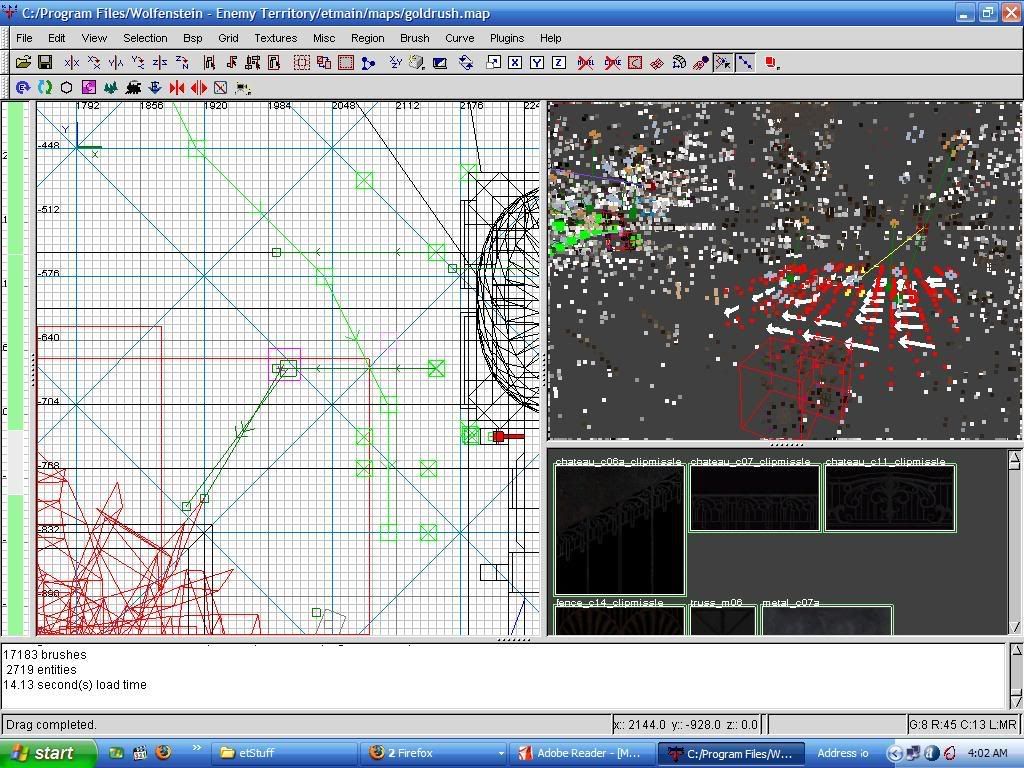
What de heck??!! is that about??? O.O


(Flippy) #2

Has it worked before or is this the first time you try it?

If it’s the first time, try updating your graphics drivers.


(msx) #3

Just so you know, it looks like its supposed to in Q3radiant (opening q3maps of course, not ET maps =P) and in gtkradiant 1.5.0 also works fine. But I did find a driver update, so I am getting it now, will post update here to let you know what happens! =)


(msx) #4

Ok i updated my graphics driver, but this still did not fix the problem. Must be a bug in gtk. =(


(DerSaidin) #5

You should update to 1.5.0 :stuck_out_tongue:

But seriously, I don’t think anything is taken out - its just different.
And theres a lot of useful things added too.


(msx) #6

Yes…I have 1.5.0 sighs still though, where de heck is my z axis gone to?

Also, how do I import prefabs or make prefabs in gtkradiant? Doesn’t seem to be a way too O.O;


(DerSaidin) #7

Click the 2d part, then press ctrl +tab to toggle between planes.
You can also change them in the view menu, but you might need to have floating windows.

File -> import
can load stuff into whatever your working on.

File -> save selected
saves whatever you have selected, which is good for making prefabs.

Prefabs are saved as .map files.


(msx) #8

Ah ok, Der’saidin, I am understanding now. The z-axis bar was taken completely out, now there is just that indicator in the upper left hand corner which tells the user what axis he/she/it is on. That sucks, I liked the z-axis bar. This why I hate gtk, the person(s) working on it keep taking good things out.

Did you know that cntrl-x closes Q3Radaint? Why was that taken out? Now I have to go through the menu to close it (in gtkradiant). Now the z-axis bar has been taken out???

Does this programmer know anything about mapping?

Plus so many more things, sorry to whine, but why so many things taken out?

Still though, I think Q3Radiant was the best radiant so far. To bad I can’t set that up for ET!

:frowning:


(-SSF-Sage) #9

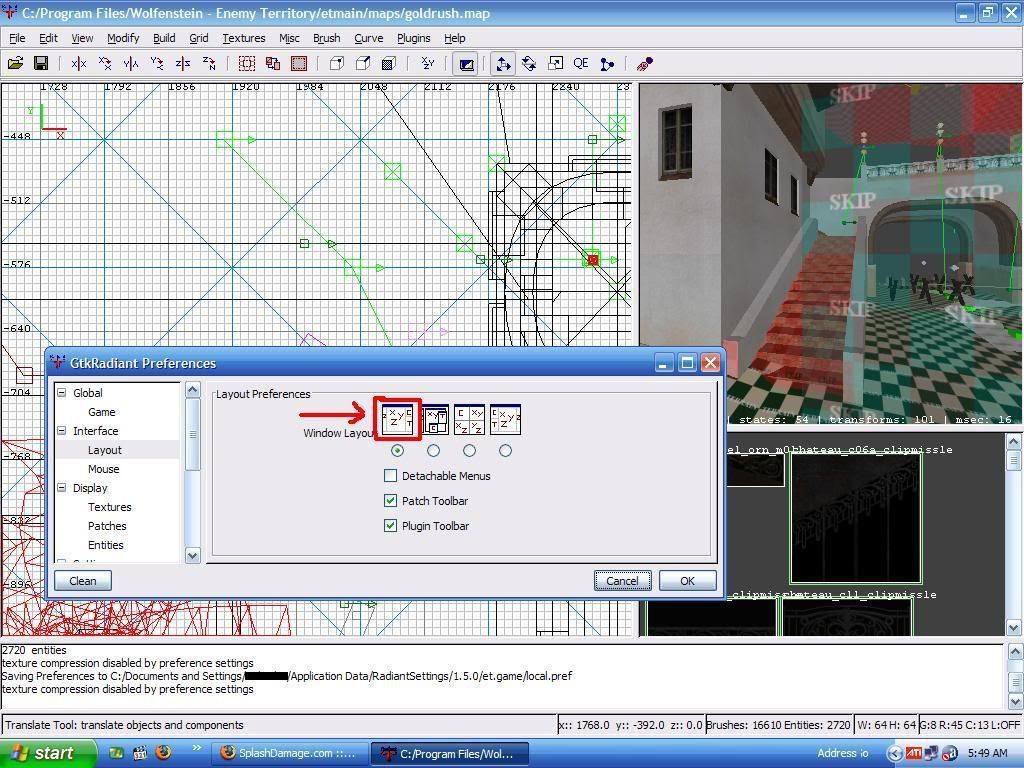
You should download the newest and the last version of 1.5.0, which is 26.04.2007. It has all things that I need and a lot more. A lot of the stuff has come back to this version in example plugins etc. I love the first layout of the 1.5.0 (first in the preferences…) and I hated the 1.4.0 layout you are talking about. But that’s just what some likes. You can and should get the newest from here.


(msx) #10

OK, got it. Thank you for the link and telling me which version I needed. That’s a huge help.

Still though, they have gone and taken out the z-axis bar completely!

NOOOOOOOOOOOOOOOOOOOOOOOOOOOOOOOOOOOOOOOO! (scream echos across the nation).

WHHHHHYYYYY?!

Ack.

Cheers!


(Flippy) #11

Why don’t you just use the third view option in the Layout Preferences screen? It shows you all 4 views (XY, YZ, XZ and 3D) at the same time.


(msx) #12

I never liked that view. That’s like using the UT level editor view, and I didn’t care for that or the “carving” of worlds. I always like the way level editing is done for the Quake 3 engine, drawing it out! Seems like to me I have more control over my map drawing things out rather than “carving” them. O.O

Ok i updated my graphics driver, but this still did not fix the problem. Must be a bug in gtk. =(

I would like to retract this statement about gtkradiant being buggy. After some thought I realized that it may very well be the ati chip/driver issue. Ati has always had some issue rendering the q3 engine (most noticeably the infamous skybox bug!) And since I am on a laptop, this ati chip may be even less supported since it’s not a ‘graphics card’, just a chip stamped on the motherboard.

I am still open to solutions though for using the gtkradiant 1.3 or 1.4! So if you have any, please let me know. Thanks!


(Flippy) #13

Changing the view options won’t change the way the editor works… You’re not ‘carving stuff out’ at all, it works exactly the same as in the view you are describing (which I suppose is the standard view for radiant 1.4?, with the small z-axis bar to the left).

I believe the z-axis bar is just the same as the z-axis window in the ‘4-windows-view’, just larger…


(msx) #14

I know I’m not “carving stuff out” in gtkradiant. I was just saying that in UT (Unreal Tournament) lvl editor, the world is carved out which I didn’t like. In Q3Radiant/gtkradiant it’s drawn out, which is the way I like it, it allows for more control of map making, in my opinion.

Thanks for the tip on views.

Cheers!


(DerSaidin) #15

Like I said, its not so much taking things out, its just changing them or moving them. You’ll get used to ctrl+tab to swap views instead of using the z axis thingo. I think its better now I’m used to it.

I would imagine ctrl+x was taken out because its easy to press, and is conventionally reserved for cut. That would be pretty annoying, since ssigning textures uses ctrl+c and ctrl+v…

Yes, the programmers know a lot about mapping. A great deal more than you I would imagine. Once you learn more you’ll appreciate their efforts.


(Roeltje) #16

Do I smell pwnage? :slight_smile: