
BSP to .Map


(reaply) #1

Hello Wolfenstein ET community :). Long time no see since i’ve posted here.

Today I have a question for GTKRadiant. I am trying to convert a map from a .bsp to a .map file for learning purposes. (I don’t copy other peoples work.)

I followed the tutorial to:

q3map2.exe -convert -format map -map *TheNameOfTheMapYouWantToConvert*.bsp -game wolf

But to no avail.

I am using GTKRadiant 1.6, and I place the .bsp file and the .bat file in the same folder as q3map2.exe. But when I run the .bat file the cmd prompt opens with:
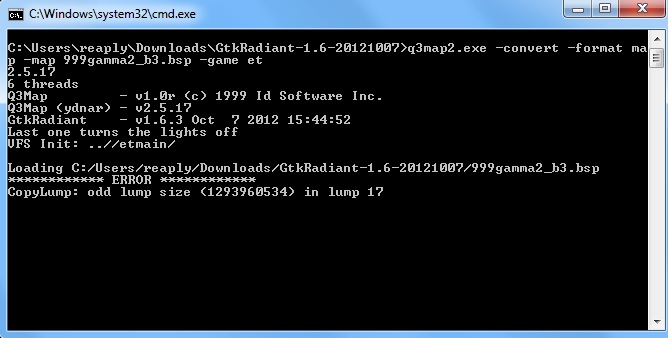

I don’t get the lump error. And please remember I am not trying to copy the map I chose it at random for general education purposes.

EDIT:

Apparently you need

Q3Map2 version 2.5.16 instead 2.5.17
. As said by YourFather_CZ
in 2010.

2.5.17 is bugged.


(twt_thunder) #2

easier to find a map source reaply :slight_smile:

http://www.splashdamage.com/files/wolf_et_map_source.zip

and still the best way to learn mapping is this:

http://www.pythononline.co.uk/et/tutorial.htm


(reaply) #3

[QUOTE=thunderpwn;420859]easier to find a map source reaply :slight_smile:

http://www.splashdamage.com/files/wolf_et_map_source.zip

and still the best way to learn mapping is this:

http://www.pythononline.co.uk/et/tutorial.htm[/QUOTE]

Thanks for the information :). But I don’t currently need it. I was swapping the map onto another game for physics test.


(StoerFaktoR) #4

q3map2.exe -convert -format map -map TheNameOfTheMapYouWantToConvert.bsp -game wolf

works for me with GTKRadiant 1.4


(reaply) #5

I was using GTKRadiant 1.6.


(Destroy666) #6

Oh, didn’t know you can study Q3 mapping.

Wondering if that is a smart spambot or human spammer?


(twt_thunder) #7

[QUOTE=Destroy666;443094]Oh, didn’t know you can study Q3 mapping.

Wondering if that is a smart spambot or human spammer?[/QUOTE]

lol… maybe a botwonder :slight_smile:


(Nail) #8

it’s actually a dumb bot