
BrinkConfig v1.1


(Gogeku) #1

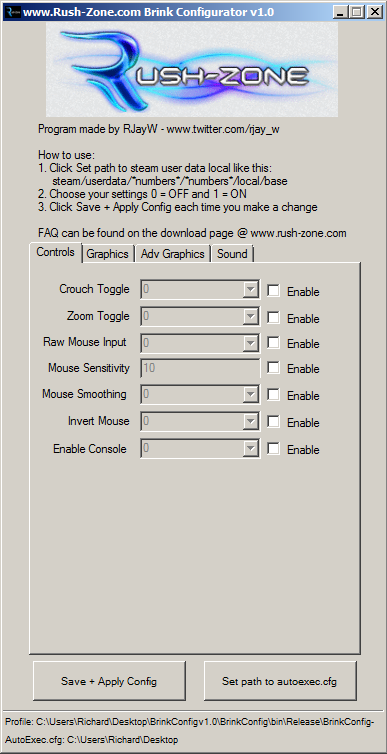
This program is to be used with the Brink it allows you to configure settings that are not in the in game menus.

This program has been developed from another previous program for Crysis 2, this program got over 30k downloads and 6 versions released.

Thanks to everyone that is supporting the tool and previous tools. I will continue to support the tool as much as I can.

As this code has been developed throughout Crysis 2, it means i can focus on bringing new cvars to the tool quickly, if you have a suggestion then let me know. The tool wont cover all cvars it is aimed at the most important ones, the ones that make the game better the most.
Changelogs:

v1.0:

  • Upgraded and moved the Crysis 2 version of the code to now support brink
  • Support for 27 cvars on day 1
  • Latest version checking

v1.1

  • Hotfix! autoexec.cfg was not saving in the location you selected, it will now.
  • Cvars didnt need = sign after them now fixed
  • Toggle sprint added

How to Use:

  1. Download and run
  2. Click Set path to steam user data local folder found here -> steam/userdata/numbers/numbers/local/base
  3. Enable the settings you want to use and set the values!
  4. Once you have selected your settings click Save and Apply Config
  5. Once you have saved and applied the config click launch game!

FAQ:

  • Will there be more versions? Yes there will be! I will try and get as many versions out as possible, if you want a cvar in the program then let me know!
    -Whats the max FOV value? Its 110 max
  • Do the older profiles from the program work with the newer program version? No they dont at the moment delete the programs profile in the same directory you run from and then run the new version
  • I want to restore the program settings to default how can i? – Only way currently is to quit the program and delete this file - BrinkConfig-rush-zone.com-Profile – it will be stored in the same place you run the program from. Then re open the program and the settings will be default.

Download: http://www.rush-zone.com/downloads/gaming/brink/brinkconfigv1.1/details.html

As this is the first version if you find any bugs with this first version i will get a hotfix out quickly! I will be adding many more as long as the demand for the program continues!

Follow me on twitter: twitter.com/rjay_w

Source ::
rush-zone.com

(trollface) #2

A list of the featurded cvars would be nice.


(system) #3

Care to share the source code? I’m not installing anything from random guys.


(Gogeku) #4

Honestly a mate of mine made it, a guy from my clan. But I can guarantee you that it is legit. But so far you can edit the basics such as:

Crouch Toggle
Zoom Toggle
Raw Mouse Input
Mouse Sensitivty
Mouse smoothing
Mouse invert
Allow Console
Machine Spec
FOV
Fullscreen
Custom resolution width
Custom resolution height
Show FPS
Motion Blur
Anti Aliasing
Anisotropy
Texture Filtering
Shadows
HBAO
Soft Particles
Gamma
Brightness
Post Processing
Portals
Optimized Shadows
Sound Occlusion
Number of speakers
Sprint Toggle


(trollface) #5

I gotta say, those are some useful cvars. I might have a go once the game is released in the EU.
Cheers.


(Senyin) #6

Is it me or is it rather strange that many of those are not in the game menus, like
Mouse Sensitivty
Mouse smoothing
Mouse invert
Gamma
FOV
They are not in the game menus?? :confused:


(trollface) #7

Wait, mouse sens isnt in game options?
You sure about that?


(crazyfoolish) #8

Surely FOV is in the game menu. Mouse sensitivity must be also.


(stealth6) #9

haha, seems you people talk alot in your clan…

http://www.splashdamage.com/forums/showthread.php?t=25036


(Ragoo) #10

As far as I know:
In BRINK tap shift = toggle sprint and hold shift = SMART. So if you disable toggle sprint, there is only shift=SMART left. Isn’t there an option to separate sprint and SMART so I can just hold down shift and sprint and do everything manually without SMART button? Would be much appreciated.

Also I wonder if there is an option to disable the sound effects (sound volume turns down) when you get hit and/or are low on health + black/white when you are low on health or if that is cheat protected.


(jotun) #11

FOV is not, and changing it currently causes problems in multi


(DrpPlates) #12

Mouse Sensitivity is there, FOV is not (as stated- if changed it causes problems)… and its driving me nuts! nor is Bob/Roll, at least that i can tell…, and that is driving me nuts… movement for me at least, is utter crap… very jittery and annoying as all…

if you are coming from ETQW- and you are used to all the ingame menus and the ability to ‘change’ settings ‘ingame’ your in for a huge disappointment…

dont take this as a ‘hate’ response, am digging the game… but i’ve spend the last few years playing ETQW (love that game) and, Brink Aint NO ETQW in every way… take the good and bad with that…


(RJayW) #13

v1.2

  • Custom resolutions should now work
  • Various small tweaks in graphics tab
  • Updated the: steam/userdata/number/22350/local/base message
  • Show Intro option added so set to 0 to disable
  • Added View effects
  • Added Skip Particles
  • Added Refresh Rate

Download here:
http://www.rush-zone.com/downloads/gaming/brink.html


(adhesive) #14

“the application failedto initialize properly click okay to terminate the application” gg


(RJayW) #15

No one else has reported this problem. Have you got netframework installed?


(V1s0r) #16

[QUOTE=DrpPlates;298694]
if you are coming from ETQW- and you are used to all the ingame menus and the ability to ‘change’ settings ‘ingame’ your in for a huge disappointment…

dont take this as a ‘hate’ response, am digging the game… but i’ve spend the last few years playing ETQW (love that game) and, Brink Aint NO ETQW in every way… take the good and bad with that…[/QUOTE]

Dude you made me cry :*(
Why are there so many options missing… C’mon this is not what I’m used to Splash Damage???

Oo ya good program. Keep up the good work. To bad we need third party programs to do these kind of things…


(DrpPlates) #17

[QUOTE=V1s0r;299063]Dude you made me cry :*(
Why are there so many options missing… C’mon this is not what I’m used to Splash Damage???

Oo ya good program. Keep up the good work. To bad we need third party programs to do these kind of things…[/QUOTE]

am with ya- at first i thought ETQW had to many options, dam you could spend a day fussing with them… but now, with Brink- am missing them…
not sure why SD left them out, other than the obvious - no need for them on Consoles…