BOMBA - HUD


(BomBaKlaK) #1

So if you are looking for a HUD here is mine :
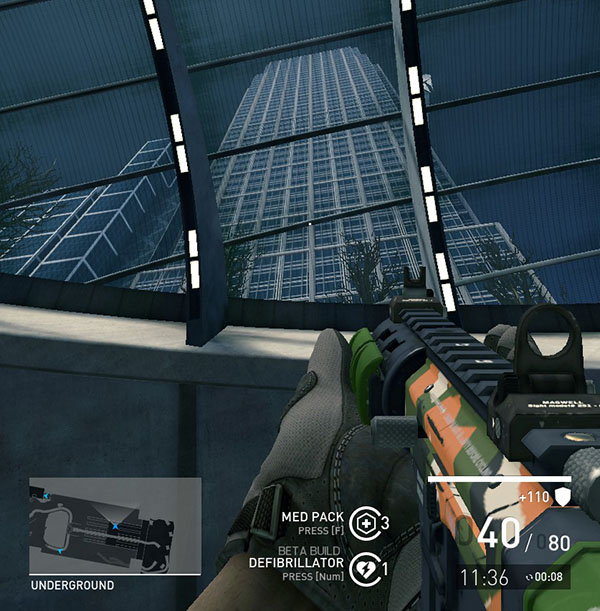
Copy paste the bloc text below at the end of your “ShooterUI.ini” and save.
(My documents / My games / UnrealEngine3 / ShooterGame / Config)

Enjoy !

[ShooterGame.SGUIHUDPlayer]
WeaponAmmoPosition=(Align=(V=HA_BOTTOM), Attach=(H=HA_RIGHT, V=HA_BOTTOM, VA=“PlayerHealth”), PixelOffset=(X=511,Y=-60), Skew=0, ShadowOffset=(X=-1, Y=-1))
AbilityCooldownPosition=(Align=(H=HA_CENTER, V=HA_BOTTOM ), Attach=(H=HA_CENTER, V=HA_BOTTOM), PixelOffset=(Y=-40, X=-45), Skew=0, ShadowOffset=(X=-1, Y=-1))
PlayerHealthPosition=(Align=(V=HA_BOTTOM), Attach=(H=HA_RIGHT, V=HA_BOTTOM), PixelOffset=(X=530, Y=85), Skew=0, ShadowOffset=(X=-1, Y=-1))
MinimapPosition=(Align=(H=HA_CENTER,V=HA_BOTTOM),Attach=(H=HA_CENTER, V=HA_BOTTOM),PixelOffset=(X=-170, y=-30), Skew=0)
ObituaryMessageLogPosition=(Align=(H=HA_RIGHT,V=HA_BOTTOM),Attach=(H=HA_RIGHT,V=HA_BOTTOM),PixelOffset=( y=-80), Skew=0)
ChatInputPosition=(Align=(H=HA_LEFT,V=HA_BOTTOM),Attach=(H=HA_LEFT,V=HA_BOTTOM), PixelOffset=(Y=-2), Skew=0)
ConsoleMessageLogPosition=(Attach=(H=HA_LEFT, V=HA_TOP, VA=“ChatInput”), Align=(H=HA_LEFT, V=HA_BOTTOM),Skew=0)
GameWaveTimerPosition=(Align=(V=HA_BOTTOM), Attach=(H=HA_RIGHT, V=HA_BOTTOM, VA=“PlayerHealth”), PixelOffset=(X=504,Y=-100), Skew=0, ShadowOffset=(X=-1, Y=-1))

http://i87.photobucket.com/albums/k159/BomBaKlaK/BANNI7REDB07.png


(SteelMailbox) #2

While I personally like the HUD I currently have I can definitely why will people like your HUD.
But HUD’s tend to be all over the place depending on resolution so because of that I INB4 what resolution is the hud designed to?

Also if I would have to suggest improvements I would have nothing to say since that HUD is clean and practical so I like it.


(bontsa) #3

Would love to see more wider screenshot to orientate where you’ve put other HUD aspects like Obj progression bar, nastily big badge goofery, death-list etc. :slight_smile: Care to share? Or are they kept on their default positions?
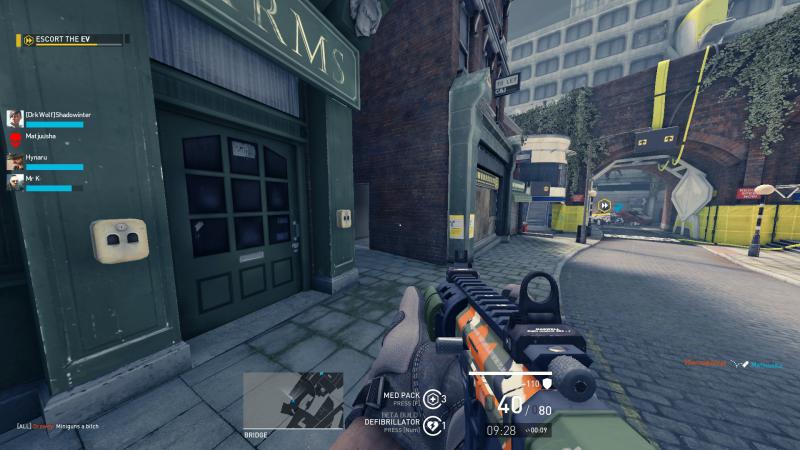
Nice compact HUD nevertheless


(BomBaKlaK) #4

working perfectly with a 1920x1080 resolution

Chatbox is botom left corner
and obituariy bottom right corner

I use it since 2 years now (Alpha player) and I just can’t play without it now


(Eox) #5

This raises another question : will we ever be able to create 100% custom huds (with custom health bar, custom skill icons, custom everything…) like in TF2 ? I think this would be cool.


(misspo) #6

Well, it’s a shame because every body sharing hud settings play on 1920x1080 …
Give some love to 1280 1024 users


(Faraleth) #7

@Eox Yes, they have said fully customisable HUD will be in the game eventually, however it’s not a high priority right now :slight_smile:


(BomBaKlaK) #8

Error 404 ? :pensive:


(Litego) #9

[quote=“pocahontas;83727”]Well, it’s a shame because every body sharing hud settings play on 1920x1080 …
Give some love to 1280 1024 users[/quote]

Well we do live in 2015… Even 1920x1080 is getting old by now.


(misspo) #10

Well competitivly speaking, many people use it… And it’s far from being bad visualy.
I don’t like big resolution expect in solo game where i play 2560*1440.
Texture are to big and i feel every thing is smaller. I dislike it.


(SteelMailbox) #11

Imagine a HUD which is inspired by your favorite merc.
For example: Kira HUD is a Kawii HUD.

[quote=“pocahontas;83727”]Well, it’s a shame because every body sharing hud settings play on 1920x1080 …
Give some love to 1280 1024 users[/quote]

Well it is because most people use 1920x1080 and less people use 1280x1024.
The world of HUD creating isn’t fair my friend.


(Jurmabones) #12

Nice HUD. Thanks for sharing!


(MarsRover) #13

I’ve been plaing in 1080p since 2008. So it may be “old”, but it’s the most popular desktop PC resolution by far. Everything above 1080p is only about 2%.

http://store.steampowered.com/hwsurvey


(Litego) #14

[quote=“pocahontas;83748”]Well competitivly speaking, many people use it… And it’s far from being bad visualy.
I don’t like big resolution expect in solo game where i play 2560*1440.
Texture are to big and i feel every thing is smaller. I dislike it.[/quote]
Well, I will personally never understand that. Could never go back to that resolution. I find that more is always better. I find myself wanting an upgrade to 1440p because 1080p doesn’t look very crisp to me anymore.

Also not playing on a native resolution, or a quarter of that resolution is just disgusting on an LCD monitor.


#15

In case anyone is looking for a guide on how to edit the HUD by changing the values in the data, I have just released one on Steam.


(BomBaKlaK) #16

[left]New HUD without minimap :

Remove the minimap :

[ShooterGame.SGUIHUDMiniMap]
m_bUseRotatingMap=false
m_FiringFadeoutTime=0
m_MiniMapScale=0
m_MiniMapWidth=0
m_MiniMapHeight=0
m_MiniMapSpecWidth=0
m_MiniMapSpecHeight=0
m_DisplayPlayerIconArrow=false
m_ContainerScaleModifier=0
m_DisplayFiringEnemies=false
m_DisplayMines=false
m_DisplayHeartbeatSensors=false
m_DisplayEnemies=false
m_DisplayAllied=false
m_DisplayTurrets=false
m_DisplayObjectives=false
m_DisplayPawnRequests=false
m_ClampObjectives=false
m_ClampAllied=false
m_ClampPawnRequests=false
m_MinimapPollThreshold=0

[/left]

My new HUD :

http://img.xooimage.com/files110/c/b/6/bomba_hud-4d1e9f8.png

[ShooterGame.SGUIHUDPlayer]
WeaponAmmoPosition=(Align=(V=HA_BOTTOM), Attach=(H=HA_RIGHT, V=HA_BOTTOM, VA=“PlayerHealth”), PixelOffset=(X=601,Y=-100), Skew=0, ShadowOffset=(X=-1, Y=-1))
AbilityCooldownPosition=(Align=(H=HA_CENTER, V=HA_BOTTOM ), Attach=(H=HA_CENTER, V=HA_BOTTOM), PixelOffset=(Y=-12, X=-205), Skew=0, ShadowOffset=(X=-1, Y=-1))
PlayerHealthPosition=(Align=(V=HA_BOTTOM), Attach=(H=HA_RIGHT, V=HA_BOTTOM), PixelOffset=(X=620, Y=75), Skew=0, ShadowOffset=(X=-1, Y=-1))
ObituaryMessageLogPosition=(Align=(H=HA_RIGHT,V=HA_BOTTOM),Attach=(H=HA_RIGHT,V=HA_BOTTOM),PixelOffset=( y=-80), Skew=0)
ChatInputPosition=(Align=(H=HA_LEFT,V=HA_BOTTOM),Attach=(H=HA_LEFT,V=HA_BOTTOM), PixelOffset=(Y=-2), Skew=0)
ConsoleMessageLogPosition=(Attach=(H=HA_LEFT, V=HA_TOP, VA=“ChatInput”), Align=(H=HA_LEFT, V=HA_BOTTOM),Skew=0)
GameWaveTimerPosition=(Align=(V=HA_CENTER), Attach=(H=HA_CENTER, V=HA_BOTTOM), PixelOffset=(X=-55,Y=80), Skew=0, ShadowOffset=(X=-1, Y=-1))

Enjoy


(gg2ez) #17

Sexaaay. I’m going to use this when I get my new monitor.


(qjack) #18

for removing the minimap just set (in ShooterUI.ini under [ShooterGame.SGUIHUDMiniMap])

m_MiniMapWidth=0
m_MiniMapHeight=0

no need for more changes :wink:

If you post HUDs, please use the exiting threads and please post your ingame Resolution!


(BomBaKlaK) #19

Resolution is up … 1920x1080 just in case you don’t read it

When you do this you don’t remove the minimap features you just reduce the size of the minimap to 0, removing all minimap options help to remove all the micros slutters/lags you can get due to the minimap, so it’s better for me this way.

Unreadable yellow quote … just in case …


(Snuffles) #20

Damn, these all look really nice. Is there somewhere I can generate one or do I need to know the scripts?