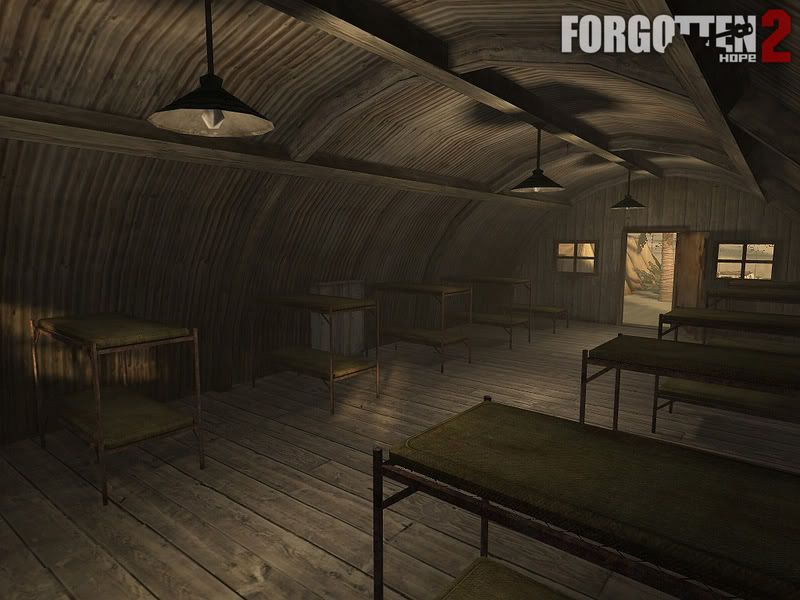
#2. I wanted to build a quonset hut, but this time made out of brushes… I tried it, and my attempt = a fail… Whats the best way to make one out of brushes?
#3. Whenever I open the limbo menu in ET on my map, ET crashes… What causes this?
About the terrain… i dunno… have you altered the terrain shaders?
i ask this because i always need to… for some reason easygen exports all textures way too small and i need to scale them up manually in the shader :\
You might have fucked something up in the blend shaders as it only seems to be weird at the blends…
Did you use the ‘q3map’ instead of ‘standard’ (for shader creation) option during export? I think you need to, but im not sure on this…
Wtf is a quonset hut?
Try this (it works for me):
Place one team_CTF_bluespawn, one team_WOLF_objective and one info_player_deathmatch entity…
Ive always heard you need to enter the mapcoords(mins/maxs) in worldspawn to stop this bug but for me this is not even necessary…
what do you mean? your terrain looks average, it seems to lack shaders like phong and alpha blending too, maybe you should try adjusting texes with the S key
i dont know what type of hut you mean, but i tried to make a hut just now and while using a cone for the roof looked stupid, i could deform a basic cubic brush with the “V” key so that it became like the tip of an arrow
_
\!  use the extra vertex on the square to make the outer side of the triangle more round. (i mean this one \)
then just clone and mirror x and y
[u]/![/u]
!/ looks better in radiant than ascii tho
select all press v and lift up the middle vertex
make it sit on top of a cylinder, of aprox 12 sides, it should look ok
the obvious solution would have been a patch bevel to make the curve. although this would make it very difficult to make the doorway and the hut would deform at distances and would not be very nice
the better solution would be to use a bevel as a template and cut some brushes using it as a guide. then you should have a much easier time adding the doorway and wooden beams. also you will want a phong shader on the metal sheeting to make it appear more curved
although judging by how far you have got with terrain i expect you wont actually understand most of this
I understood most of it, and the bevel was my original idea, hence the thread called “doorway in a bevel” or something of the likes. I made it entirely out of brushes this time, and it looks pretty good, besides the texture… im not quite sure what to use for it yet. And the terrain is pissing me off :x
yes, precisely like that… mines pretty much like that, except not as wide ( i hope the bunks fit in, ahah… i dont wanna change the modelscale and have everyone be like wtf is up with the beds?).
i have a problem though, when i insert misc_gamemodel, the beds just dont appear in game… should I use misc_model’s instead?
oh but they show up perfectly fine in radiant, just not in game… Lol you know, i might have pulled a total stupid last time, and added the bunk AFTER the compile ahah
//Snowy and rock cliffs. working with snow textures for development might change to temprate textures later. alretate planar projection
textures/castlealpha/snowrock2
{
	q3map_nonplanar
	q3map_shadeangle 120
qer_editorimage textures/castlealpha/snowrock2.tga
{
	map textures/castlealpha/rock_rounded.tga
	tcGen vector ( 0.00390625 0 0 ) ( 0 0 0.00390625 )	// 1 by 256  half res = 0.00390625		//consider reducing texture size for final map
  	rgbGen identity
}
{
	map textures/castlealpha/snow_dirty.tga
	tcGen vector ( 0.0078125 0 0 ) ( 0 0.0078125 0 )	// 1 by 128 for standard res = 0.0078125
  	blendFunc GL_SRC_ALPHA GL_ONE_MINUS_SRC_ALPHA
  	rgbGen identity
  	alphaGen vertex
}
{
  	map $lightmap
  	blendFunc GL_DST_COLOR GL_ZERO
  	rgbGen identity
}
}
this shows where you need the commands to go in your shader file
q3map_nonplanar - each triangle that your hut is made from has a normal vector. the vector of each vertice is the same as the planes normal of witch it belongs. when calculating light you look at the angle of a surface stored in normal vector of the surface. this command looks at shared vertices’s of triangles with different normal vectors and blends them together
so when you calculate the angle of each light map pixel on the surface you sample the directional vector of the surface but because you have used this command the vectors don’t all point in the direction of the surface normal and so you create the illusion that the surface is curved
q3map_shadeangle 120
this command sets how smooth you want the effect to look. too low values and the effect doesn’t work. to high values and the lighting looks wrong. around 80 - 120 normally works quite well
both commands must be used together to work. although you don’t need to know all this to use phong shading understanding how it works should give you a much better idea how to use it
If you look closely, there are beams supporting the roof in two directions: along the length of the roof and along the width of the roof.
Most of these beams are made by using square cylinder patches. As long as the control points for the roof bevel patches match those cylinder’s control points, the roof will fit nicely.
Now, you can hide your rough-shaped brush with the doorway in such a beam. That way, you would have a smooth looking hut at the cost of a little overdraw.