Dirty Bomb - FPS CONFIG from SYKU & Toon, How can i make the map smooth to become more FPS ?


(Amerika) #21

As others have mentioned your CPU and GPU are not great for gaming in general. Throw in the fact that it’s a laptop and heat can quickly start clocking down both the CPU and GPU. Also, NVIDIA Optimus could also be an issue if your laptop switches between onboard and the 710. You didn’t list which i5 you have so I can’t look it up. Optimus, with some games, likes to force you to use the onboard video card if there isn’t an Optimus profile within Nvidia Gefore Experience for that game. You can go into the Geforce control panel and force the 710 to be used with Dirty Bomb though to make sure it’s not that.

Good luck!


(Mister__Wiggles) #22

[quote=“Gi.Am;75028”]4GB should be enough DB normaly takes 1-2 GB unless there is a memory leak. Either way disable all other programs running in the background and check if your memory gets maxed out. But I doubt it.

Looking at your stats I’d wager both your CPU (shouldn’t, but DB is highly CPU bound) and especially your GPU are the cultrip, those mobile cards are usually bottom of the line and further throttled for energy cost reasons.

Also you are propably already doing this but just to be sure check if you are running in the performance energyprofile to ensure throttling is kept at a minimum. But otherwise I think short of getting a better computer there is not much you can do.[/quote]

You got to remember, he has to run the system with that ram aswell which can easily mount to 2gb when you factor in all the different programs that he may have. I’ve also had the game crash for memory reasons and its never happened with any of my other games so it must be a DB thing.


(ZOPPY!) #23

Thank you All for you Questions! :slight_smile:
I will try something and finding the right Settings!
when i have enough Money i will buy me an New PC! :dizzy:
But like what @Amerika say, my Labtop is really heat when
im Play DB.


(ZOPPY!) #24

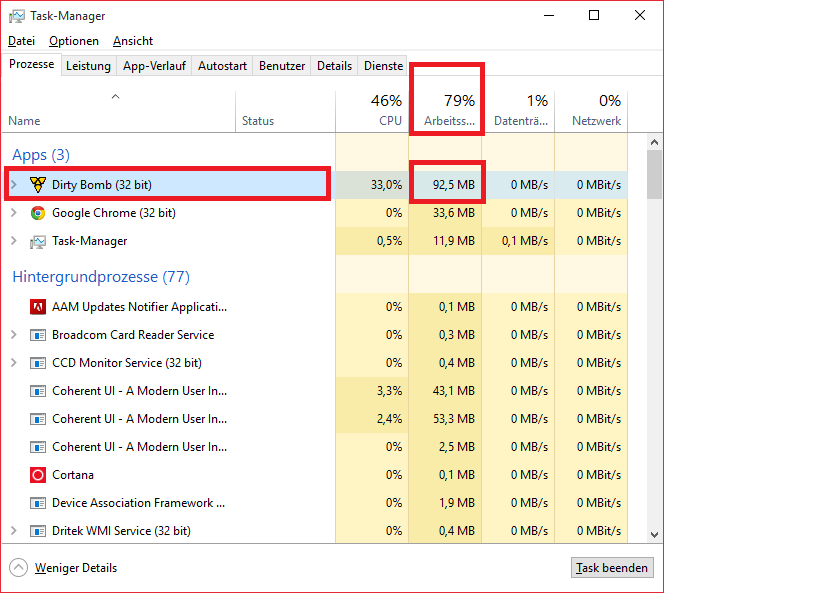
Here the Screenshot from my Task Manager.
Its in German so maybe bit different ^^ :slight_smile:


(watsyurdeal) #25

Well chrome shouldn’t be on, and anything else eating up processes should be turned off as well.


(Gi.Am) #26

[quote=“ZOPPY!;75357”]Here the Screenshot from my Task Manager.
Its in German so maybe bit different ^^ :slight_smile:

http://fs1.directupload.net/images/150902/miyniylv.png[/quote]

You might want to wait for Dirty Bomb to be fully loaded (and propably running a live game or atleast the tutorial, but wait a couple minutes till its stabilized itself) because 95,5 MB is a bit low. Also sort by memory, because somehow you are allready at 79% of your RAM and its not DB, whatever it is you might want to

@Mister__Wiggles True, but usually there are telltale since of full memory, extrem hdd activity, while having strong fps drops, or as you describe it yourself simply a crash.


(ZOPPY!) #27

Ok, i will close all Programs that i don’t need! :slight_smile:

PS: Can anyone Say me how can i change my Profile Image
Here in the Forum ?

Best Regards,

  • ZOPPY! :smiley:

#28

Click on your profile picture. Go on preferences.
At the left side of the screen you click on “Change My Picture.”

Now you can choose one from the list or you upload one. :slight_smile:


(ZOPPY!) #29

ok, Tank You! :wink:


(Ghosthree3) #30

I don’t know how he snapped a screenshot of DB using 92.5MB of memory because when I start it it first appears at 220MB.

Also this is the usage for me when:
Idling at the main menu, https://i.imgur.com/N7L1MN0.png
Loading into the tutorial until free movement, https://i.imgur.com/aYVJVnL.png
Loading into a game of Underground until free movement, https://i.imgur.com/wIbc9f9.png

This actually raises 2 questions from me unrelated to OP - sorry OP. Why the fuck does the tutorial take more CPU than a real game. And why the fuck is the CPU hitting 85-90%. I don’t remember it ever being that high before, I swear it used to use like 20-30%. Does Windows 10 task manager show usage differently?


(Mister__Wiggles) #31

That cpu usage is insane! I haven’t checked to see if it’s the same case for me but I’m guessing so. I knew DB was a cpu oriented game but to see it soak up that much processing power just for a tutorial is a bit insane.


(Ghosthree3) #32

Kind of pisses me off actually, probably killing the lifetime of the CPU.


(Gi.Am) #33

Well the tutorial is propably one of the most demanding part of the game, atleast the intro fly in, there is alot of things going on, alot of scripting, particle effects geometry, dynamic lightning, realtime shadows also it was propably done once and hardly saw any optimization.

One can also see the effect of resource streaming quite well in the tutorial (atleast I can on my rig) takes 1-2 minutes before the fps reach their stable maximum.
One thing I noticed when looking around in it with “stat unit” is that while looking in the direction of the city (which is overall more demanding) the game becomes CPU limited (“game” takes more time than “draw” or “gpu”) while looking on the ground reduces “game” quite a bit but “gpu” stays pretty much where it was.

I guess there is quite a bit of gamelogic going on and if I remember correctly one of the big new things about UE4 are GPU based particle systems. So they are propably CPU in UE3.
And there is quite alot of stuff flying around in that street.


(Ghosthree3) #34

I considered the fact that the tutorial has the cinematics, then realised that real games do too. The optimisation point might have something to it though.


(watsyurdeal) #35

You guys have to also remember it’s DX9, I think, it’s not going to run that great cause it has less access to resources.

Heck I’d even say DX9 sort of bottlenecks your possible performance from your GPU, therefore the CPU has to make up for it a lot more than it should. You definitely need at least a sandy bridge processor to make up for it. Sandy bridge is intel processor family, look it up.


(Ghosthree3) #36

I miss my 2600K, might still work I have no idea. Wasn’t sure if it fried with my last system so replaced it.


(Mister__Wiggles) #37

What rigs have you guys got qnd what sort of performance are you looking at in game? I’m on a humble fx8320e and gtx 660 and my performance is pretty good. 60fps is all I’m after really so it’s ideal for me. Getting my 970 in 2 weeks though!


(ZOPPY!) #38

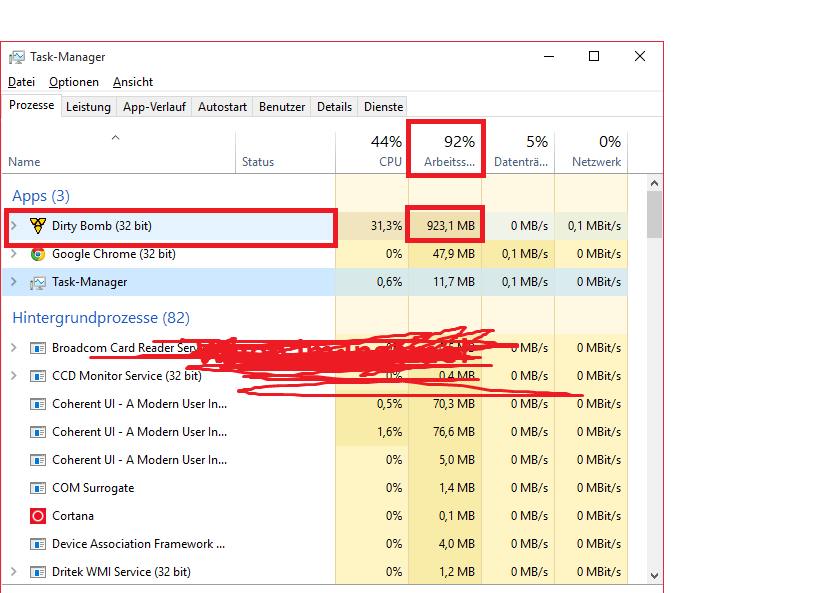
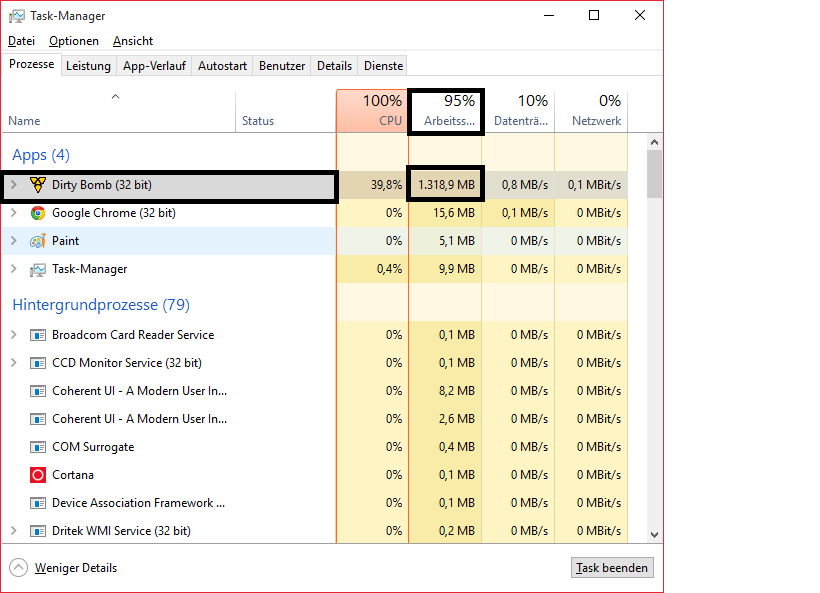
Here are the Task Manager Specs when i Play! :smile:

When im Menu

When i am Ingame


(Ghosthree3) #39

3570K @ 4.2 and a 770. Get about 220-250fps in-game.

[quote=“ZOPPY!;75498”]Here are the Task Manager Specs when i Play! :smile:
When im Menu
http://fs2.directupload.net/images/150902/wlquvxt2.png[/quote]
I don’t understand, you wrote “when in menu” but on the screenshot it has written “when in-game”?


(ZOPPY!) #40

@Ghosthree3 Yeah it was an Fail :wink:
I have Edited it :smile: